
O Elementor Website Builder tem tudo: construtor de páginas com recurso de arrastar e soltar, editor atômico, design com precisão em pixels, sistemas de estilo globais e reutilizáveis, compatibilidade com dispositivos móveis…

Visibility Logic for Elementor
Hospedagem WordPress com plugin Visibility Logic for Elementor
Onde posso hospedar o plugin Visibility Logic for Elementor?
Este plugin pode ser hospedado em qualquer provedor que tenha WordPress configurado. Recomendamos utilizar uma empresa de hospedagem confiável, com servidores adaptados para WordPress, como o serviço de hospedagem de sites da MCO2.
Hospedando o plugin Visibility Logic for Elementor em uma empresa de hospedagem de confiança
A MCO2, além de configurar e instalar o WordPress na versão mais nova para seus clientes, fornece o plugin WP SafePress, um sistema singular que protege e otimiza seu site conjuntamente.
Por que a Hospedagem WordPress funciona melhor na MCO2?
A Hospedagem WordPress funciona melhor pois a MCO2 possui servidores otimizados para WordPress. A instalação de WordPress é diferente de uma instalação trivial, pois habilita imediatamente recursos como otimização de imagens e fotos, proteção da página de login, bloqueio de atividades suspeitas diretamente no firewall, cache avançado e HTTPS ativado por padrão. São recursos que potencializam seu WordPress para a máxima segurança e o máximo desempenho.
Visibility Logic adds powerful conditional display conditions to every Elementor widget, section, and container. Control exactly who sees what, when, and on which device — without writing a single line of code.
Hidden elements are completely removed from the HTML (not just hidden with CSS), keeping your pages fast and your content secure.
When to use Visibility Logic
- Restrict content to logged-in users, specific roles, or subscribers
- Schedule content to appear during a sale, event, or launch window
- Personalize pages based on user meta, ACF custom fields, or device type
- Show/hide elements for Desktop, Tablet, or Mobile visitors
- A/B test layouts by showing different content to different user segments
- Hide empty sections automatically when all child widgets are hidden
Free Conditions
- ACF Fields (NEW) — Show/hide based on Advanced Custom Fields values on the current post or page. 7 operators: is empty, is not empty, equals, not equals, contains, is true, is false.
- Device Type (NEW) — Target Desktop, Tablet, or Mobile users with server-side User-Agent detection. Hidden elements are fully removed from HTML.
- User Role — Logged in, logged out, or specific roles (Administrator, Editor, Subscriber, custom roles).
- User Meta — Show/hide based on any user meta field value.
- Date & Time — Schedule visibility with “from” and “to” dates. Perfect for sales, events, and time-limited content.
- Browser Type — Target Chrome, Firefox, Safari, Edge, Opera, iPhone, Android, and more.
- Flexbox Containers — Full support for Elementor’s Flexbox containers, classic sections, and nested containers.
- Hide When Empty — Automatically hide a parent section/container when all child widgets are hidden by visibility conditions.
PRO Conditions
- Advanced ACF — Repeater fields, options page, term meta, user fields, specific post/user sources, AND/OR logic with 17 operators.
- Language — Show/hide based on current language. Supports WPML, Polylang, and TranslatePress.
- URL Parameters — Standalone query string conditions with repeater support and 9 operators.
- Geo Location — Display elements based on visitor’s country using MaxMind geolocation.
- Dynamic Conditions — Use all Elementor Pro Dynamic Tags as visibility conditions.
- WooCommerce — Restrict content based on order history, active subscriptions, or customer status.
- Easy Digital Downloads — Restrict based on purchase history or subscription status.
- Advanced User Meta — Multiple user meta conditions with AND/OR logic.
- Post & Page, Taxonomy — Show/hide based on current post type, specific pages, or taxonomy terms.
- Archive — Conditions based on post type archives and taxonomy archives.
- IP & Referrer — Target visitors by IP address or referral source.
- WordPress Conditional Tags — Use any WordPress conditional tag as a visibility condition.
- Fallback Content — Replace hidden elements with a custom text message or an Elementor template.
- Copy/Paste — Right-click to copy visibility settings between widgets or sections.
Get Visibility Logic Pro and unlock all conditions.
How it works
- Edit any page with Elementor
- Select a widget, section, or container
- Go to the Visibility tab (or Advanced Visibility Control)
- Enable conditions and configure your display rules
- Save — elements are shown or hidden on the live site based on your rules
More from StaxWP
- BuddyBuilder — BuddyPress Builder for Elementor — Build stunning BuddyPress communities with Elementor.
- Elementor Addons & Widgets — Powerful widgets to help you build stunning pages.
- Woo Addons for Elementor — Elementor enhancements for WooCommerce.
Privacy Policy
We use Appsero SDK to collect some telemetry data upon user’s confirmation. This helps us troubleshoot problems faster and make product improvements.
Found a bug?
Report security bugs through the Patchstack Vulnerability Disclosure Program. The Patchstack team helps validate, triage, and handle any security vulnerabilities.
Credits
This plugin implements some functionality similar to:
* Dynamic Content for Elementor (GPL v2 or later)
Capturas de tela

Visibility tab — Enable conditional visibility on any Elementor widget

User Role — Restrict content by user role or logged-in status
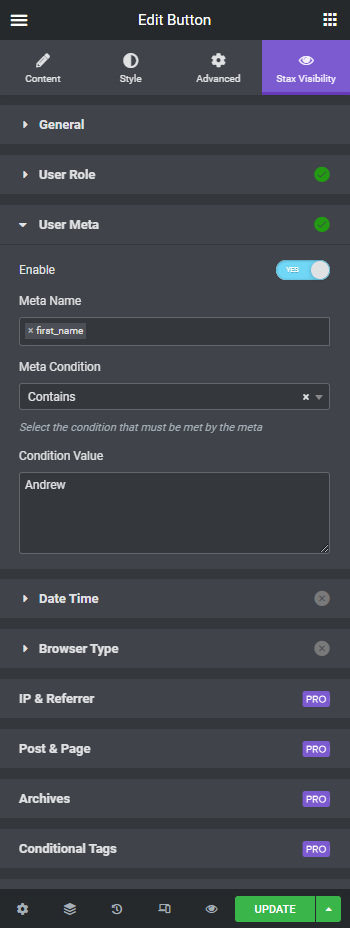
User Meta — Show/hide based on user meta field values

Date & Time — Schedule content to appear during a specific period

Browser Type — Target specific browsers and devices

Admin Panel — Global plugin settings and configuration
Plugins semelhantes


Elementor addons with 18+ free widgets, Header & Footer Builder, WooCommerce widgets & templates. Trusted by 2+ million websites.

The growing library of 300+ ready-to-use templates that work with all WordPress themes including Astra, Hello, OceanWP, GeneratePress and more

O complemento Elementor oferece mais de 120 widgets e modelos - Galeria do Elementor, Controle deslizante, Formulário, Grade de posts, Menu, Sanfona, WooCommerce e muito mais.

Join millions who empower their websites with ElementsKit Elementor Addons. Get templates, & 100+ widgets like header-footer, mega menu, custom widget

Elementor Carousel, Mega Menu, Posts List/Slider, WooCommerce Widgets, Display Conditions, AI Abilities, Premade Templates & more.
Do mesmo author (StaxWP)

BuddyPress builder for Elementor — design member profiles, group pages, activity feeds and directories with drag & drop.