
O Elementor Website Builder tem tudo: construtor de páginas com recurso de arrastar e soltar, Editor Atômico, design com precisão em pixels, sistemas de estilo globais e reutilizáveis, compatibilidade com dispositivos móveis…

Fonts Plugin | Google Fonts, Adobe Fonts & Upload Fonts
Hospedagem WordPress com plugin Fonts Plugin | Google Fonts Typography
Onde hospedar o plugin Fonts Plugin | Google Fonts Typography?
Este plugin pode ser hospedado em qualquer provedor que tenha WordPress configurado. Recomendamos escolher uma empresa de hospedagem de confiança, com servidores otimizados para WordPress, como o serviço de hospedagem de sites da MCO2.
Hospedando o plugin Fonts Plugin | Google Fonts Typography em um provedor de confiança
A MCO2, além de configurar e instalar o WordPress na versão mais atualizada para seus clientes, disponibiliza o WP SafePress, um mecanismo exclusivo que protege e aumenta a performance do seu site ao mesmo tempo.
Por que a Hospedagem WordPress funciona melhor na MCO2?
A Hospedagem WordPress funciona melhor pois a MCO2 possui servidores otimizados para WordPress. A instalação de WordPress é diferente de uma instalação trivial, pois habilita imediatamente recursos como otimização de imagens e fotos, proteção da página de login, bloqueio de atividades suspeitas diretamente no firewall, cache avançado e HTTPS ativado por padrão. São plugins que potencializam seu WordPress para a máxima segurança e o máximo desempenho.
Fonts Plugin is the most widely used Google Fonts plugin for WordPress, with over 200,000 active installations and a 5-star rating from more than 1,200 verified users. It gives website owners instant access to all 1,455 fonts in the Google Fonts library — directly inside the WordPress Customizer — without touching a single line of code. Install the plugin, open the Customizer, choose your fonts, and see the result live on your actual website before publishing. It takes less than two minutes from installation to a completely new look.
What Can You Do With Fonts Plugin?
Fonts Plugin lets you apply different fonts to different parts of your website. Choose one typeface for headings and a completely different one for body text, then fine-tune size, weight, colour, line height, and letter spacing — all from the same screen. The live preview updates instantly as you make changes, so you never have to guess what a font will look like on your content. Once you are happy with the result, click Save and the changes go live. The plugin works with every WordPress theme — from Twenty Twenty-Five to Genesis to Elementor — and requires no changes to your theme files.
What Fonts Are Available?
Fonts Plugin gives you access to three distinct font libraries. The Google Fonts library contains 1,455 unique, professionally designed typefaces — all free to use on personal and commercial websites. The Adobe Fonts (Typekit) integration connects your Adobe Creative Cloud subscription to your WordPress site, unlocking thousands of premium Adobe typefaces. You can also (upload your own font files)[https://docs.fontsplugin.com/custom-font-uploads/custom-font-uploads] in any standard format, giving you complete typographic freedom. Whether you need a clean sans-serif for a corporate site, a warm serif for a blog, or a distinctive display font for a landing page, Fonts Plugin covers every use case without requiring multiple plugins.
Recursos do plug-in
Free Features
* Live Customizer Preview — see fonts on your real site before saving
* 1,455 Google Fonts — the complete library, always up to date
* Adobe Fonts (Typekit) integration
* Upload Custom Fonts — use your own .ttf, .otf, or .woff2 files
* Works with any WordPress theme — no coding required
* Gutenberg Block — apply Google Fonts inside the block editor
* WooCommerce support
* Translated into 25+ languages
* SSL / HTTPS compatible
* SEO-Friendly (Search Engine Optimization).
* Tested with PHP 7 and PHP 8
Pro Features
* Host Google Fonts Locally — GDPR-compliant, no data sent to Google
* Selective Font Loading — load only the exact font weights used, up to 400% faster
* Preconnect Resource Hints — improve font loading performance
* Font Size Control
* Font Colour Control
* Line-Height Control
* Letter Spacing Control
* Text Transform (uppercase, capitalize, lowercase)
* Custom Elements — define your own CSS selectors and build controls for them
* Priority email support — responses within 24 hours
Ready to unlock the full power of typography? Upgrade to Fonts Plugin Pro
Compare free and Pro features side by side
Why Choose Fonts Plugin Over Other Font Plugins?
Fonts Plugin is the only WordPress font plugin that combines Google Fonts, Adobe Fonts, and custom font uploads in a single, lightweight plugin — with a live preview built directly into the WordPress Customizer. Unlike page builder-specific typography tools, it works with every theme and every builder. Unlike GDPR-focused font plugins that only localize existing fonts, Fonts Plugin lets you choose, preview, and change fonts too. With over 200,000 active installs and 1,200+ five-star reviews, it is the most trusted all-in-one typography solution in the WordPress ecosystem.
Compatibilidade de plug-ins
Fonts Plugin works with all WordPress themes. It has been specifically tested and confirmed compatible with:
Page Builders
* Elementor
* Divi Builder
* Beaver Builder
* WPBakery
Themes
* All StudioPress / Genesis themes
* Twenty Twenty-Five, Twenty Twenty-Four, Twenty Twenty-Three
* Twenty Twenty, Twenty Nineteen, Twenty Seventeen
* ThemeGrill themes
* LyraThemes
* ThemeIsle themes
Helpful Resources
- Full Documentation
- Best Google Font Combinations for WordPress
- Google Fonts Checker — audit any website’s fonts
- How to Add Google Fonts to WordPress (step-by-step guide)
- Website Font Checker
- Free vs Pro Comparison
Found a Bug?
Please let us know via the support forum. We read every report.
Contribute
Fonts Plugin is open source and welcomes contributions:
- Report a bug or issue
- Translate the plugin into your language
- Submit feedback or feature requests
Capturas de tela

Live Font Preview — see Google Fonts on your real website in real time
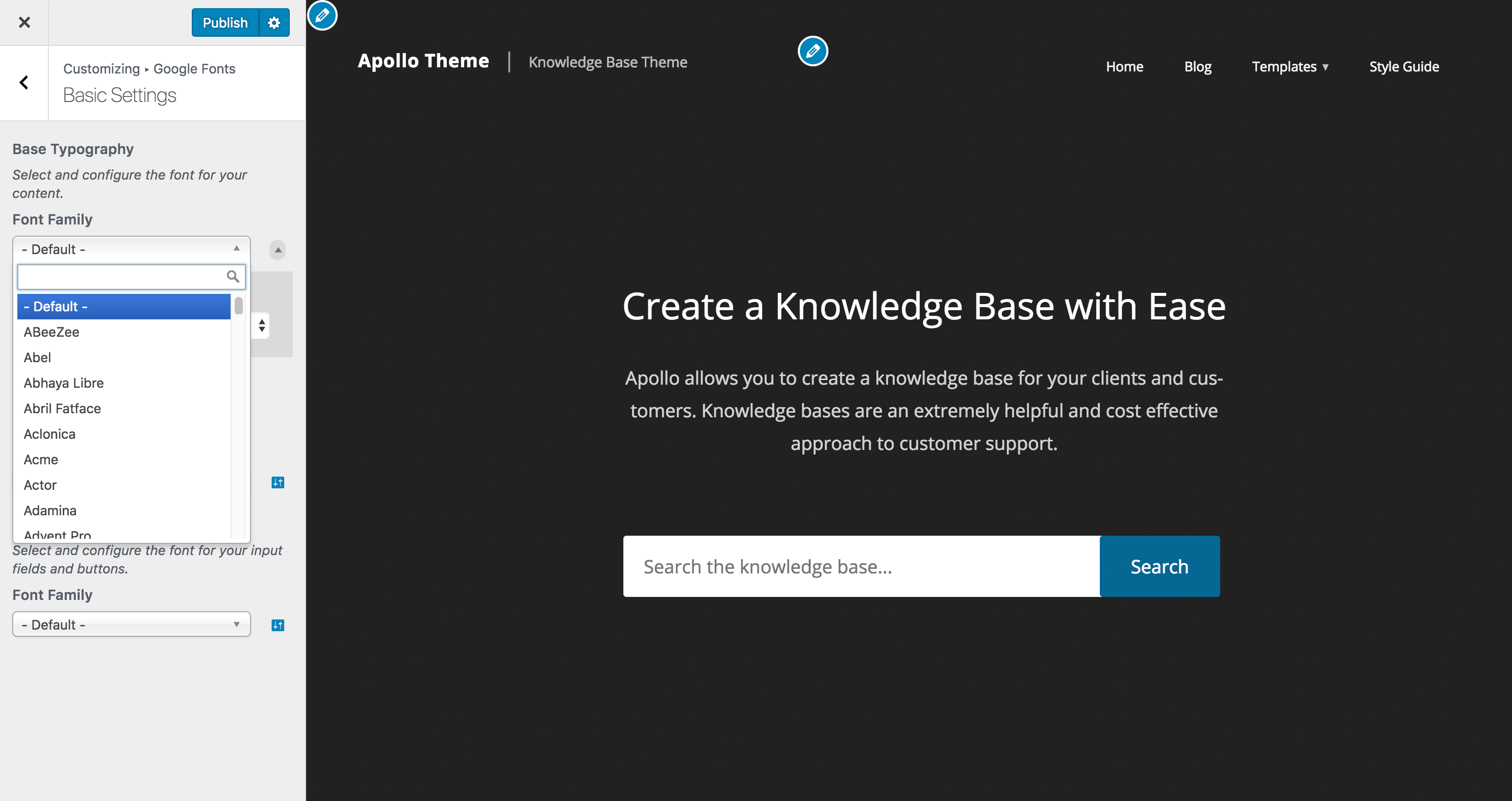
Customizer Font Search — instantly find any of the 1,455 Google Fonts
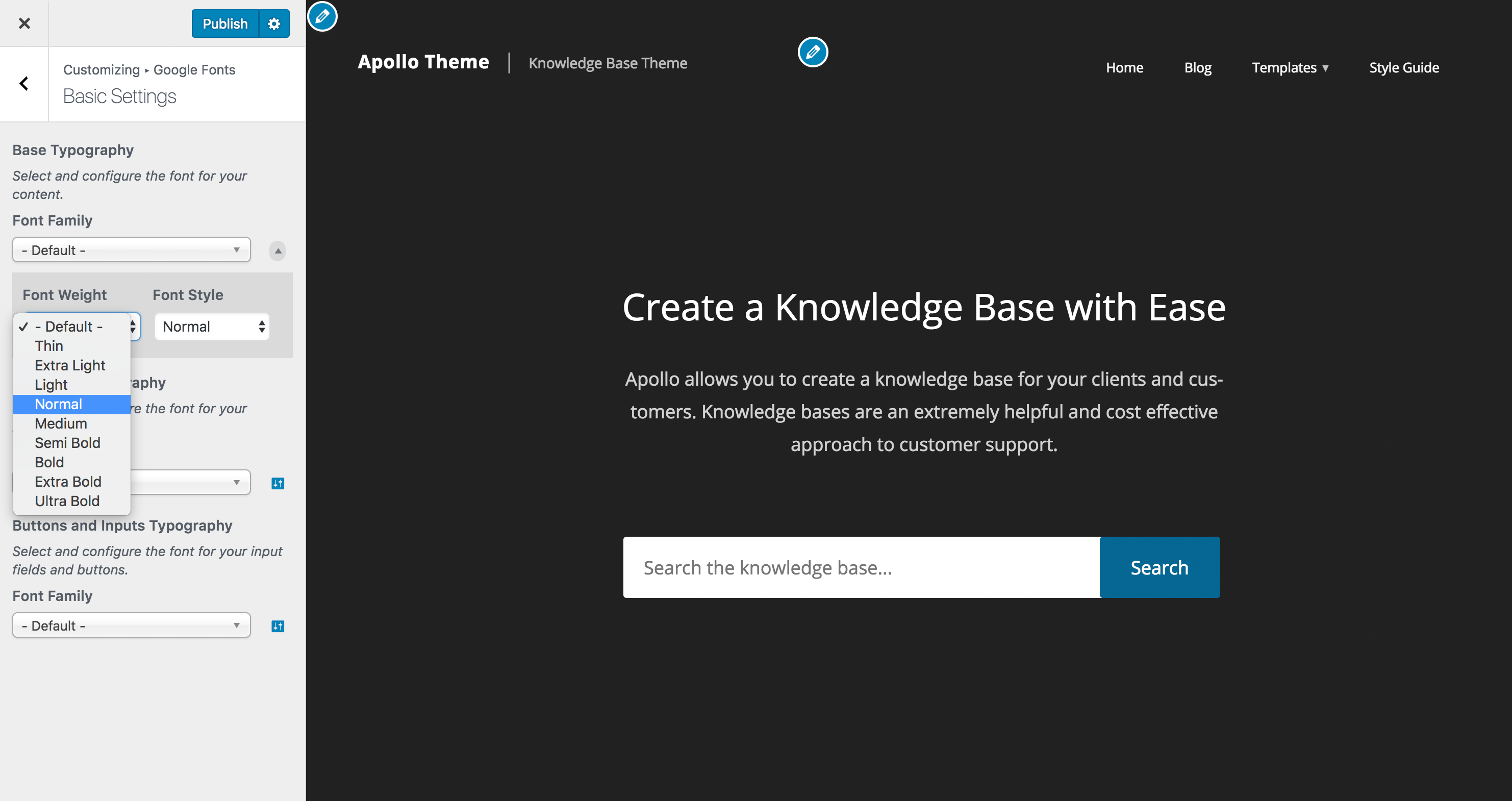
Typography Controls — adjust font weight, style, size, and line height
Plugins semelhantes


Site Kit é uma solução completa para usuários do WordPress usarem tudo que o Google oferece para torná-los bem-sucedidos na web.

The growing library of 300+ ready-to-use templates that work with all WordPress themes including Astra, Hello, OceanWP, GeneratePress and more

O complemento Elementor oferece mais de 110 widgets e modelos - Galeria do Elementor, Controle deslizante, Formulário, Grade de posts, Menu, Sanfona, WooCommerce e muito mais.

Powerful Elementor addon with advanced Elementor widgets, templates, WooCommerce widgets & Header-Footer builder to build professional websites fa …

Incorpore as avaliações do Google de forma rápida e fácil ao seu site WordPress. Melhore o SEO, a confiança e as vendas usando as avaliações do Google.
Do mesmo author (fontsplugin)

Improve frontend performance by disabling Google Fonts. GDPR and DSGVO friendly.