Obtenha insights sobre o tráfego do site com análises compatíveis com GDPR/CCPA e que respeitam a privacidade. Inclui dados de visitantes, gráficos impressionantes e sem compartilhamento de dados.

StatCounter – Free Real Time Visitor Stats
Hospedagem WordPress com plugin StatCounter – Free Real Time Visitor Stats
Onde posso hospedar o plugin StatCounter – Free Real Time Visitor Stats?
Este plugin pode ser hospedado em qualquer servidor que possua WordPress configurado. Recomendamos fortemente utilizar uma hospedagem seguro, com servidores especializados para WordPress, como o serviço de hospedagem WordPress da MCO2.
Hospedando o plugin StatCounter – Free Real Time Visitor Stats em um provedor de confiança
A MCO2, além de instalar o WordPress na versão mais nova para seus clientes, fornece o WP SafePress, um mecanismo exclusivo que salvaguarda e melhora seu site ao mesmo tempo.
Por que a Hospedagem WordPress funciona melhor na MCO2?
A Hospedagem WordPress funciona melhor pois a MCO2 possui servidores otimizados para WordPress. A instalação de WordPress é diferente de uma instalação trivial, pois habilita imediatamente recursos como otimização automática de imagens e fotos, proteção da página de login, bloqueio de atividades maliciosas diretamente no firewall, cache avançado e HTTPS ativado por padrão. São recursos que potencializam seu WordPress para a máxima segurança e o máximo desempenho.
The Official StatCounter WordPress Plugin brings you all the powerful StatCounter features to your wordpress blog.
Including but not limited to the following:
- Invisible Counter Option
- Configurable Counter
- Configurable Summary Stats
- Magnify User
- Drill Down
- Popular Pages
- Entry Pages
- Exit Pages
- Came From
- Keyword Analysis
- Recent Keyword Activity
- Search Engine Wars
- Visitor Paths
- Visit Length
- Returning Visits
- Recent Pageload Activity
- Recent Visitor Activity
- Country/State/City Stats
- Recent Visitor Google Map
- ISP Stats
- Browser Stats
- O.S. Stats
- Resolution Stats
- JavaScript Stats
- Email Reports
- Multiple Site Management
- User Access Management
- Public Stats
- Blocking Cookie
Capturas de tela
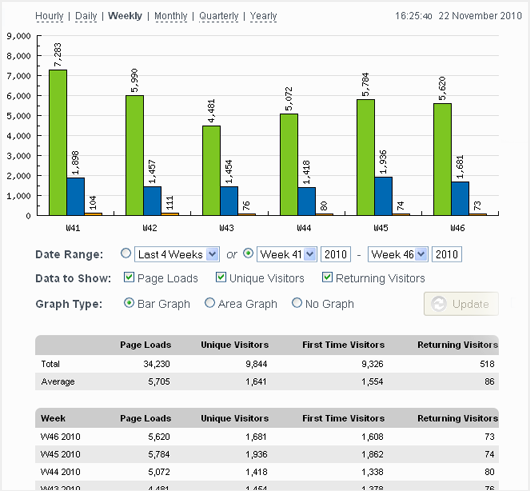
Example StatCounter.com Summary Stats
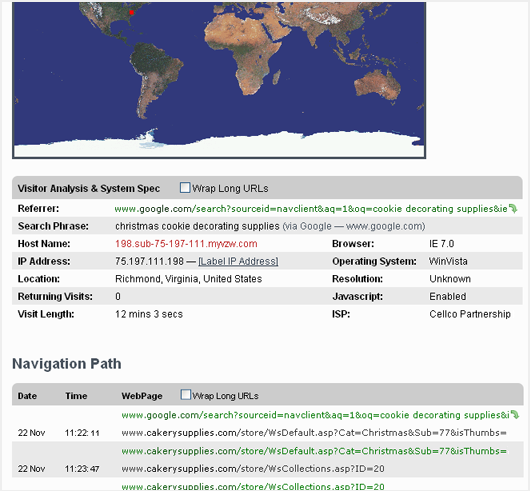
Using the magnify tool, you can "zoom in" on individual visitors and get a detailed report on where they are from, their system settings, and most importantly, what link reffered them to your site and their navigation path through your site.
Plugins semelhantes


Post Views Counter allows you to collect and display how many times a post, page, or other content has been viewed in a simple, fast and reliable way.

Simple, lightweight WordPress analytics with privacy-friendly visitor tracking. Cookieless and GDPR-ready. Setup in seconds, no cookie banner needed.

A simple, yet powerful WordPress analytics plugin that gives you privacy-friendly stats to grow your website. A Google Analytics alternative.

Privacy friendly, GDPR compliant and self-hosted. Matomo is the #1 Google Analytics alternative that gives you control of your data. Free and secure.

Visitor statistics for WordPress with focus on data protection, transparency and clarity. Perfect as a widget in your WordPress Dashboard.