
Site Kit é uma solução completa para usuários do WordPress usarem tudo que o Google oferece para torná-los bem-sucedidos na web.

Burst Statistics – Análise Simples para WordPress (Alternativa ao Google Analytics)
Hospedagem WordPress com plugin Burst Statistics – Privacy-Friendly Analytics for WordPress
Onde hospedar o plugin Burst Statistics – Privacy-Friendly Analytics for WordPress?
Este plugin pode ser hospedado em qualquer hospedagem que possua WordPress instalado. Recomendamos fortemente escolher um provedor de hospedagem seguro, com servidores adaptados para WordPress, como o serviço de hospedagem de sites da MCO2.
Hospedando o plugin Burst Statistics – Privacy-Friendly Analytics for WordPress em uma empresa de hospedagem de confiança
A MCO2, além de configurar e instalar o WordPress na versão mais atual para seus clientes, disponibiliza o plugin WP SafePress, um mecanismo singular que assegura e otimiza seu site simultaneamente.
Por que a Hospedagem WordPress funciona melhor na MCO2?
A Hospedagem WordPress funciona melhor pois a MCO2 possui servidores otimizados para WordPress. A instalação de WordPress é diferente de uma instalação trivial, pois habilita imediatamente recursos como otimização automática de imagens, proteção da página de login, bloqueio de atividades suspeitas diretamente no firewall, cache avançado e HTTPS ativado por padrão. São plugins que potencializam seu WordPress para a máxima segurança e o máximo desempenho.
Finalmente, uma análise do WordPress que você vai realmente usar
O Google Analytics é exagero. A maioria dos outros plugins de estatísticas para WordPress são cheios de recursos e confusos. Você só quer rastrear visitantes e saber o que está acontecendo no seu site, sem precisar de um diploma em ciência de dados.
O Burst Statistics oferece-te um painel de análise limpo e intuitivo, focado nas métricas que realmente importam. Sem contas de análise externas. Sem configuração complexa. Instala, ativa e compreende o tráfego do teu site em segundos.
Com a confiança de mais de 200.000 sites WordPress. Criado pela equipa por trás da Team Updraft, conhecida pelo UpdraftPlus, WP-Optimize e All-In-One Security (AIOS).
O que nossos usuários estão dizendo
“Finalmente, um plugin de análise que consigo explicar para os clientes.”
— @anguskeystone no wordpress.org“Experimentei o WP Statistics e o Independent Analytics, mas são sobrecarregados e confusos. A interface do Burst é intuitiva e focada no que importa para mim.”
— @vallered no wordpress.org
Por que escolher o Burst Statistics?
Análise concebida para ser útil na prática
Outros plugins de análise mostram-te tudo de uma vez. O Burst mostra o que importa — visitantes, visualizações de página, referências, páginas mais vistas — num painel que vais realmente usar. Sem sobrecarga de dados. Sem menus confusos. Vê por que o Burst é perfeito para bloggers.
Análise com privacidade por design
Todas as estatísticas do site ficam no teu servidor, tornando o Burst uma verdadeira solução de análise local. Sem rastreamento externo. Os teus dados são teus — nunca os vemos sem a tua permissão explícita. Concebido para análise em conformidade com o RGPD de raiz. Lê por que o Burst Statistics respeita a privacidade.
Configuração sem fricção
Instala, ativa, pronto. Sem conta Google Analytics, sem configuração do GA4, sem códigos de rastreamento, sem dores de cabeça na configuração. Começa a ver visitantes em tempo real de imediato. Novo em análise? Começa com o nosso guia sobre análise no WordPress.
Análise nativa para WordPress
Não é uma adaptação de outra plataforma. Criado especificamente para WordPress com desempenho nativo e integração perfeita. Funciona com WooCommerce, blogs, sites empresariais e sites de membros.
Análise leve, rápida por padrão
Consultas de base de dados otimizadas. Um script de rastreamento minúsculo com menos de 4 KB. Sem dependências externas a abrandar as tuas páginas. Concebido para rastrear com precisão mesmo com cache agressiva do lado do servidor. Vê a prova em o Burst abranda o meu site?.
Recursos
Entenda o tráfego do seu site
- Páginas e posts com melhor desempenho em um piscar de olhos
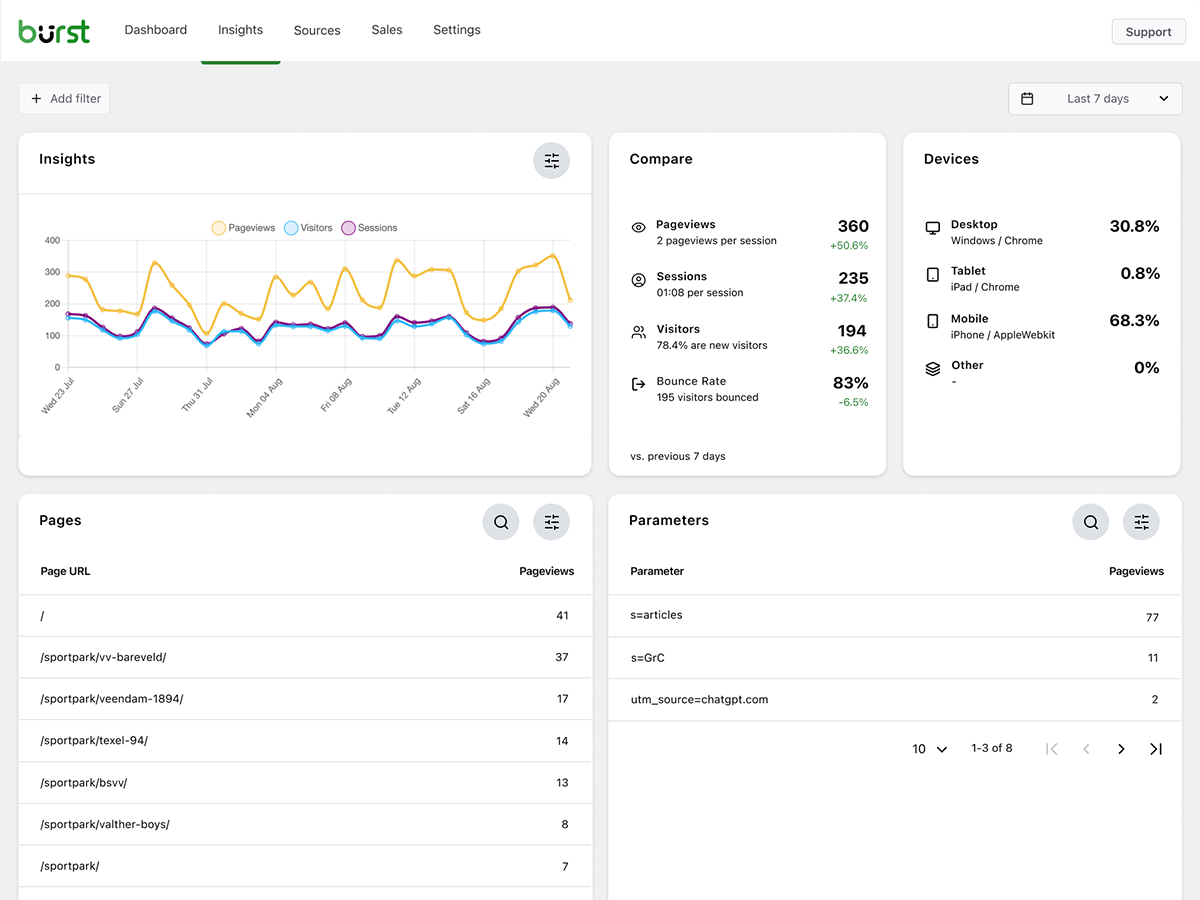
- Acompanhe métricas principais: visitantes, sessões, visualizações de página, taxa de rejeição
- Divisão de visitantes por dispositivo (desktop, tablet, celular)
- Filtrar dados por intervalos de datas personalizados
- Compare o tráfego entre períodos
- Search Console integration, view Google searches right on your dashboard
Análises em tempo real
- Identifique a origem em tempo real para visitantes ao vivo
- Veja as páginas específicas que os usuários estão visitando agora
- Contagem em tempo real de usuários ativos no seu site
Veja qual conteúdo está bombando
- Principais páginas e posts classificados por visualizações
- Compare qualquer intervalo de datas
- Acompanhe o desempenho de cada página
Rastreamento personalizado de conversões e metas
- Rastreie visualizações, cliques e hooks do WordPress
- Rastreie análises e vendas do WooCommerce (Burst Pro Business)
- Rastreie eventos personalizados e conversões
- Configuração passo a passo no nosso guia de metas
Análise respeitadora da privacidade sem compromissos
- 100% auto-hospedado, todas as estatísticas armazenadas localmente no seu banco de dados do WordPress
- Rastreamento sem cookies, uma configuração de análise sem cookies que não exige banner de consentimento em muitos países
- Análises desenvolvidas para suportar conformidade com GDPR, CCPA, DSGVO, AVG, RGPD e PECR
- Nenhum dado compartilhado com o Google, Facebook ou terceiros
Fique por dentro
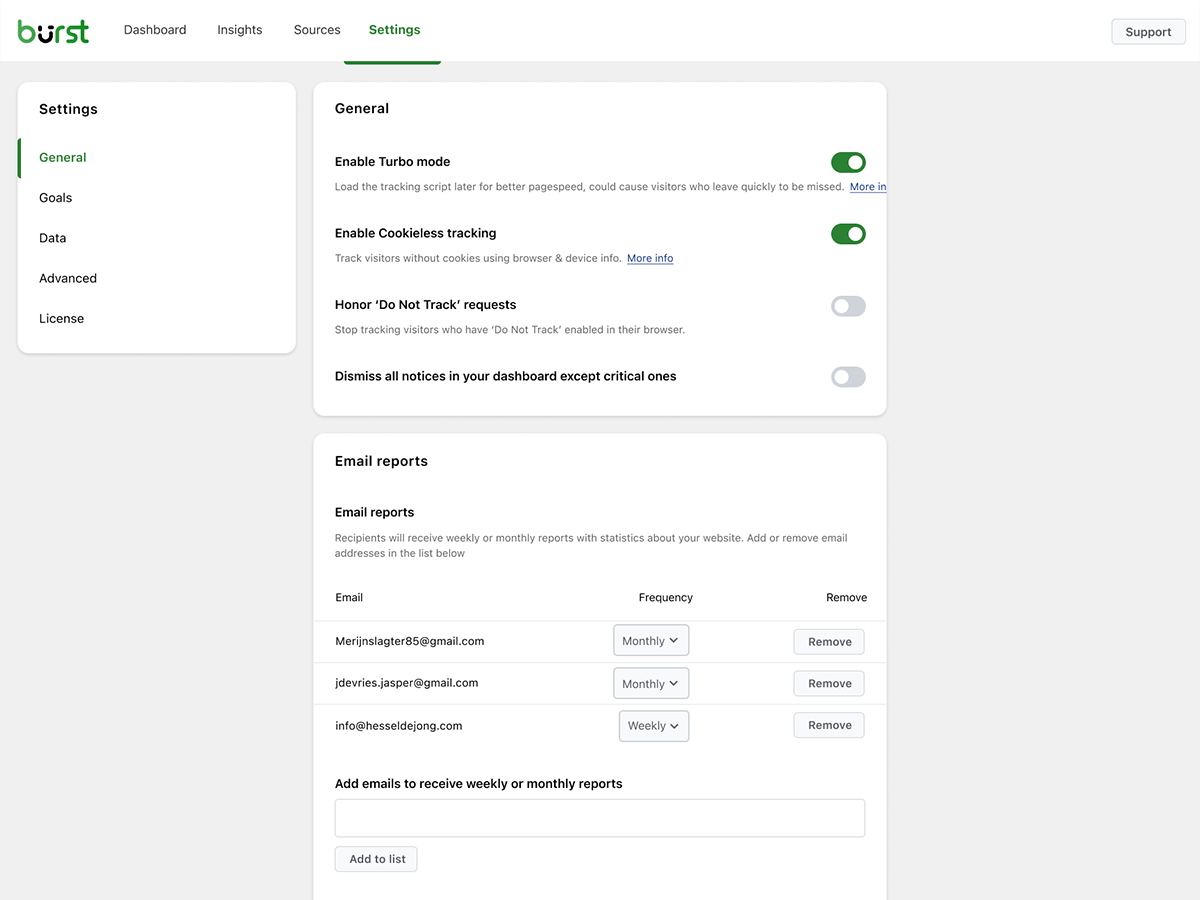
- Relatórios por e-mail semanais ou mensais entregues na sua caixa de entrada
- Compare períodos para identificar tendências
- Receba uma notificação quando o rastreamento não funcionar
Uma alternativa nativa do WordPress ao Google Analytics
Se já ultrapassaste o Google Analytics, ou nunca quiseste o GA4 para começar, o Burst foi feito para ti. Como alternativa ao Google Analytics, o Burst troca a complexidade do GA4 por clareza. Tens as métricas que importam num único painel, sem amostragem, sem limitação de dados e sem enviar os teus visitantes pela rede de publicidade do Google.
O GA4 foi criado para melhorar o negócio publicitário do Google. O Burst foi criado para melhorar o teu site.
Curioso sobre o panorama completo? Lê por que os proprietários de sites WordPress estão a abandonar o Google Analytics ou a comparação direta Burst Statistics vs Google Analytics.
Da equipe por trás do UpdraftPlus, WP-Optimize e All-In-One Security
O Burst Statistics faz parte da Team Updraft, a equipa por trás de alguns dos plugins WordPress mais instalados no mercado:
- UpdraftPlus – Plugin de backup e migração para WP
- WP-Optimize – cache, compressão de imagens, minificação e limpeza de base de dados
- All-In-One Security (AIOS) – segurança e firewall
Para quem é o Burst Statistics?
O Burst funciona para qualquer site WordPress, mas criámos soluções específicas para os quatro públicos que mais tiram partido dele:
- Bloggers e criadores de conteúdo, vê quais as publicações que ressoam com o teu público
- Empreendedores e pequenos empresários, compreende o teu tráfego e campanhas sem complexidade
- Lojas WooCommerce, rastreia o comportamento dos visitantes, receitas e desempenho de produtos
- Agências e freelancers, gere a análise e os relatórios de vários sites de clientes
- Proprietários de sites preocupados com privacidade, análises em conformidade com a LGPD sem banners de consentimento
- Quem está cansado do Google Analytics, tenha clareza em vez de confusão
Grátis vs Pro
O Burst Statistics (gratuito) inclui tudo o que você precisa para entender o tráfego do seu site. Visitantes, visualizações de página, referenciadores, conteúdo mais acessado, estatísticas de dispositivos, rastreamento de metas, relatórios por e-mail e muito mais.
O Burst Pro adiciona funcionalidades avançadas para empresas e profissionais. Compara todos os planos na página de preços.
PLANO CREATOR
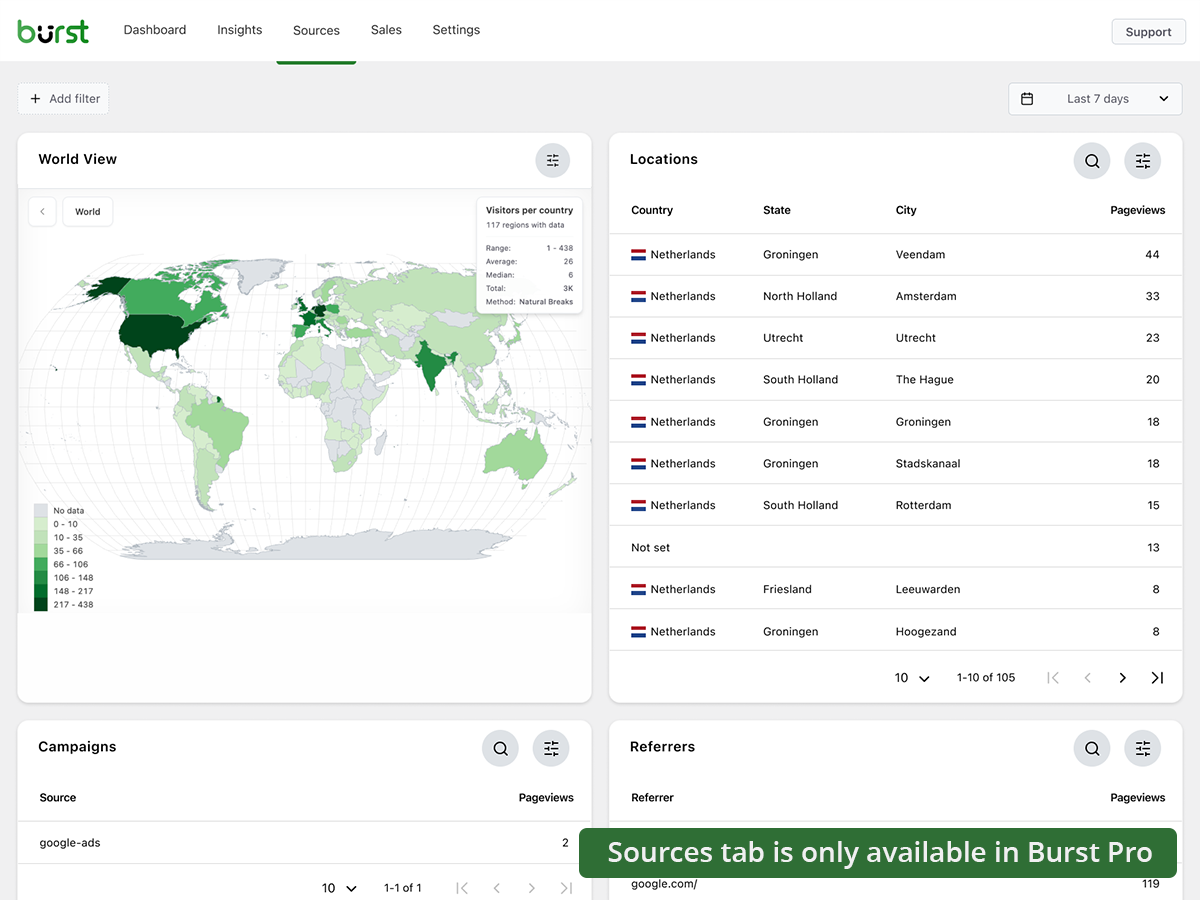
- Rastreamento de campanhas UTM, vê quais os esforços de marketing que geram resultados
- Dados geográficos, informações sobre visitantes ao nível do país e cidade
- Filtragem avançada, segmenta os dados por qualquer dimensão
- Definições de arquivo de dados, mantém a tua base de dados leve automaticamente
- Suporte prioritário, contacto direto com os nossos programadores
PLANO BUSINESS
- Tudo o que está no plano Creator, mais
- Painel completo de vendas WooCommerce, vê qual o conteúdo que gera mais receita
- Atribuição de receitas, liga as vendas do WooCommerce às fontes de tráfego
PLANO AGÊNCIA
- Tudo o que está no plano Business, mais
- Relatórios, gera relatórios de desempenho partilháveis para clientes
Todos os planos Burst Pro incluem suporte prioritário. Você terá contato direto com nossos desenvolvedores, pessoas reais, não um chatbot.
Como o Burst se compara a outros plugins de análise para WordPress
Perguntam-nos frequentemente como o Burst se compara a outras ferramentas. Versão honesta e resumida:
- Google Analytics / GA4, o GA4 é poderoso, mas foi criado para anunciantes, não para proprietários de sites. É complexo, aplica amostragem e limitação de dados aos teus números, e requer um banner de cookies na maioria dos países. O Burst é uma alternativa ao GA4 mais simples e respeitadora da privacidade, que mostra números reais sem a configuração complicada. Lê a comparação completa.
- MonsterInsights, o MonsterInsights é um conector que envia os teus dados para o Google Analytics. Se queres uma verdadeira alternativa ao MonsterInsights que mantém os dados no teu próprio site em vez de os enviar para o Google, o Burst é a melhor escolha.
- Independent Analytics, um concorrente respeitável com uma abordagem semelhante de privacidade em primeiro lugar e nativa no WordPress. O Burst aposta mais em painéis práticos, rastreamento UTM e de objetivos mais aprofundado, análise de receitas WooCommerce e relatórios de nível Agência. Experimenta os dois e fica com o que te convencer mais.
- Koko Analytics, uma opção limpa e leve que se foca no essencial. O Burst vai mais longe com rastreamento de objetivos, análise em tempo real, campanhas UTM, análise WooCommerce e relatórios por email.
- WP Statistics, um plugin de estatísticas para WordPress com longa história e muitas opções. Muitos utilizadores acham a interface sobrecarregada. O Burst aposta num único painel claro, concebido para a clareza em vez da quantidade de funcionalidades.
- Matomo, alojável no próprio servidor e rico em funcionalidades, mas mais pesado e complexo de gerir. O Burst é a opção mais simples, rápida e totalmente nativa no WordPress.
Guias e recursos úteis
Aprende as métricas, resolve problemas comuns e tira mais partido da tua análise. Tudo gratuito, tudo em burst-statistics.com.
Primeiros passos
- Análise no WordPress e as métricas que realmente importam
- Como instalar o Burst Statistics a partir do Repositório WordPress
- Como configurar o teu primeiro objetivo
Privacidade e RGPD
- Por que o Burst Statistics respeita a privacidade
- Como configurar o teu site sem banner de cookies
- Como o Burst rastreia visitantes do site sem cookies
Métricas e interpretação de dados
- Como reduzir a taxa de rejeição no WordPress
- O que é a taxa de rejeição?
- O que é uma visualização de página?
- O que é a taxa de conversão?
Campanhas e conversões
- Como rastrear parâmetros UTM (e Burst)
- Construtor de URLs de campanha
- Como criar e fazer testes A/B de campanhas de marketing com o Burst
WooCommerce
- 10 formas comprovadas de reduzir o abandono do carrinho no WooCommerce
- Apresentamos a análise de vendas para WooCommerce no Burst Pro
Explora o centro de aprendizagem completo para mais informações.
Instalação
- Vá em Plugins → Adicionar novo no seu painel do WordPress
- Procure por Burst
- Clique em Instalar Agora, depois em Ativar
- Acesse Estatísticas → Painel para ver suas análises
É só isso. Sem contas externas. Sem códigos de rastreamento para colar. O Burst começa a coletar estatísticas do site imediatamente.
Preferes instalar manualmente ou via Composer? Vê como instalar o Burst Statistics com Composer.
Credits
Country-level geographic data is provided by the MaxMind GeoLite2 database. This product includes GeoLite2 Data created by MaxMind, available from https://www.maxmind.com/.
Capturas de tela
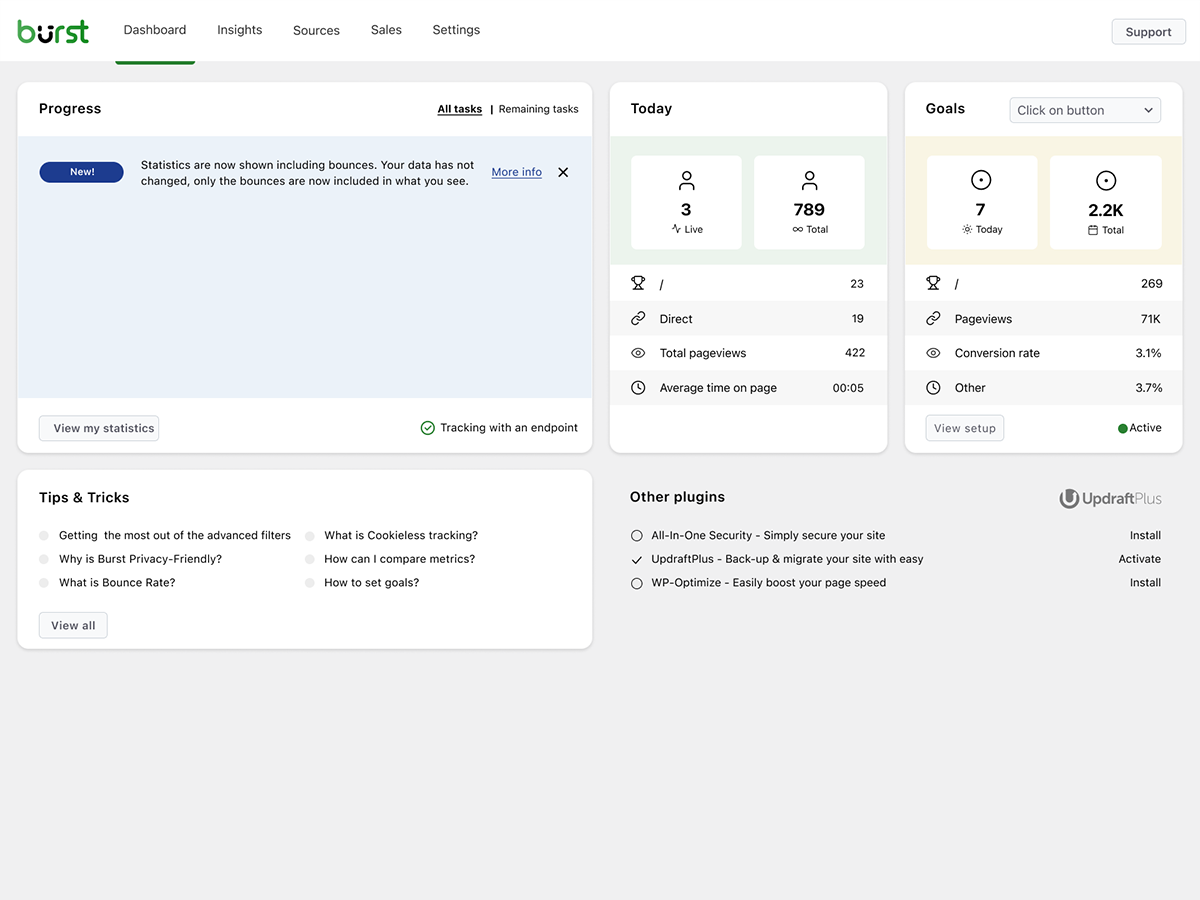
Burst Statistics: Painel de Análises
Painel: Visão geral limpa e fácil de ler
Insights: Veja exatamente como seu site está se saindo
Fontes: Analise de onde vêm seus visitantes (Burst Pro)
Plugins semelhantes


Obtenha insights sobre o tráfego do site com análises compatíveis com GDPR/CCPA e que respeitam a privacidade. Inclui dados de visitantes, gráficos impressionantes e sem compartilhamento de dados.

Adds Google Analytics tracking code to your WordPress site. Supports many tracking features.

Head and Footer plugin lets you to add HTML code to the head and footer sections of your site pages, inside posts... and more!

Conecta o Google Analytics ao seu site WordPress. Exibe estatísticas para ajudar você a entender seus usuários e o conteúdo do site, em outro nível!

Post Views Counter allows you to collect and display how many times a post, page, or other content has been viewed in a simple, fast and reliable way.