
WordPress login security with brute force protection, Two-factor authentication (2FA/MFA), firewall, IP/country blocking, and login monitoring

Login Widget With Shortcode
Hospedagem WordPress com plugin Login Widget With Shortcode
Onde posso hospedar o plugin Login Widget With Shortcode?
Este plugin pode ser hospedado em qualquer provedor que tenha WordPress instalado. Recomendamos utilizar uma hospedagem confiável, com servidores otimizados para WordPress, como o serviço de hospedagem de sites da MCO2.
Hospedando o plugin Login Widget With Shortcode em uma empresa de hospedagem seguro
A MCO2, além de configurar e instalar o WordPress na versão mais atualizada para seus clientes, disponibiliza o plugin WP SafePress, um mecanismo exclusivo que protege e otimiza seu site ao mesmo tempo.
Por que a Hospedagem WordPress funciona melhor na MCO2?
A Hospedagem WordPress funciona melhor pois a MCO2 possui servidores otimizados para WordPress. A instalação de WordPress é diferente de uma instalação trivial, pois habilita imediatamente recursos como otimização automática de imagens, proteção da página de login, bloqueio de atividades maliciosas diretamente no firewall, cache avançado e HTTPS ativado por padrão. São recursos que potencializam seu WordPress para a máxima segurança e o máximo desempenho.
- This is a simple login form in the widget.
- Compatible with WordPress Multisite Installation.
- Use this shortcode [login_widget] to use login form in your pages/ posts.
- Just install the plugin and add the login widget in the sidebar.
- Change some ‘optional’ settings in
Login Widget Settings(admin panel left side menu) and you are good to go. - Add CSS as you prefer because the form structure is really very simple.
- Use this shortcode [forgot_password] in your page to display the forgot password form. Forgot password link can be added to login widget from plugin settings page.
- Login form is responsive.
- Plugin is compatible with WPML plugin. You can check the compatibility at wpml.org.
Other Optional Options
- Add CAPTCHA security in admin and frontend login forms.
- Login Logs are stored in database ( IP, login status, login time ). PRO version has options to block IPs after certain numbers of wrong login attempts.
- You can choose the redirect page after login. It can be a page or a custom URL.
- Choose redirect page after logout.
- Choose user profile page.
- Easy CSS implementation from admin panel.
Social Login No Setup
The plugin supports login with 30+ sites. The most important part is that it requires no Setups, no Maintanance, no need to create any APPs, APIs, Client Ids, Client Secrets or anything. Get it for USD 3.00. Supported sites are listed below.
- YouTube
- Google Drive
- Gmail
- PayPal
- Yahoo
- Microsoft
- WordPress
- Amazon
- Github
- Tumblr
- Vimeo
- Dribbble
- Twitch
- Medium
- Discord
- Line
- Stack Exchange
- Stack Overflow
- Disqus
- Blogger
- Meetup
- Foursquare
- Yandex
- VKontakte
- Telegram
- Dropbox
- Fitbit
- Slack
- Deviantart
- Mailchimp
- Skype
Click here for more details | Click here for Live Demo
Post your plugin related queries at https://goplugins.in/support.php
Capturas de tela

Login widget

Login widget
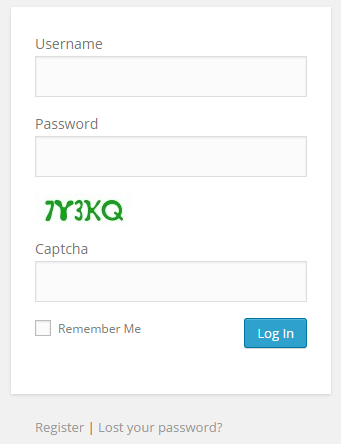
Admin login with captcha security

General Settings
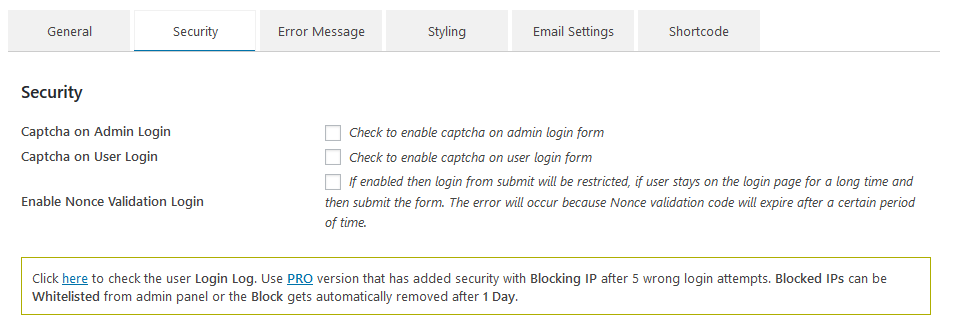
Security Settings

Error Message Settings
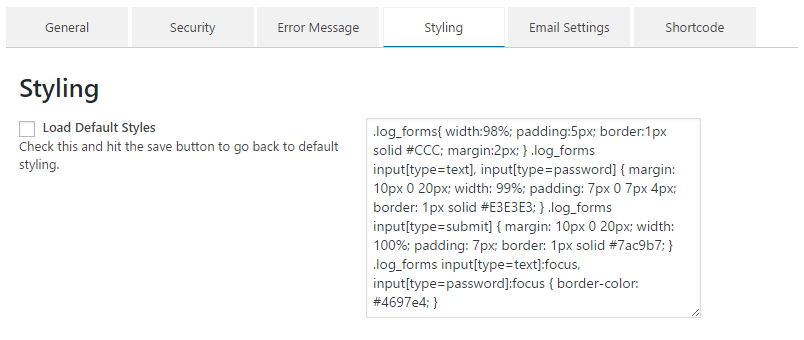
Style Settings

Email Settings

Users Login Log

Forgot Password form

Facebook Comments Addon

WPML Plugin compatibility Certificate.
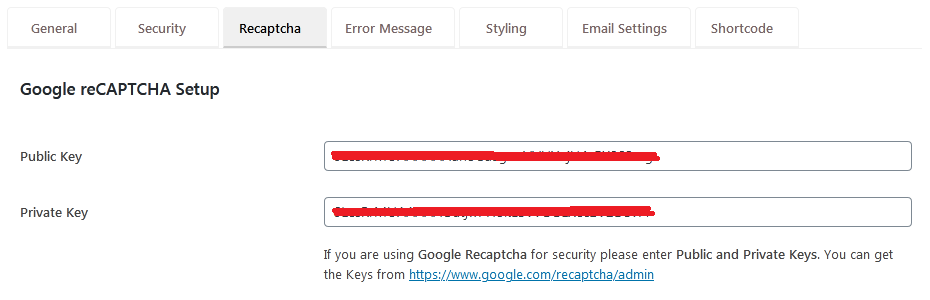
Google reCaptcha settings
Plugins semelhantes


Loginizer is a WordPress security plugin which helps you fight against bruteforce attacks.

Incorpore as avaliações do Google de forma rápida e fácil ao seu site WordPress. Melhore o SEO, a confiança e as vendas usando as avaliações do Google.

Limit rate of login attempts, including by way of cookies, for each IP. Fully customizable.

Essential elements for modern websites. Add buttons, sliders, heroes, maps, images, carousels, features, icons, more. Create dynamic pages easily.

Protect your WordPress site, pages, posts, WooCommerce products, and categories with single or multiple passwords.
Do mesmo author (aviplugins.com)

This is a simple registration form in the widget. just install the plugin and add the register widget in the sidebar. Thats it. :)