
The go-to tool for cloning posts and pages, including the powerful Rewrite & Republish feature.
Toolkit for Polylang – Translation Inspector & Duplicate Content
Hospedagem WordPress com plugin Polylang Duplicate Content Addon
Onde devo hospedar o plugin Polylang Duplicate Content Addon?
Este plugin pode ser hospedado em qualquer servidor que tenha WordPress configurado. Recomendamos fortemente optar por uma empresa de hospedagem seguro, com servidores especializados para WordPress, como o serviço de hospedagem WordPress da MCO2.
Hospedando o plugin Polylang Duplicate Content Addon em uma empresa de hospedagem seguro
A MCO2, além de instalar o WordPress na versão mais atualizada para seus clientes, oferece o plugin WP SafePress, um sistema exclusivo que protege e otimiza seu site ao mesmo tempo.
Por que a Hospedagem WordPress funciona melhor na MCO2?
A Hospedagem WordPress funciona melhor pois a MCO2 possui servidores otimizados para WordPress. A instalação de WordPress é diferente de uma instalação trivial, pois habilita imediatamente recursos como otimização automática de imagens e fotos, proteção da página de login, bloqueio de atividades suspeitas diretamente no firewall, cache avançado e HTTPS ativado por padrão. São recursos que potencializam seu WordPress para a máxima segurança e o máximo desempenho.
Toolkit for Polylang – Translation Inspector & Duplicate Content is a powerful WordPress plugin that helps you scan your multilingual website and find translation issues.
As a multilingual website owner you must already know that even when the main content is translated, problems like link to the wrong language, 404 error, wrong Elementor template display, untranslated URLs and more still goes unnoticed.
Toolkit for Polylang brings these checks together in one place. Just run a scan, review the findings, and understand what need attention.
Key Features
-
Multilingual Site Scan: Scan your multilingual WordPress website built using Polylang for translation and configuration issues across supported content, languages, URLs, Polylang settings, Elementor setup, and other areas.
-
Issue Severity & Status: Organizes scan results into Critical, Warning, Passed, and Ignored categories, making it easier to understand which issues need attention and which checks have passed.
-
Missing Translation Detection: Find supported posts, pages, and other content that are missing translations in one or more active Polylang languages.
-
URL & Routing Checks: Review multilingual URLs and language routing for supported problems, including incorrect language URLs, broken links, and routes that results in 404 pages.
-
Elementor Translation Checks: Detect multilingual issues with Elementor headers, footers, templates, and display conditions that can cause the wrong template to appear on translated pages.
-
Translation Health Score: Get an overall translation health score based on the results of your latest site scan, giving you a quick view of the current state of your multilingual website.
-
Translation Coverage: Review translation availability across your active Polylang languages and identify content that does or does not have corresponding language versions.
-
Issue Rescanning: Rescan individual issues or completed website after making changes to check whether they have been resolved.
-
Duplicate Content: Duplicate your pages/posts and make them available for translation via Polylang.
-
Privacy-Friendly Inspection: Toolkit for Polylang performs its core checks using information available within your WordPress installation. The plugin does not send your website content to an external service to perform its core inspection.
-
Lightweight & Easy to Use.
-
Fully Responsive.
Tools & Addons for Polylang
Toolkit for Polylang plugin includes two main tools:
Built-In Tools
-
Translation Inspector: Scans your multilingual website and helps identify translation, setup, routing, coverage, and related issues.
-
Duplicate Content: Duplicates your pages/posts content and make it available for translation via Polylang.
Polylang Addons
Toolkit for Polylang works as part of a broader Polylang workflow. You can optionally use the following addons with it.
-
AI Translation for Polylang: Automate the translation process using Polylang. It works by integrating AI translation providers with Polylang plugin and allowing you to translate pages built using Gutenberg, Elementor, or Divi.
-
Language Switcher for Polylang: Add a floating language switcher or standard language switcher to your multilingual Elementor, Gutenberg or Divi websites.
Check out our other Plugins
-
AI Translation for TranslatePress: Powerful TranslatePress addon that enhances the functionality of the TranslatePress plugin. This addon uses advanced translation services, like Google Translate, Yandex, and Chrome AI translator, to provide accurate and instant translations for your web pages automatically.
-
Linguator – Multilingual AI Translation: It is a powerful multilingual plugin that helps you create and manage multilingual content on your WordPress website. Easily translate your posts, pages, menus, and categories into different languages using AI and connect with visitors worldwide.
-
AutoMLP – AI Translation for WPML: AutoMLP is an WPML automatic translation addon. It allows you to translate your WordPress website using different AI services like OpenAI, Google Gemini, or Chrome AI at low cost.
-
LocoAI – Auto Translate for Loco Translate: It is an addon that enhances the functionality of the Loco Translate plugin by enabling the automatic translation of WordPress themes and plugins. This addon connects with sources like Google, Yandex, DeepL, or AI-powered sources like ChatGPT, Gemini AI and Chrome built-in AI to provide instant and automated translations.
Capturas de tela
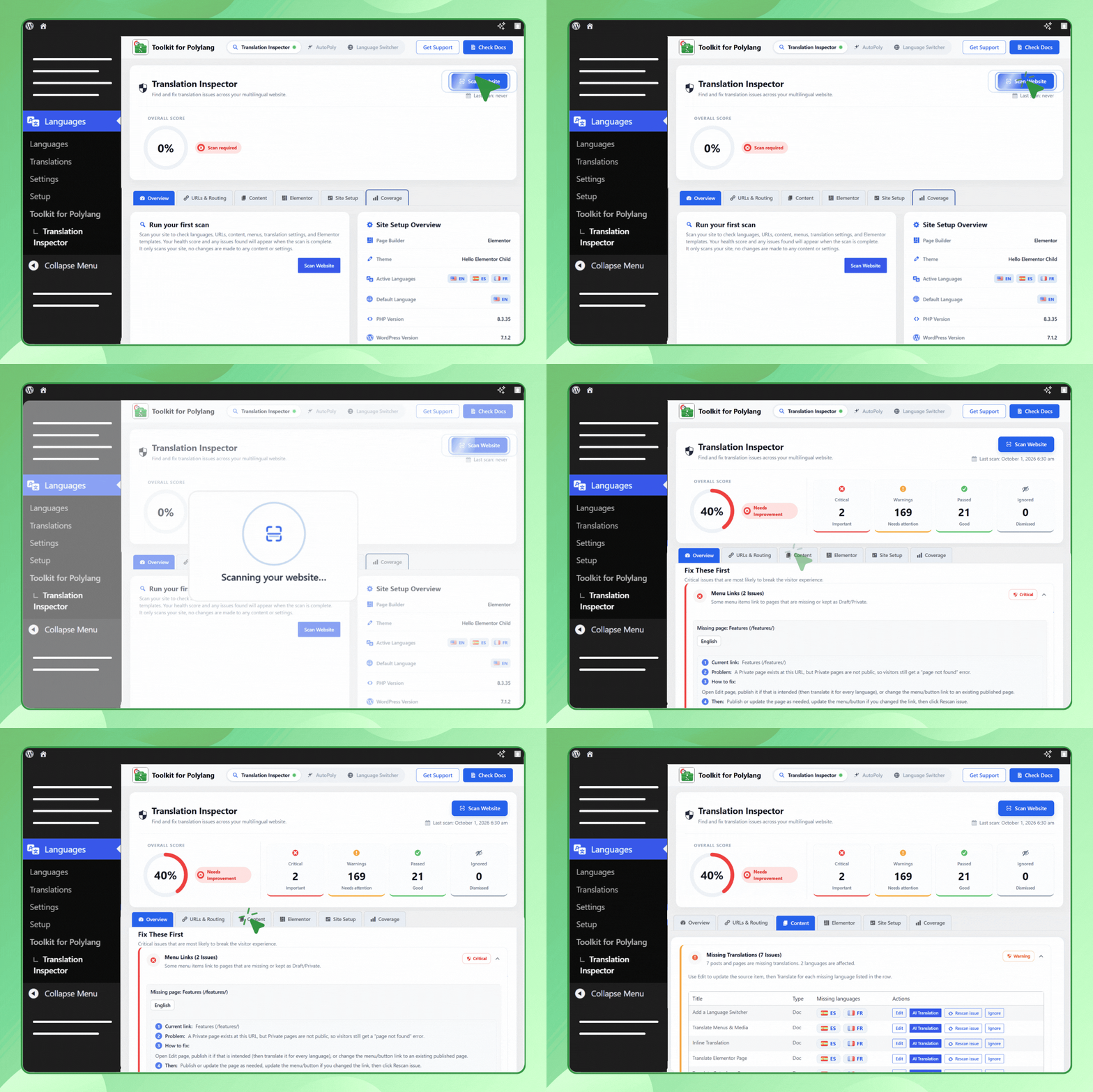
Multilingual Website Issue Scan

Configure Multilingual Issues

Automatic Translation.
Plugins semelhantes


O melhor plugin de backup e migração do WordPress. Faça backup, migre, copie, mova ou clone seu site de um local para outro de forma rápida e fácil.

Translate WordPress plugins and themes directly in your browser. Versatile PO file editor with integrated AI translation providers.

Translate WordPress with Google Translate multilanguage plugin using AI translation. Complete multilingual SEO solution, WooCommerce compatible.

Plugin completo para backup, migração e ambiente de teste do WordPress. Agende backups automáticos, restaure com um clique e migre ou clone sites com segurança.

Torne-se multilíngue de maneira simples e eficiente. Continue escrevendo posts e termos de taxonomia normalmente enquanto define seus idiomas de uma só vez.