Adicione facilmente snippets de código no WordPress. Insira scripts de cabeçalho e rodapé, adicione trechos de código PHP com lógica condicional, insira código de pixel de anúncios e muito mais.

AccessiYes Accessibility Widget for ADA, EAA & WCAG Readiness
Hospedagem WordPress com plugin Accessibility Widget
Onde posso hospedar o plugin Accessibility Widget?
Este plugin pode ser hospedado em qualquer hospedagem que possua WordPress instalado. Recomendamos fortemente optar por uma hospedagem seguro, com servidores adaptados para WordPress, como o serviço de hospedagem de sites da MCO2.
Hospedando o plugin Accessibility Widget em uma empresa de hospedagem confiável
A MCO2, além de instalar o WordPress na versão mais atual para seus clientes, disponibiliza o WP SafePress, um mecanismo singular que assegura e aumenta a performance do seu site ao mesmo tempo.
Por que a Hospedagem WordPress funciona melhor na MCO2?
A Hospedagem WordPress funciona melhor pois a MCO2 possui servidores otimizados para WordPress. A instalação de WordPress é diferente de uma instalação trivial, pois habilita imediatamente recursos como otimização de imagens e fotos, proteção da página de login, bloqueio de atividades maliciosas diretamente no firewall, cache avançado e HTTPS ativado por padrão. São plugins que potencializam seu WordPress para a máxima segurança e o máximo desempenho.
AccessiYes Accessibility Widget is a free, lightweight plugin that adds an accessibility widget to your WordPress website.
Visitors open the widget and adjust your site to suit how they read and browse. They can change font size, contrast, spacing and more, or apply a ready-made accessibility profile with one click.
The widget supports your work towards accessibility standards such as the Web Content Accessibility Guidelines (WCAG) 2.2 AA, and laws like the Americans with Disabilities Act (ADA) and the European Accessibility Act (EAA). It also includes a free accessibility statement generator, so you can publish your statement and show it right inside the widget.
Disclaimer:
AccessiYes Accessibility Widget is intended to support your accessibility efforts. It does not guarantee conformance with WCAG or compliance with laws such as the ADA, EAA, or other regulations. Full compliance may still require a comprehensive audit and remediation.
Why accessibility matters
Over 1 billion people globally live with some form of disability. Web accessibility makes sure your content is usable by everyone, including people with visual, cognitive, motor, and neurological impairments.
WordPress powers over 43% of all websites in 2026, so improving accessibility on WordPress sites makes a real difference to how inclusive the web is.
AccessiYes gives your visitors simple tools to change how your website looks and behaves based on their needs, while you continue improving accessibility in your site’s code.
Features
Accessibility profiles
- One-click profiles: Visitors can apply a preset combination of settings built for a specific need. Available profiles are Low Vision, ADHD, Seizure Safe and Epilepsy Safe.
Text and Reading
- Font size controls: Increase or decrease the font size for easier reading.
- Highlight title: Emphasise page headings to help visitors scan content.
- Highlight links: Make every link on the page stand out.
- Dyslexia-friendly font: Switch the site to a high-legibility font.
- Font weight: Make text bolder for better visibility.
- Letter spacing and line height: Adjust text spacing to support visitors with dyslexia or other reading difficulties.
- Text alignment: Align content to the left, center or right.
Color and Contrast
- Contrast modes: Dark Contrast, Light Contrast and High Contrast.
- Saturation options: High saturation, low saturation and monochrome (grayscale) views.
Navigation and Interaction
- Reading guide: A horizontal band that helps visitors keep their place while reading. It works on mobile too, where the band can be tapped or dragged into position.
- Pause animations: Stops CSS animations, animated GIFs and autoplaying videos that may distract or cause discomfort.
- Big cursor: A larger, higher-contrast cursor.
- Page reader: Reads page content aloud when visitors select, click or tab to it.
- Mute sounds: Mutes all audio on the page.
- Keyboard shortcut: Visitors can open and close the widget with Alt+A (Windows) or Option+A (Mac), without using a mouse.
Accessibility statement
- Statement generator: Create an accessibility statement inside the plugin. Choose your target standard (WCAG 2.2, 2.1 or 2.0 Level AA, or another standard) and your conformance status, then preview, copy or edit the result.
- Show the statement inside the widget: Visitors can read your generated statement in a panel within the widget, in their own language. The statement is available in 21 languages and falls back to English.
- Link an existing statement: Already have a statement page or VPAT? Link it, and the widget will open it in a new tab.
Widget customisation
- Look and feel: Pick the widget colour, icon (four shapes) and size (small, medium or large). A built-in reminder helps you check your colour against WCAG AA contrast guidelines.
- Position: Place the widget in any corner and set separate margins for desktop and mobile.
- Device visibility: Show or hide the widget on desktop and mobile separately.
- Choose the features visitors see: Turn individual features on or off from the Modules tab, so the widget only shows the options your audience needs.
Languages
- 58 languages: The widget appears in the visitor’s browser language. If that language isn’t supported, it uses the default language you choose.
- Multilingual sites: When your page language changes, the widget switches to match. This works with translation plugins that update the page language.
Built to stay out of your way
- Isolated styling: The widget loads separately from your theme, so your site’s CSS won’t break it and it won’t change your site’s design.
- No visitor tracking: The plugin does not collect or store personal data about your visitors.
Need help? Post in the WordPress.org support forum and our team will get back to you.
Got feedback about the plugin? We’d love to hear it. Write to us at support@accessiyes.com.
Note: AccessiYes is a standalone accessibility widget developed by CookieYes. It works independently and does not need a CookieYes account.
External services
This plugin connects to an external service only when you choose to share deactivation feedback.
CookieYes feedback service
When you deactivate the plugin, a short optional form asks why. If you click “Submit & Deactivate”, the following is sent to https://feedback.cookieyes.com: the reason you selected, any comment you typed, your email address if you entered one, your site URL, and technical details about your setup (WordPress, PHP, MySQL and plugin versions, server software, site language, active theme, and whether the site is a multisite). If you click “Skip & Deactivate”, nothing is sent. This data is used only to improve the plugin.
Privacy policy: https://www.cookieyes.com/privacy-policy/
The plugin admin also shows optional links to WebYes (an accessibility scanner and a free accessibility consultation). These are plain links. No data is sent unless you click them and use those services.
Capturas de tela
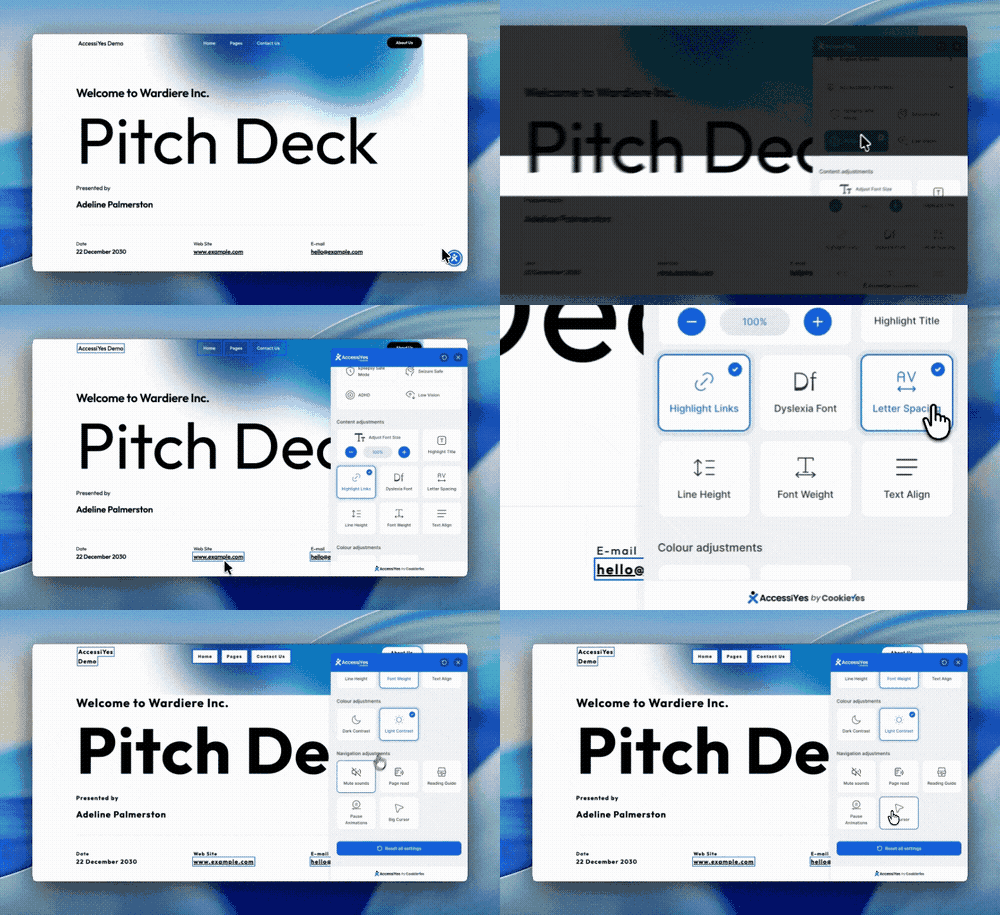
Accessibility menu with profiles, text, colour and navigation tools.

Customise the widget language, colour, icon, size and position, with a live desktop and mobile preview.

Generate an accessibility statement or link your existing statement page.

General settings: show the widget on desktop and mobile, and turn on the keyboard shortcut.
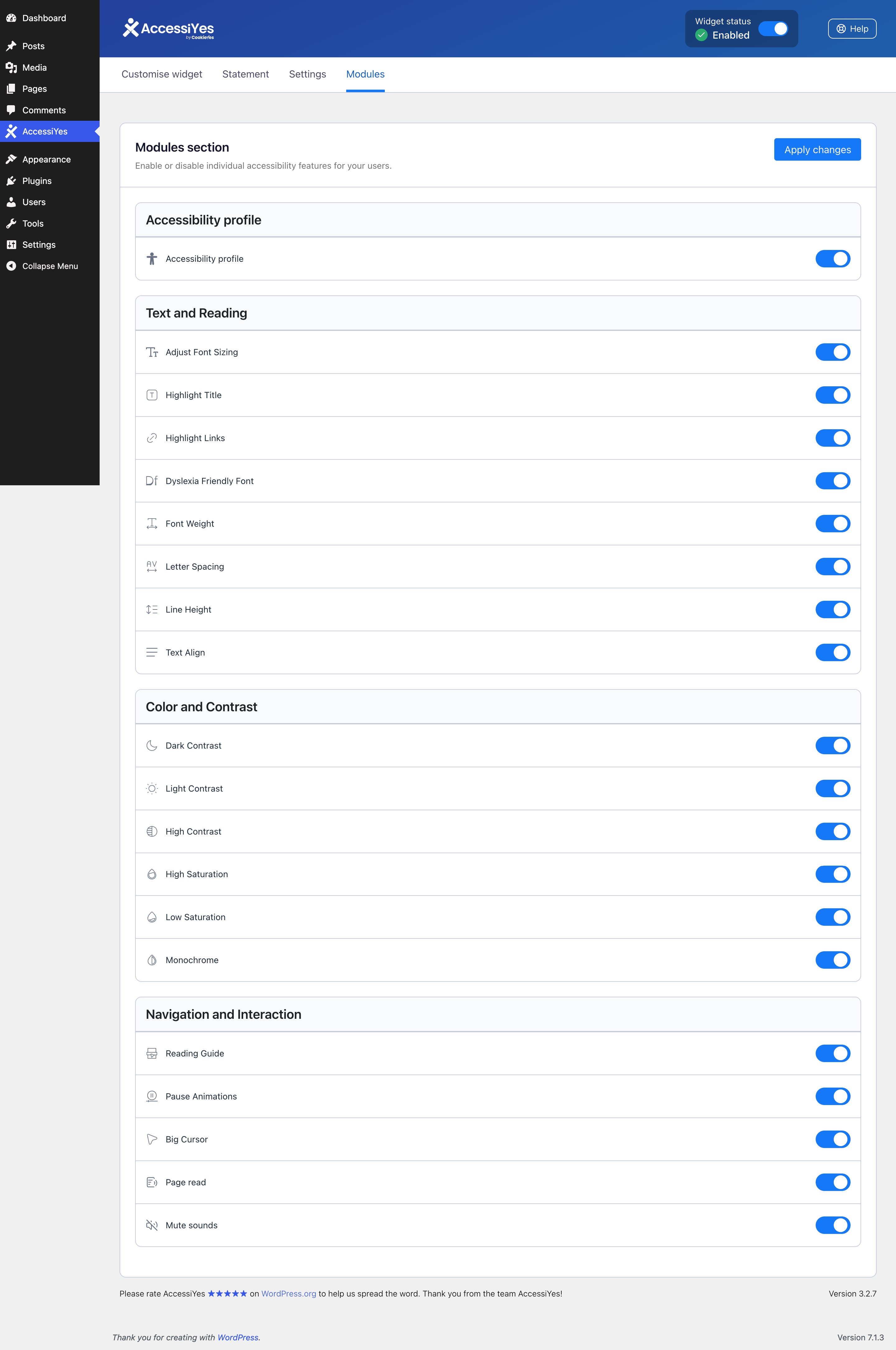
Choose which accessibility features visitors see in the widget.
Plugins semelhantes

Google Reviews Widget for WordPress. Display Google reviews in 1 minute with 45 professional layouts. Build trust, boost SEO, and increase sales.

Amplia e aprimora o editor de blocos (Gutenberg) e o editor clássico (TinyMCE).

Import your demo content, widgets and theme settings with one click. Theme authors! Enable simple theme demo import for your users.
90+ Elementor widgets & addons, 600+ templates, Mega Menu, WooCommerce, Display Conditions. The only Elementor addon AI agents can fully build with.

Easily add Custom CSS or JS to your website with an awesome editor.
Do mesmo author (CookieYes)

Cookie consent banner for GDPR, CCPA and privacy compliance. Auto cookie blocking, cookie scanner, Consent Mode v2 and consent management.