Translate WordPress plugins and themes directly in your browser. Versatile PO file editor with integrated AI translation providers.

WPGlobus
Hospedagem WordPress com plugin WPGlobus – Multilingual Everything!
Onde devo hospedar o plugin WPGlobus – Multilingual Everything!?
Este plugin pode ser hospedado em qualquer provedor que possua WordPress configurado. Recomendamos fortemente optar por uma hospedagem seguro, com servidores especializados para WordPress, como o serviço de hospedagem de sites da MCO2.
Hospedando o plugin WPGlobus – Multilingual Everything! em um provedor confiável
A MCO2, além de instalar o WordPress na versão mais nova para seus clientes, fornece o WP SafePress, um mecanismo singular que assegura e otimiza seu site simultaneamente.
Por que a Hospedagem WordPress funciona melhor na MCO2?
A Hospedagem WordPress funciona melhor pois a MCO2 possui servidores otimizados para WordPress. A instalação de WordPress é diferente de uma instalação trivial, pois habilita imediatamente recursos como otimização automática de imagens e fotos, proteção da página de login, bloqueio de atividades suspeitas diretamente no firewall, cache avançado e HTTPS ativado por padrão. São recursos que potencializam seu WordPress para a máxima segurança e o máximo desempenho.
WPGlobus turns your WordPress site into a multilingual one. You choose the languages you want, and WPGlobus adds the fields where you enter your own translations – post and page titles, content, excerpts, categories, tags, and more.
Free and Pro versions
- Free: WPGlobus – this plugin. The essential multilingual tools, free from WordPress.org.
- Pro: TIV Globus – the successor to WPGlobus Plus and WooCommerce WPGlobus. The complete multilingual tools, sold on the WooCommerce.com marketplace.
WPGlobus allows you to:
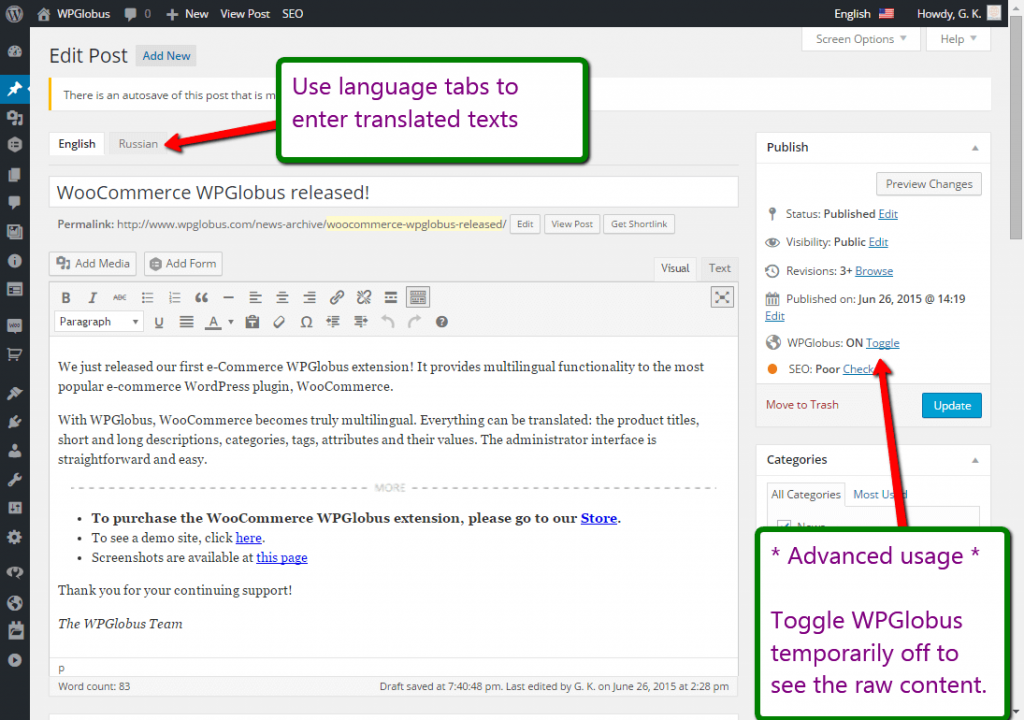
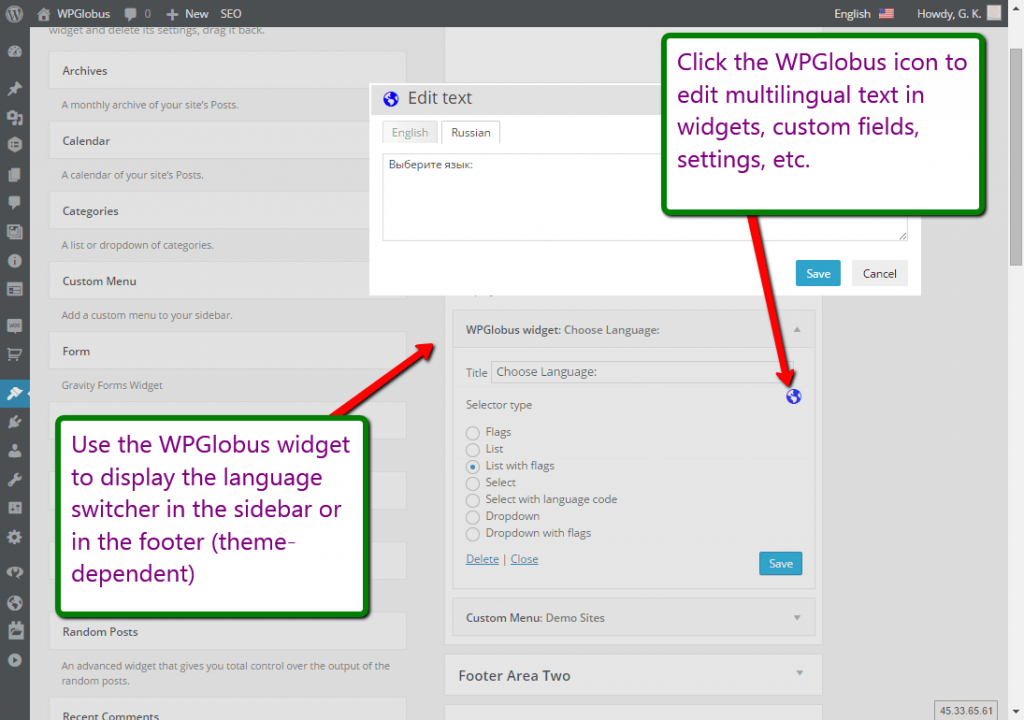
- Enter translations for posts, pages, custom post types, categories, tags, menus, and widgets;
- Enter translations for the Site Title and Tagline;
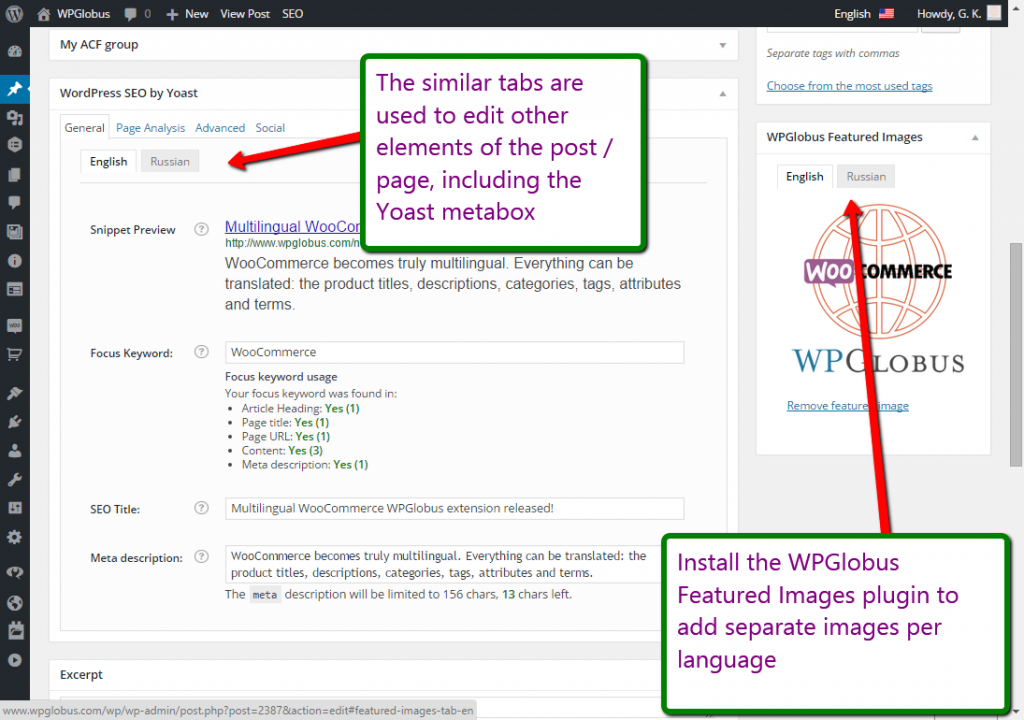
- Enter multilingual SEO titles and meta descriptions – compatible with Yoast SEO (free version);
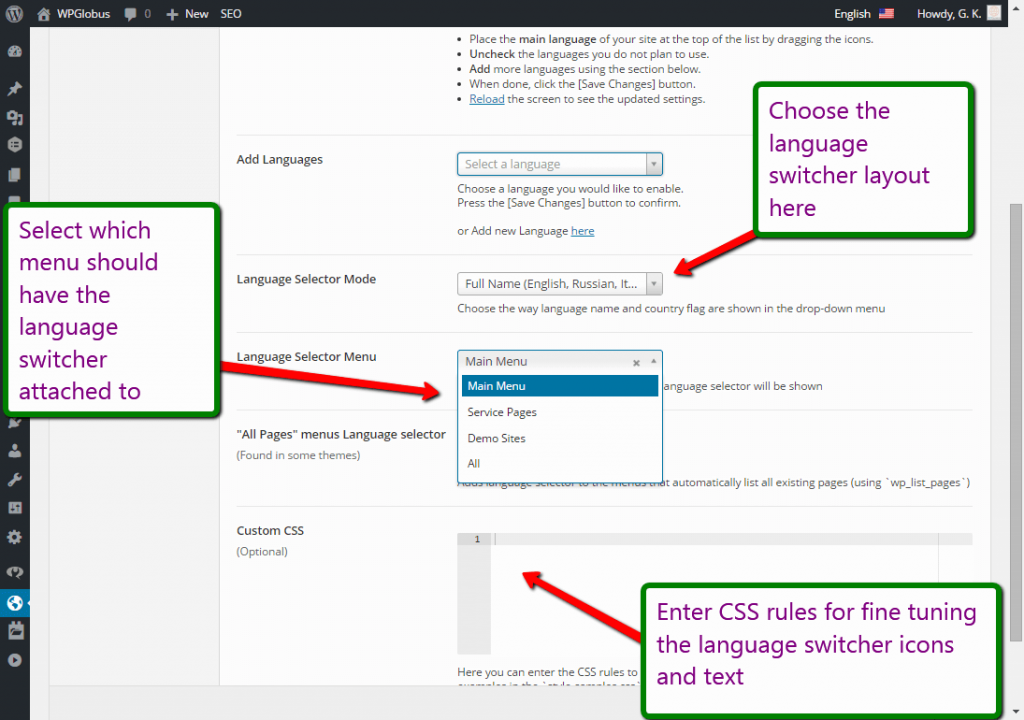
- Add one or several languages using custom combinations of country flags, locales, and language names;
- Give each language its own URL (
example.com/,example.com/es/,example.com/fr/, and so on); - Switch languages on the front-end with a drop-down menu extension and/or a customizable widget with various display options;
- Switch the admin interface language from the top bar.
What is in the Pro version (TIV Globus)?
Everything in the Free version, plus the ability to:
- Give each page a full translated address, including “slug” (
/my-page/becomes/fr/ma-page/,/es/mi-pagina/, and so on); - Enter translations for WooCommerce products, categories, and attributes;
- Use popular page builders (Elementor, Avada, and more) in every language;
- …and much more.
Get TIV Globus – the Pro version of WPGlobus. It replaces WPGlobus without losing your settings or translations, and works with or without WooCommerce.
A free upgrade for our customers
Already own WPGlobus Plus or WooCommerce WPGlobus? You can move to TIV Globus at no extra cost. This is a limited-time offer for existing customers.
Important Notes: please read first!
These notes apply to both WPGlobus (free) and TIV Globus (Pro).
- NO AUTOMATIC TRANSLATION:
- The plugin does NOT translate texts automatically! You translate texts manually.
- IF YOU UNINSTALL, YOU MUST REMOVE THE EXTRA LANGUAGES:
- All translations are stored together in a special format:
{:en}English{:}{:fr}French{:}{:es}Spanish{:}. If the plugin is not active, every language shows at once and your site becomes unreadable. Before you deactivate and uninstall, you must run the cleanup tool to remove all languages but one. See the details in the plugin’s settings.
- All translations are stored together in a special format:
- PAGE BUILDERS / COMPOSERS:
- Page-builder support is available only in TIV Globus (Pro).
- COOKIES:
- The plugin uses a browser cookie to remember your language preference. It stores only the language code (such as
enores) – no personal information.
- The plugin uses a browser cookie to remember your language preference. It stores only the language code (such as
- MULTISITE:
- The multisite mode (multiple virtual sites sharing a single WordPress installation) is not tested and not officially supported. It may still work, but use it at your own discretion.
Compatibility with themes and plugins
WPGlobus works with any theme or plugin that passes its text through the standard WordPress filters before displaying it – which covers the large majority of them.
Some add-ons that render their own output (sliders, forms, page composers, and the like) are not always multilingual-ready. When you find an element that will not translate, please let its author know – the fix is usually small.
We test against many popular themes and plugins and follow their updates as closely as we can. Since third-party code changes frequently, an occasional tweak on our side may be needed after an update.
Permalinks
WPGlobus needs “pretty” permalinks. Go to Settings -> Permalinks and pick any structure other than “Plain” (with no index.php in it) – URLs like example.com/?p=123 will not work.
WooCommerce: set your store bases explicitly (for example, Shop Base /product/). If you leave them blank, WooCommerce may translate the base itself (e.g. /produkt/ for German), causing 404 errors.
Capturas de tela
Plugins semelhantes


Translate WordPress with Google Translate multilanguage plugin using AI translation. Complete multilingual SEO solution, WooCommerce compatible.

Torne-se multilíngue de maneira simples e eficiente. Continue escrevendo posts e termos de taxonomia normalmente enquanto define seus idiomas de uma só vez.

Traduza seu site visualmente, diretamente pela interface. Torne-o multilíngue em poucos minutos, usando a tradução automática por IA. Funciona com qualquer tema ou plugin.

Translate WordPress with Google Language Translator multilanguage plugin which allows to insert a language selector widget anywhere on your website.

Connect Polylang with Elementor: translated templates, language switcher widget, language visibility conditions and more