
WordPress login security with brute force protection, Two-factor authentication (2FA/MFA), firewall, IP/country blocking, and login monitoring

WP Last Login
Hospedagem WordPress com plugin WP Last Login
Onde devo hospedar o plugin WP Last Login?
Este plugin pode ser hospedado em qualquer hospedagem que tenha WordPress instalado. Recomendamos optar por uma hospedagem de confiança, com servidores especializados para WordPress, como o serviço de hospedagem WordPress da MCO2.
Hospedando o plugin WP Last Login em uma empresa de hospedagem confiável
A MCO2, além de instalar o WordPress na versão mais atualizada para seus clientes, oferece o plugin WP SafePress, um mecanismo singular que protege e melhora seu site ao mesmo tempo.
Por que a Hospedagem WordPress funciona melhor na MCO2?
A Hospedagem WordPress funciona melhor pois a MCO2 possui servidores otimizados para WordPress. A instalação de WordPress é diferente de uma instalação trivial, pois habilita imediatamente recursos como otimização de imagens e fotos, proteção da página de login, bloqueio de atividades suspeitas diretamente no firewall, cache avançado e HTTPS ativado por padrão. São recursos que potencializam seu WordPress para a máxima segurança e o máximo desempenho.
WP Last Login records when each user signs in and surfaces it as a sortable column on the Users screen — so you can see who’s active, identify dormant accounts, and confirm that real people are coming back.
Features
- Sortable “Last Login” column on the Users screen, including the network admin user list on multisite.
- Hover any date to reveal the exact login time.
- Captures logins via the standard
wp_loginaction, so it works with any login flow that triggers it — including the Two Factor plugin, WooCommerce, BuddyBoss, and most social-login plugins. - Users without a recorded login show a neutral em-dash (—) — never a misleading “never” — and still sort correctly when ordered by last login.
- Lightweight: one user meta key, no settings page, no extra database tables.
- Filter hooks let you customize the date format or hide the column from non-admin roles.
Plugin Filter Hooks
wpll_current_user_can (boolean)
Whether the column is supposed to be shown.
Default: true
wpll_date_format (string)
The date format string for the date output.
Capturas de tela
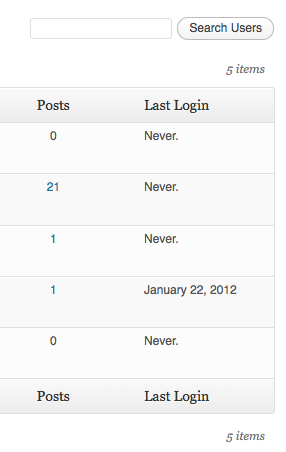
Last login column in the user table.
Plugins semelhantes


Loginizer is a WordPress security plugin which helps you fight against bruteforce attacks.

Redux is a simple, truly extensible, and fully responsive options framework for WordPress themes and plugins. It ships with an integrated demo.

O plugin “User Role Editor” do WordPress facilita a alteração de funções e permissões de usuários. Edite, adicione ou exclua funções e permissões de usuários do WordPress.

O MainWP Child estabelece uma ligação segura entre os seus sites WordPress e o seu painel dedo MainWP auto-hospedado, simplificando a gestão do site.

Limit rate of login attempts, including by way of cookies, for each IP. Fully customizable.