Site Kit é uma solução completa para usuários do WordPress usarem tudo que o Google oferece para torná-los bem-sucedidos na web.
Post Views Counter
Hospedagem WordPress com plugin Post Views Counter
Onde devo hospedar o plugin Post Views Counter?
Este plugin pode ser hospedado em qualquer servidor que tenha WordPress configurado. Recomendamos fortemente optar por uma hospedagem de confiança, com servidores especializados para WordPress, como o serviço de hospedagem WordPress da MCO2.
Hospedando o plugin Post Views Counter em um provedor seguro
A MCO2, além de configurar e instalar o WordPress na versão mais nova para seus clientes, disponibiliza o plugin WP SafePress, um sistema exclusivo que salvaguarda e otimiza seu site conjuntamente.
Por que a Hospedagem WordPress funciona melhor na MCO2?
A Hospedagem WordPress funciona melhor pois a MCO2 possui servidores otimizados para WordPress. A instalação de WordPress é diferente de uma instalação trivial, pois habilita imediatamente recursos como otimização de imagens, proteção da página de login, bloqueio de atividades suspeitas diretamente no firewall, cache avançado e HTTPS ativado por padrão. São plugins que potencializam seu WordPress para a máxima segurança e o máximo desempenho.
Post Views Counter counts how many times your posts, pages and other content are viewed, shows those counts on your site, and helps you see which content works – right inside WordPress. No external tools. No bloat. Just the numbers you need to see what’s working.
It counts two things:
- Views – Counted views of your selected posts, pages and other content, according to your counting settings. Views can be displayed on your site and used to sort content.
- Visits – A Visit starts with a browser’s first counted view and covers subsequent counted content views within the fixed Count Interval. Visits are shown as site-wide totals beside Views, not per post.
Key Benefits
Clarity, speed, and control:
- Clear, Focused Metrics – Views for every post and Visits for the whole site give you a clear picture of how your content is performing.
- Made for WordPress – Runs entirely in your site. No GA, no third-party pipes; accurate counts in your Dashboard and post lists.
- Your counting rules – Choose which content to count, exclude selected visitors, and set the interval for repeat counts.
- Privacy-first – Views and Visits are stored as aggregate totals on your server. Browser storage helps prevent repeat counting within your Count Interval. Pro offers cookieless browser storage; its optional Strict Counts feature also caches IP-derived data to limit repeat counts.
- Works at scale – Minimal overhead, no external scripts, Multisite-ready.
- Display anywhere – Automatically show counts, or place them exactly where you want via blocks, shortcode or PHP.
Features
Practical features that matter:
- Count & display views for any post type you select.
- Count Visits and see them beside Views in the dashboard chart.
- Three counting modes: PHP, JavaScript, REST API
- Post Views dashboard widget: a chart of Views, Visits or both, with a Views comparison for the selected month. A month in progress is compared with the same days of the previous month.
- Top Posts dashboard widget, month by month.
- Sortable Post Views admin column, with a Views chart for each post.
- Traffic Signals admin column that flags unusual traffic changes compared with the same days of the previous month.
- Weekly email summary of how your content performed.
- Exclude bots, logged-in users, specific roles, or IPs
- Manually adjust a post’s views when needed.
- Query and order content by views (developer-friendly)
- Custom REST API endpoints
- Count Interval to set the fixed window for repeat counts from the same browser.
- One-click data import from WP-PostViews, Statify and Page Views Count
- Show the counter automatically, or place it with the Post Views block, shortcode or PHP function.
- Most Viewed Posts block and widget.
- Multisite compatible
- WPML/Polylang compatible; translation-ready (.pot)
Post Views Counter Pro
More capability without extra complexity:
- Fast AJAX counting that keeps counting light on busy sites.
- Caching compatibility and dynamic loading to count through cached pages and refresh displayed counts when a compatible counting mode is selected.
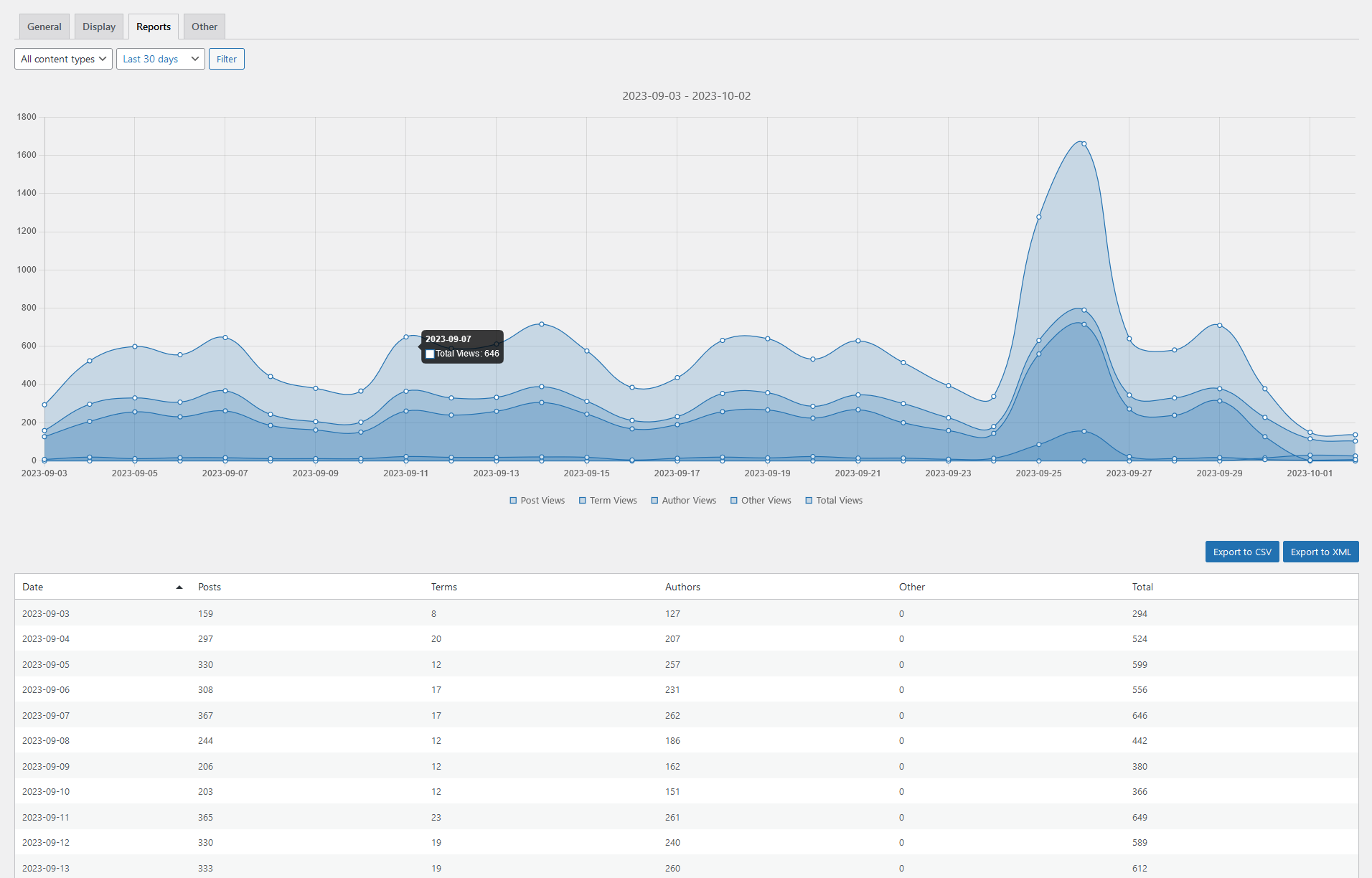
- Reports: Views by Date, Post and Author to spot winners, trends and top contributors, plus Visits in aggregate date reports.
- Visit trends and Views per visit in dashboard insights and email summaries.
- Performance Insights that explain how a post’s Views changed, in the admin column, Traffic Signals and email summaries.
- Daily, weekly and monthly email summaries with insights.
- Traffic sources: aggregate stats on referrers, devices, browsers, operating systems and languages.
- Views for taxonomy terms, authors and other archives.
- Customizable Views Period (e.g., last 7/30 days) to control the views count timeframe.
- Export to CSV/XML to download and share data.
- Integrations for ordering by views in popular builders (e.g., Elementor Pro, Divi, GenerateBlocks).
Capturas de tela

screenshot-1.png

screenshot-2.png
Plugins semelhantes


Cookieless, privacy-friendly WordPress analytics. GDPR/CCPA compliant visitor data and clear graphs, with no data sharing.

Adds Google Analytics tracking code to your WordPress site. Supports many tracking features.

Head and Footer plugin lets you to add HTML code to the head and footer sections of your site pages, inside posts... and more!

Conecta o Google Analytics ao seu site WordPress. Exibe estatísticas para ajudar você a entender seus usuários e o conteúdo do site, em outro nível!

O melhor plugin de feedback de usuários para fazer perguntas, pesquisas e enquetes no seu site em segundos
Do mesmo author (dFactory)

The most popular lightbox plugin and responsive gallery builder for WordPress.