
WordPress login security with brute force protection, Two-factor authentication (2FA/MFA), firewall, IP/country blocking, and login monitoring

Loggedin – Session Manager, Limit Concurrent Logins & Force Logout
Hospedagem WordPress com plugin Loggedin – Limit Active Logins
Onde hospedar o plugin Loggedin – Limit Active Logins?
Este plugin pode ser hospedado em qualquer hospedagem que tenha WordPress instalado. Recomendamos fortemente escolher um provedor de hospedagem seguro, com servidores especializados para WordPress, como o serviço de hospedagem de sites da MCO2.
Hospedando o plugin Loggedin – Limit Active Logins em um provedor confiável
A MCO2, além de instalar o WordPress na versão mais nova para seus clientes, fornece o plugin WP SafePress, um sistema singular que salvaguarda e otimiza seu site ao mesmo tempo.
Por que a Hospedagem WordPress funciona melhor na MCO2?
A Hospedagem WordPress funciona melhor pois a MCO2 possui servidores otimizados para WordPress. A instalação de WordPress é diferente de uma instalação trivial, pois habilita imediatamente recursos como otimização de imagens e fotos, proteção da página de login, bloqueio de atividades maliciosas diretamente no firewall, cache avançado e HTTPS ativado por padrão. São plugins que potencializam seu WordPress para a máxima segurança e o máximo desempenho.
Loggedin is a session manager for WordPress — it gives you control over the login sessions your users hold, and the tools to end them when you need to.
At its core, Loggedin caps the number of simultaneous WordPress sessions a user account is allowed to hold. When the cap is reached, you choose what happens next — log out the oldest device, log out every other device, or block the new login outright. It’s the lightweight, no-bloat way to stop account sharing on membership sites, LMS courses, paid communities, and any WordPress install where one paid account shouldn’t be open on five devices at once.
The plugin hooks straight into WordPress’s standard authentication pipeline and uses the native WP_Session_Tokens API, so it works on every host, with every theme, and alongside every login plugin you might already run. No cron jobs, no background polling, no third-party services.
How it works
A “session” in WordPress is the authenticated token created the moment a user logs in — one per browser, per device. Two browsers on the same laptop count as two sessions; a phone and a desktop count as two. Closing a tab does not end a session — the token lives server-side until the user explicitly signs out or another login displaces it.
Loggedin watches every login attempt:
- Counts the user’s current active sessions.
- Compares that count to the limit you’ve configured.
- Applies the rule you’ve picked — silently make room for the new login, or reject the new login with an error on wp-login.
There’s a one-click Force Logout panel in the admin to clear every session for a specific user when someone’s locked out by the cap and can’t reach their other devices. Identify the user by ID, email, or username — all three work. Need a clean slate instead? Logout All Users signs out every account on the site in one click — instantly, even with thousands of users — while your own session stays active.
Who it’s for
- Membership sites — MemberPress, Paid Memberships Pro, Restrict Content Pro, WooCommerce Memberships, etc. Stop one paid account from being shared across a household, a classroom, or a Discord server.
- Online courses & LMS — LearnDash, LifterLMS, TutorLMS, Sensei. Make sure the seat someone paid for is actually used by that someone.
- Subscription stores — WooCommerce Subscriptions, Easy Digital Downloads recurring. Keep subscriber counts honest.
- Corporate intranets & client portals — Enforce a one-device-at-a-time policy for staff or client accounts.
- BuddyPress / BuddyBoss communities — Reduce ban-evasion and duplicate-account abuse.
- Compliance-driven sites — Healthcare, finance, education installs where audit policy requires a per-account session cap.
Features
- Session management from the dashboard — Inspect and end user sessions from Users Loggedin, or from WP-CLI. Add the Active Sessions add-on for a live, sortable view of every signed-in user and device.
- Global concurrent-login limit — Pick any number from 1 upwards as the per-user cap.
- Three built-in modes — Logout Oldest (kick the user’s oldest device, keep the rest), Logout All (the new login becomes the only active session), or Block New (reject the login and show an error on wp-login).
- Admin Force Logout — Type a user ID, email, or username and clear every active session for that user in one click.
- Logout All Users — Sign out every user on the site at once. Instant at any scale — no per-user loops, no timeouts — and the admin who clicks the button stays logged in.
- Works with any session storage — Uses the standard
WP_Session_TokensAPI. Stock WordPress, Redis, Memcached — all supported (the Logout Oldest mode needs the default user-meta storage; the other modes work everywhere). - Customizable error message — Override the message shown when a login is blocked, via a single filter.
- WP-CLI support — Inspect and destroy user sessions and read or write settings from the command line:
wp loggedin sessions list <user>,wp loggedin sessions destroy <user>,wp loggedin sessions destroy-all,wp loggedin settings set maximum 3. Ideal for bulk operations, deploy scripts and headless installs. - Built for developers — Every decision passes through documented PHP hooks and filters. Override the cap per user / role / capability, exempt service accounts, audit force-logouts, or splice the plugin into your own auth pipeline. Full hook reference in the developer docs.
- Lightweight — No cron, no background polling, no remote calls. The whole plugin runs at the moment a login happens.
- Translation-ready — Loaded with the WordPress i18n APIs; contribute translations on WordPress.org.
📦 Add-ons
Extend Loggedin with these official add-ons:
- Active Sessions — See exactly who’s signed in right now, drill into each device per user, and sign out a single session — or every session — in one click.
- Auto Logout — Sign users out automatically after a period of inactivity. Set an idle timeout, warn users before the session ends, and keep unattended machines from staying signed in.
- Limit Per User — Override the global session cap for an individual user account directly from their WordPress profile. Perfect for tiered access or trusted-staff exemptions.
- Limit Per Role — Set a different concurrent-session cap per WordPress role. Give administrators more headroom while keeping subscribers tight, or vice versa.
- Real-time Logout — Detect logouts in near-real-time. When Loggedin terminates a session, the user’s other open tabs reload to wp-login automatically — no waiting for the next page click.
📚 Documentation
- Getting started
- General settings
- Force Logout (Manage Sessions)
- WP-CLI commands
- Add-ons overview
- Developer docs — hooks, filters, REST
🐛 Bug reports
Found a bug? File it on the Loggedin GitHub repository.
GitHub is for bug reports and development-related issues only. For end-user support, please use the WordPress.org support forums.
Capturas de tela

General Settings — concurrent-login limit and login logic.
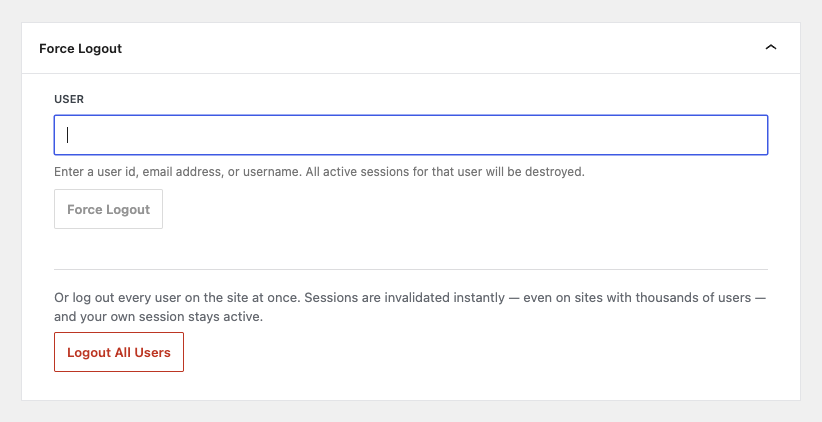
Force Logout — admin Force Logout panel.
Plugins semelhantes


Loginizer is a WordPress security plugin which helps you fight against bruteforce attacks.

Limit rate of login attempts, including by way of cookies, for each IP. Fully customizable.

Protect your WordPress site, pages, posts, WooCommerce products, and categories with single or multiple passwords.

LoginPress is a Custom Login Page Customizer plugin allows you to easily customize the layout of login, admin login, client login, register pages.

Enable Two-Factor Authentication (2FA) using time-based one-time passwords (TOTP), email, and backup verification codes.
Do mesmo author (Joel James)

Use Disqus comments with advanced features like lazy load, shortcode, widgets etc. Don't let Disqus to slow your site down.

Speed up your posts by lazy-loading the WordPress comments on scroll or click. Works with classic and block themes.

[DISCONTINUED] Facebook has permanently shut down the Facebook Comments embed. This plugin can no longer function.