Google Reviews Widget for WordPress. Display Google reviews in 1 minute with 45 professional layouts. Build trust, boost SEO, and increase sales.

List Last Changes
Hospedagem WordPress com plugin List Last Changes
Onde hospedar o plugin List Last Changes?
Este plugin pode ser hospedado em qualquer servidor que tenha WordPress configurado. Recomendamos optar por um provedor de hospedagem de confiança, com servidores especializados para WordPress, como o serviço de hospedagem de sites da MCO2.
Hospedando o plugin List Last Changes em uma empresa de hospedagem seguro
A MCO2, além de configurar e instalar o WordPress na versão mais nova para seus clientes, disponibiliza o WP SafePress, um sistema exclusivo que protege e aumenta a performance do seu site ao mesmo tempo.
Por que a Hospedagem WordPress funciona melhor na MCO2?
A Hospedagem WordPress funciona melhor pois a MCO2 possui servidores otimizados para WordPress. A instalação de WordPress é diferente de uma instalação trivial, pois habilita imediatamente recursos como otimização automática de imagens e fotos, proteção da página de login, bloqueio de atividades suspeitas diretamente no firewall, cache avançado e HTTPS ativado por padrão. São plugins que potencializam seu WordPress para a máxima segurança e o máximo desempenho.
Shows a list of the last changes in the widget area, via shortcode or in the gutenberg block editor.
This can include changed pages and/or posts (configurable).
Additional features include:
- Select the number of entries in the list
- Define pages to be excluded
- Show the author or the last editor of the page/post
- Select and order by date modified or date published
Exclude page or post
To exclude a page or post from being listed in the widget do the following steps:
- Open the page or post you want to exclude for editing.
- Open the “Screen Options” (on the top right of the page)
- Ensure that “Custom Fields” is checked (see Screenshot #3)
- In the “Custom Fields” further down the screen add the following custom field (see Screenshot #4):
- name: list_last_changes_ignore
- value: true
To include it again set the value to false or remove the custom field completely.
Block Editor (Gutenberg)
The block can be found in Widgets -> List Last Changes.
The block can be configured in the block settings (panel on the right side)
In difference to the widget, with the block no title is written. If a title is needed it has to be defined in an own block in front of the List Last Changes block.
Shortcode
To show the list of the last changes via shortcode use the following syntax:
[list_last_changes number='7' showpages='true' showposts='true' showauthor='false' usedatepublished='true' template='{title} {change_date} {author}' /]
The attribute ‘number’ defines the number of entries shown.
With the attributes ‘showpages’ and ‘showposts’ changed pages and/or posts are included.
To show also the author set the attribute ‘showauthor’ to true (deprecated, use template mechanism instead).
With the attribute ‘usedatepublished’ set to ‘true’ the date when the page or post was first published, if set to ‘false’ (or not set at all) the date the page or post was modified is used.
The ‘template’ attribute defines the content of the entries. If the ‘template’ attribute is defined the attribute ‘showauthor’ is ignored.
In difference to the widget, with the shortcode no title is written. If a title is needed it has to be defined by hand in front of the shortcode.
Templates
In the template string the following fields can be used: {title}, {change_date}, {published_date}, {author} and {editor}.
{title} : the title of the page or post with a link to it
{change_date} or {change_date[format]} : the date the page or post was changed (“modified date”)
{published_date} or {published_date[format]} : the date the page or post was published (“post date”)
{author} : the author of the page or post
{editor} : the last editor of the page or post
With the optional [format] the date format of change_date and published_date can be defined. The date format is in the php date formatting.
Without definition the wordpress system date format is used.
Sample templates:
{title} {change_date} : the default template
{title} {change_date[Y-m-d H:i]} : like the default template but with date and time defined by the given format
{title} {change_date} {author} : behaves as in versions before 0.9 when show author was enabled
{change_date} : shows only the change_date, can be used with number = 1 as last modified date of a WordPress Site
Capturas de tela
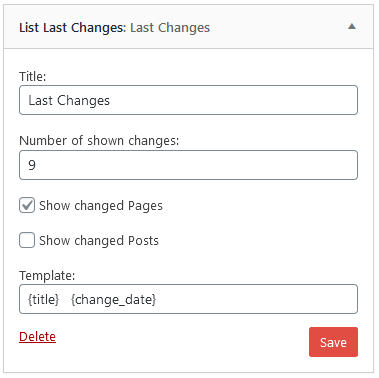
Configuration of the widget
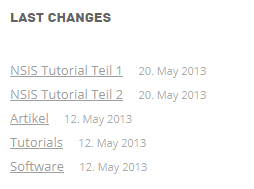
Output of the widget
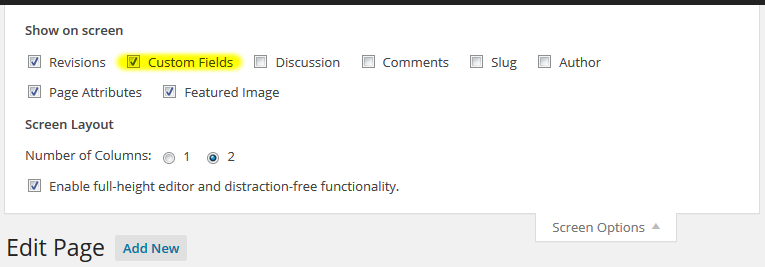
Enable custom fields on the page
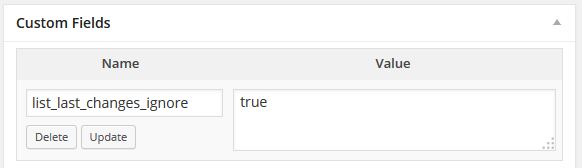
Add this custom field on a page to exclude it from being listed in the widget.
Plugins semelhantes


Adiciona uma interface de navegação de páginas mais avançada.

Add 50+ shortcodes with live preview for tabs, accordions, buttons, FAQs, sliders and boxes. Works in Block Editor and Classic Editor.

Essential elements for modern websites. Add buttons, sliders, heroes, maps, images, carousels, features, icons, more. Create dynamic pages easily.

The official companion plugin for Blocksy theme, packed with starter sites, extra features, and integrations.

Extend Elementor with 68+ widgets, 114 prebuilt demos, Mega Menu Builder, Theme Builder, and advanced interactive effects.