
Fastest growing Anti Spam plugin. No API calls, subscriptions, captcha or puzzle. Full GDPR complaint. For comments, contact form, login, registration

Multiple Columns for Gravity Forms
Hospedagem WordPress com plugin Multiple Columns for Gravity Forms
Onde hospedar o plugin Multiple Columns for Gravity Forms?
Este plugin pode ser hospedado em qualquer hospedagem que possua WordPress instalado. Recomendamos fortemente optar por uma hospedagem seguro, com servidores especializados para WordPress, como o serviço de hospedagem da MCO2.
Hospedando o plugin Multiple Columns for Gravity Forms em um provedor de confiança
A MCO2, além de instalar o WordPress na versão mais atualizada para seus clientes, oferece o WP SafePress, um sistema singular que protege e aumenta a performance do seu site simultaneamente.
Por que a Hospedagem WordPress funciona melhor na MCO2?
A Hospedagem WordPress funciona melhor pois a MCO2 possui servidores otimizados para WordPress. A instalação de WordPress é diferente de uma instalação trivial, pois habilita imediatamente recursos como otimização de imagens e fotos, proteção da página de login, bloqueio de atividades suspeitas diretamente no firewall, cache avançado e HTTPS ativado por padrão. São plugins que potencializam seu WordPress para a máxima segurança e o máximo desempenho.
When activated this plugin allows Gravity Forms elements to be split into columns. To implement the columns three new elements (Row Start, Column Break, and Row End) which are introduced into the Gravity Forms administration area in a group labelled as Multiple Columns Fields.
For each form, in its form settings it is possible to enable and disable the plugin’s CSS and JS that are used by the plugin. The CSS file is responsible for the layout of the form, and the JS file is used to remove unwanted spacing generated if using conditional logic to hide form elements. It is advised to keep the CSS enabled at all times, but the JS should only be enabled in the case of hidden elements through the use of conditional logic.
** Note: Plugin no longer supports initial column specification using Sections in versions 2 and before. If updating plugin from a version prior to version 3, the form will need to be recreated with the current design definitions.**
Note: If updating from version 3.0.3 or earlier. If the columns are not displaying as expected, first please visit the Form Settings for each form and check the Enable CSS checkbox.
Support this plugin by purchasing Gravity Forms now, using the affiliate link. No extra cost to you, and a big help towards supporting this plugin.
Credits
A big thank you goes to K. Woodberry, T. Kaufenberg, J. Wright, D. Donnelly, A. Sharma, L. Hanbury-Pickett for identifying issues, and assisting in finding solutions to them. 🙂
Capturas de tela

New Gravity Form with Multiple Columns Fields floating panel (collapsed).

Multiple Columns Fields floating panel close up (expanded).

Form showing new fields (Row Start, Column Break, Row End) added to form.

Example of a completed form, composed of Multiple Columns Fields and generic Gravity Form fields.
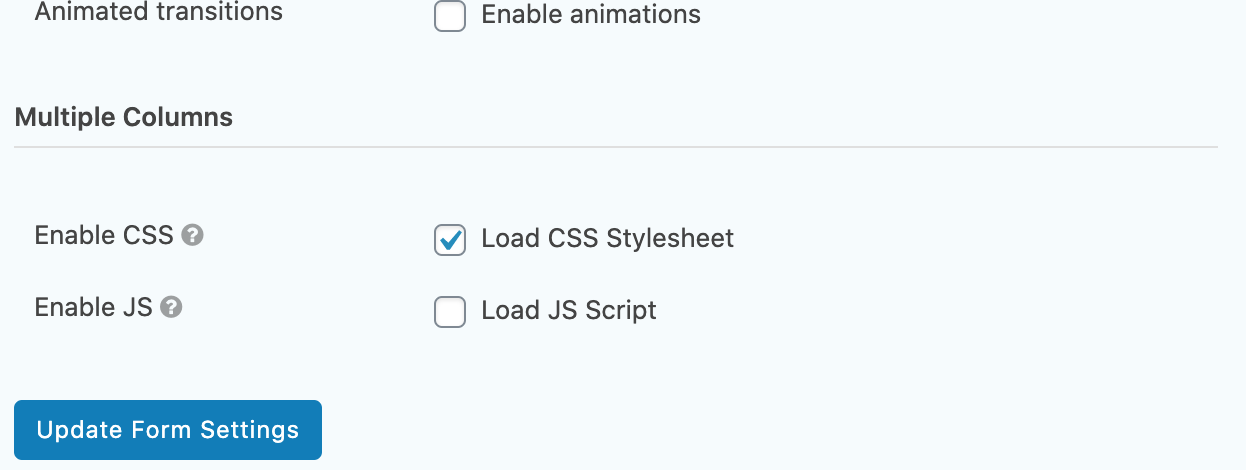
Gravity Forms - Form - Settings -> Form Settings showing the Enable CSS and Enable JS checkboxes.
Plugins semelhantes


Enhance your Gravity Forms to include anti-spam measures originally based on the work of David Walsh's "Zero Spam" technique.

Export all Gravity Forms entries to Excel (.xlsx) or CSV via a download button or a secret shareable URL.

Map your Gravity-Forms-generated posts to a custom post type and/or custom taxonomies.

Gravity Forms Google Sheets Connector sends Gravity forms entries to Google Sheets.

The Pronamic Pay plugin adds payment methods like iDEAL | Wero, Bancontact, credit card and more to your WordPress site for a variety of payment provi …