
Avaliações do Google no WordPress: exiba-as em 1 minuto com 45 layouts profissionais. Gere confiança, melhore o SEO e aumente as vendas.

Editor Menu and Widget Access
Hospedagem WordPress com plugin Editor Menu and Widget Access
Onde devo hospedar o plugin Editor Menu and Widget Access?
Este plugin pode ser hospedado em qualquer provedor que possua WordPress instalado. Recomendamos utilizar uma empresa de hospedagem de confiança, com servidores especializados para WordPress, como o serviço de hospedagem de sites da MCO2.
Hospedando o plugin Editor Menu and Widget Access em um provedor de confiança
A MCO2, além de instalar o WordPress na versão mais nova para seus clientes, disponibiliza o WP SafePress, um sistema singular que salvaguarda e otimiza seu site simultaneamente.
Por que a Hospedagem WordPress funciona melhor na MCO2?
A Hospedagem WordPress funciona melhor pois a MCO2 possui servidores otimizados para WordPress. A instalação de WordPress é diferente de uma instalação trivial, pois habilita imediatamente recursos como otimização automática de imagens e fotos, proteção da página de login, bloqueio de atividades maliciosas diretamente no firewall, cache avançado e HTTPS ativado por padrão. São plugins que potencializam seu WordPress para a máxima segurança e o máximo desempenho.
Editor Menu and Widget Access is an open-source plugin that helps site owners let Editors, WooCommerce Shop Managers, or selected custom roles manage appearance-related content. Configure each role under Settings > Editor Access.
- Grant the shared WordPress appearance capability while respecting explicit capability denials from other plugins.
- Hide specific Appearance links, plugin menu links, submenu links, and toolbar items per role.
- Hide Navigation, Identity, Styles, Patterns and Templates sidebar links inside the Site Editor.
- Show items available to the edited role by default, with a Show all items toggle and clear role-visibility reasons.
- Find menu items quickly, expand or collapse groups, and see how many saved rules refer to unavailable items.
- Preview saved Appearance access and estimated top-level menus for an existing user with the selected role.
- Review and copy a complete saved role profile to another role without changing which roles are selected or their stored WordPress capabilities.
- Save rules for unavailable plugin items so they return when those plugins are reactivated.
- Export/import profiles, restore one of ten recent backups, and reset one role and section at a time.
- Optionally deny core WordPress Customizer access for selected role(s).
- Reset a built-in role’s Appearance permission to its WordPress default without changing unrelated capabilities.
- Work with WooCommerce legacy order storage and High-Performance Order Storage (HPOS).
Menu and toolbar checkboxes hide links; they do not block direct URLs, AJAX or REST requests. WordPress uses the same edit_theme_options capability for several appearance features, so granting it may also allow theme or third-party screens that use that capability. Review each role’s permissions after changing grants.
Upgrade safety
Version 4 backs up the original options before migration and leaves them unchanged. It keeps ten recent complete configurations and preserves unavailable-item rules. An empty version 3 role option meant Editor and Shop Manager; migration keeps those defaults. In version 4, explicitly clearing all roles disables profiles.
Every activation removes stored positive edit_theme_options, edit_themes, update_themes, delete_themes, install_themes and upload_themes grants from Editor, Author, Contributor and Subscriber. This cleanup also runs once after an upgrade. If the legacy role list selected Administrator, missing core theme-management grants are restored. Explicit denials, unrelated capabilities and custom-role permissions are preserved; custom roles have no WordPress-defined defaults. WooCommerce-owned Shop Manager permissions are retained.
Complete snapshots of changed roles are saved before cleanup. A backup failure blocks explicit activation; failed upgrade cleanup shows an administrator notice and is retried. Existing settings are retained. Deactivation ends runtime grants and restrictions without rewriting stored role permissions. Other permission tools may independently grant access.
Export settings and back up the database before downgrading. Older versions read the preserved pre-upgrade options, not edits made in version 4. Ordinary uninstall retains data.
Capturas de tela

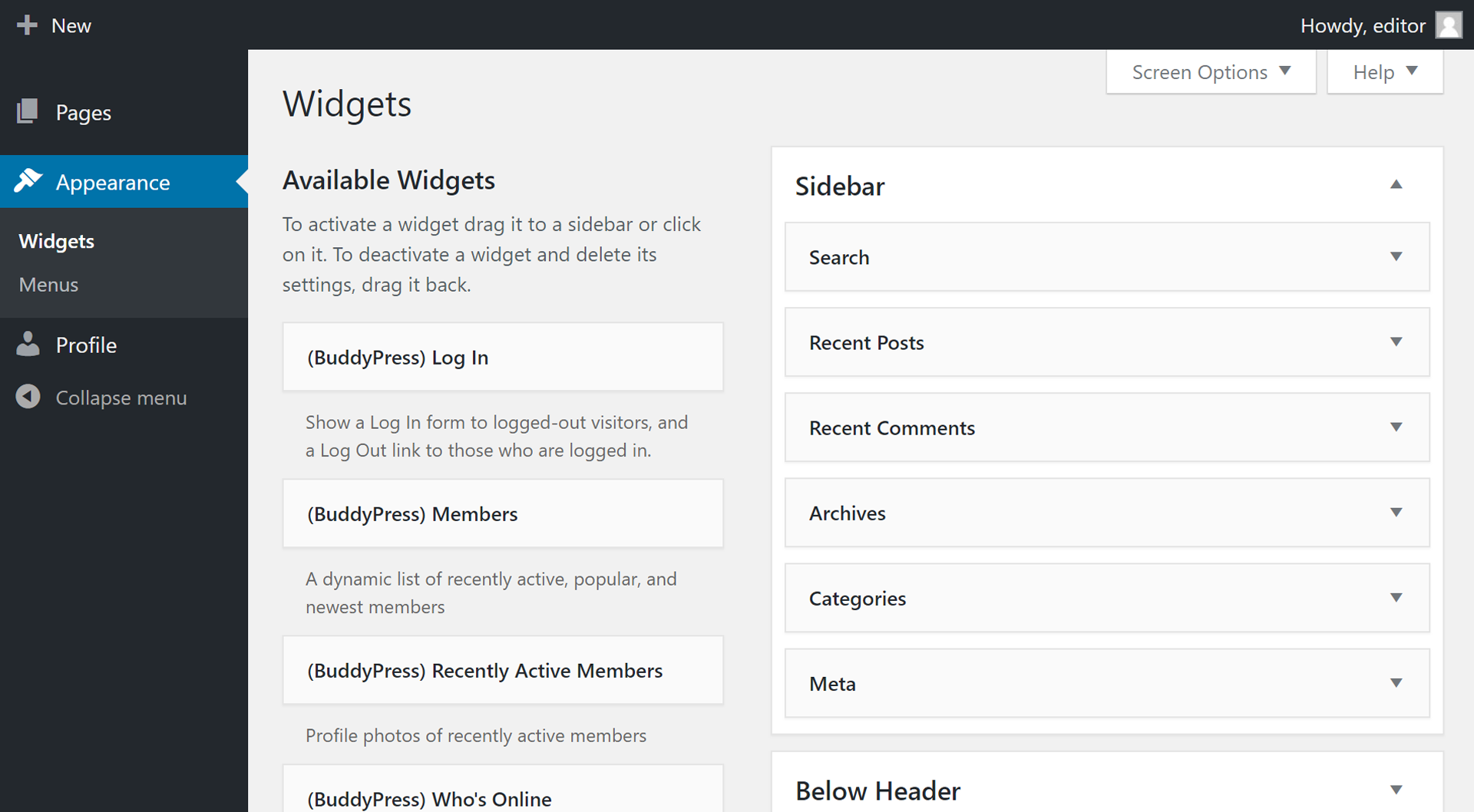
A simplified Appearance menu showing only Widgets and Menus for a selected role.

The Roles & Access screen, where you select roles and configure Appearance access and the optional Customizer restriction.

The Admin Menu list, with controls to hide links and status labels showing available items, hidden items and items hidden by a parent menu.

Plugins semelhantes


Import your demo content, widgets and theme settings with one click. Theme authors! Enable simple theme demo import for your users.

Adds breadcrumb navigation showing the visitor's path to their current location.

90+ Elementor widgets & addons, 600+ templates, Mega Menu, WooCommerce, Display Conditions. The only Elementor addon AI agents can fully build with.

Construa leiautes de página responsivos com widgets que você conhece e adora, usando um construtor de páginas simples, estilo arrastar e soltar.

Essential elements for modern websites. Add buttons, sliders, heroes, maps, images, carousels, features, icons, more. Create dynamic pages easily.