
Import your demo content, widgets and theme settings with one click. Theme authors! Enable simple theme demo import for your users.
CSV to HTML
Hospedagem WordPress com plugin CSV to HTML
Onde devo hospedar o plugin CSV to HTML?
Este plugin pode ser hospedado em qualquer servidor que tenha WordPress instalado. Recomendamos fortemente optar por uma empresa de hospedagem confiável, com servidores especializados para WordPress, como o serviço de hospedagem de sites da MCO2.
Hospedando o plugin CSV to HTML em uma empresa de hospedagem confiável
A MCO2, além de instalar o WordPress na versão mais nova para seus clientes, disponibiliza o plugin WP SafePress, um sistema singular que assegura e melhora seu site conjuntamente.
Por que a Hospedagem WordPress funciona melhor na MCO2?
A Hospedagem WordPress funciona melhor pois a MCO2 possui servidores otimizados para WordPress. A instalação de WordPress é diferente de uma instalação trivial, pois habilita imediatamente recursos como otimização de imagens e fotos, proteção da página de login, bloqueio de atividades maliciosas diretamente no firewall, cache avançado e HTTPS ativado por padrão. São plugins que potencializam seu WordPress para a máxima segurança e o máximo desempenho.
CSV to HTML is a highly configurable plugin that makes it easy to fetch content from file(s) (.csv,.xlsx, .json and .ods) and put content from that file/those files and display the html(table) on a page with a single shortcode. If using more than one file, content from all files are mixed into one single table instead of creating two tables.
The plugin fetches the actual content directly from the file(s) without having to import/export any file(s) manually. So any changes in the file(s) will be updated when you view your table(s). CSV to HTML is able to fetch both local and external files.
Get started with the plugin by moving on to the Installation tab. There’s a 4 step guide how you could start using the plugin. Good luck!
Capturas de tela
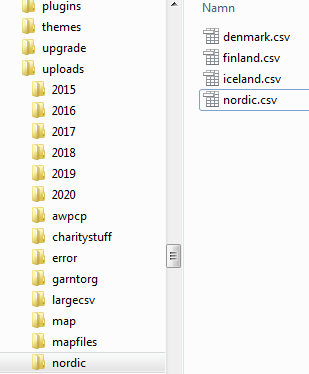
Screenshot - file structure with folder nordic in upload-folder
![Screenshot - [csvtohtml_create path="nordic" source_files="denmark" source_type="guess" debug_mode="no"] OR [csvtohtml_create path="nordic" source_files="denmark.csv" source_type="guess" debug_mode="no"]](https://ps.w.org/csv-to-html/assets/screenshot-2.png?rev=2446692)
Screenshot - [csvtohtml_create path="nordic" source_files="denmark" source_type="guess" debug_mode="no"] OR [csvtohtml_create path="nordic" source_files="denmark.csv" source_type="guess" debug_mode="no"]
![Screenshot - [csvtohtml_create path="nordic" source_files="*.csv" source_type="guess" debug_mode="no"]](https://ps.w.org/csv-to-html/assets/screenshot-3.png?rev=2446692)
Screenshot - [csvtohtml_create path="nordic" source_files="*.csv" source_type="guess" debug_mode="no"]
![Screenshot - [csvtohtml_create path="nordic" source_files="*.csv" source_type="guess" debug_mode="no" filter_data="2010" filter_col="1"]](https://ps.w.org/csv-to-html/assets/screenshot-4.png?rev=2446692)
Screenshot - [csvtohtml_create path="nordic" source_files="*.csv" source_type="guess" debug_mode="no" filter_data="2010" filter_col="1"]
![Screenshot - [csvtohtml_create path="nordic" source_files="denmark;iceland" source_type="guess" debug_mode="no"]](https://ps.w.org/csv-to-html/assets/screenshot-5.png?rev=2446692)
Screenshot - [csvtohtml_create path="nordic" source_files="denmark;iceland" source_type="guess" debug_mode="no"]
![Screenshot - [csvtohtml_create path="nordic" source_files="denmark;iceland" source_type="guess" debug_mode="no"] with css.
<strong>CSS</strong>
.csvtohtml tr.rowset-7 .colset-2 {
background: #27b399;
color: #fff;
font-weight:600;
}](https://ps.w.org/csv-to-html/assets/screenshot-6.png?rev=2446692)
Screenshot - [csvtohtml_create path="nordic" source_files="denmark;iceland" source_type="guess" debug_mode="no"] with css. CSS .csvtohtml tr.rowset-7 .colset-2 { background: #27b399; color: #fff; font-weight:600; }
![Screenshot - [csvtohtml_create path="nordic" source_files="denmark;iceland" source_type="guess" title="Nordic growth" debug_mode="no"]](https://ps.w.org/csv-to-html/assets/screenshot-7.png?rev=2446692)
Screenshot - [csvtohtml_create path="nordic" source_files="denmark;iceland" source_type="guess" title="Nordic growth" debug_mode="no"]
![Screenshot - [csvtohtml_create path="nordic" source_files="denmark" source_type="guess" debug_mode="no" sort_cols="2" sort_cols_order="asc"] AND [csvtohtml_create path="nordic" source_files="iceland" source_type="guess" debug_mode="no" sort_cols="1,2" sort_cols_order="desc,asc"]](https://ps.w.org/csv-to-html/assets/screenshot-8.png?rev=2446692)
Screenshot - [csvtohtml_create path="nordic" source_files="denmark" source_type="guess" debug_mode="no" sort_cols="2" sort_cols_order="asc"] AND [csvtohtml_create path="nordic" source_files="iceland" source_type="guess" debug_mode="no" sort_cols="1,2" sort_cols_order="desc,asc"]
![<p>Screenshot - [csvtohtml_create path="nordic" source_files="nordic.csv" source_type="guess" debug_mode="no" sort_cols="1" sort_cols_order="asc" title="Year"]
<strong>original csv (nordic.csv):</strong>
,Finland,Iceland,Denmark
2013,"10.2%","7.2%","1.4%"
2014,"11.0%","11.0%","1.9%"
2010,"2.5%","2.3%","2.8%"
2011,"-16.6%","6.6%","-6.6%"
2012,"-14.2%","6.2%","1.2%"
2015,"13.2%","16.2%","2.0%"</p>](https://ps.w.org/csv-to-html/assets/screenshot-9.png?rev=2446692)
Screenshot - [csvtohtml_create path="nordic" source_files="nordic.csv" source_type="guess" debug_mode="no" sort_cols="1" sort_cols_order="asc" title="Year"] original csv (nordic.csv): ,Finland,Iceland,Denmark 2013,"10.2%","7.2%","1.4%" 2014,"11.0%","11.0%","1.9%" 2010,"2.5%","2.3%","2.8%" 2011,"-16.6%","6.6%","-6.6%" 2012,"-14.2%","6.2%","1.2%" 2015,"13.2%","16.2%","2.0%"
![<p>Screenshot - [csvtohtml_create path="nordic" source_files="nordic.csv" source_type="guess" debug_mode="no" sort_cols="1" sort_cols_order="asc" title="Year" exclude_cols="3"]</p>](https://ps.w.org/csv-to-html/assets/screenshot-10.png?rev=2446692)
Screenshot - [csvtohtml_create path="nordic" source_files="nordic.csv" source_type="guess" debug_mode="no" sort_cols="1" sort_cols_order="asc" title="Year" exclude_cols="3"]
![Screenshot - [csvtohtml_create path="nordic" source_files="nordic.csv" source_type="guess" debug_mode="no" sort_cols="1" sort_cols_order="asc" title="Year" exclude_cols="2,4"]](https://ps.w.org/csv-to-html/assets/screenshot-11.png?rev=2446692)
Screenshot - [csvtohtml_create path="nordic" source_files="nordic.csv" source_type="guess" debug_mode="no" sort_cols="1" sort_cols_order="asc" title="Year" exclude_cols="2,4"]
![Screenshot - [csvtohtml_create path="nordic" source_files="nordic.csv" source_type="guess" debug_mode="no" sort_cols="1" sort_cols_order="asc" title="Year" include_cols="1,3-4"]](https://ps.w.org/csv-to-html/assets/screenshot-12.png?rev=2446692)
Screenshot - [csvtohtml_create path="nordic" source_files="nordic.csv" source_type="guess" debug_mode="no" sort_cols="1" sort_cols_order="asc" title="Year" include_cols="1,3-4"]
![Screenshot - [csvtohtml_create path="nordic" source_files="nordic.csv" source_type="guess" debug_mode="no" sort_cols="1" sort_cols_order="asc" title="Year" include_cols="1,3-4" fetch_lastheaders="2"]](https://ps.w.org/csv-to-html/assets/screenshot-13.png?rev=2446692)
Screenshot - [csvtohtml_create path="nordic" source_files="nordic.csv" source_type="guess" debug_mode="no" sort_cols="1" sort_cols_order="asc" title="Year" include_cols="1,3-4" fetch_lastheaders="2"]
![Screenshot - [csvtohtml_create path="nordic" source_files="nordic.csv" source_type="guess" debug_mode="no" sort_cols="1" sort_cols_order="asc" title="Year" table_in_cell_cols="2,3,4"]](https://ps.w.org/csv-to-html/assets/screenshot-14.png?rev=2446692)
Screenshot - [csvtohtml_create path="nordic" source_files="nordic.csv" source_type="guess" debug_mode="no" sort_cols="1" sort_cols_order="asc" title="Year" table_in_cell_cols="2,3,4"]
![Screenshot - [csvtohtml_create path="nordic" source_files="nordic.csv" source_type="guess" debug_mode="no" sort_cols="1" sort_cols_order="asc" title="Year" table_in_cell_cols="2,3,4" include_cols="1" table_in_cell_header="Countries"]](https://ps.w.org/csv-to-html/assets/screenshot-15.png?rev=2446692)
Screenshot - [csvtohtml_create path="nordic" source_files="nordic.csv" source_type="guess" debug_mode="no" sort_cols="1" sort_cols_order="asc" title="Year" table_in_cell_cols="2,3,4" include_cols="1" table_in_cell_header="Countries"]
![<p>Screenshot - [csvtohtml_create path="nordic" source_files="nordic.csv" source_type="guess" debug_mode="no" sort_cols="1" sort_cols_order="asc" title="Year" table_in_cell_cols="2,3,4" include_cols="1" table_in_cell_header="Countries"]
<strong>CSS</strong>
.csvtohtml .extra-data::before {content: "Hover here for more info";}
.csvtohtml .extra-data table {visibility:hidden;}
.csvtohtml .extra-data:hover table {visibility:visible;}</p>](https://ps.w.org/csv-to-html/assets/screenshot-16.png?rev=2446692)
Screenshot - [csvtohtml_create path="nordic" source_files="nordic.csv" source_type="guess" debug_mode="no" sort_cols="1" sort_cols_order="asc" title="Year" table_in_cell_cols="2,3,4" include_cols="1" table_in_cell_header="Countries"] CSS .csvtohtml .extra-data::before {content: "Hover here for more info";} .csvtohtml .extra-data table {visibility:hidden;} .csvtohtml .extra-data:hover table {visibility:visible;}
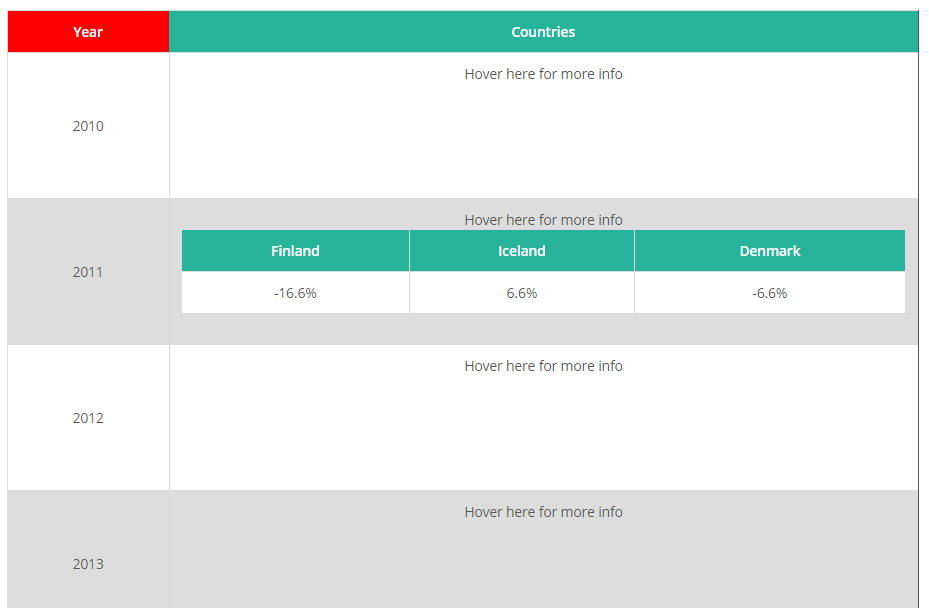
Screenshot - Same as 16 but when hovered on a specific row(year)
Plugins semelhantes


Incorpore tabelas bonitas, acessíveis e interativas nos posts e páginas do seu site WordPress, sem precisar escrever código!

The visual editor widget for WordPress.

Import and export your widgets.

Easily import any file of any size into any plugin, post type, custom field, or taxonomy. Supports WooCommerce, ACF, images, galleries, users, real es …

Create custom "Shortcodes" easily for HTML, JavaScript, CSS code snippets and use the shortcodes within posts, pages & widgets