
Supercharge WooCommerce with FREE Abandoned Cart Recovery, Product Variation Swatches, PDF Invoices & 100+ tools. Boost sales & save time.

Custom Post Type WooCommerce Integration – Sell Any CPT with WooCommerce
Hospedagem WordPress com plugin Custom Post Type Woocommerce Integration
Onde devo hospedar o plugin Custom Post Type Woocommerce Integration?
Este plugin pode ser hospedado em qualquer servidor que tenha WordPress configurado. Recomendamos optar por um provedor de hospedagem seguro, com servidores adaptados para WordPress, como o serviço de hospedagem de sites da MCO2.
Hospedando o plugin Custom Post Type Woocommerce Integration em uma empresa de hospedagem seguro
A MCO2, além de configurar e instalar o WordPress na versão mais atualizada para seus clientes, disponibiliza o plugin WP SafePress, um mecanismo exclusivo que assegura e otimiza seu site simultaneamente.
Por que a Hospedagem WordPress funciona melhor na MCO2?
A Hospedagem WordPress funciona melhor pois a MCO2 possui servidores otimizados para WordPress. A instalação de WordPress é diferente de uma instalação trivial, pois habilita imediatamente recursos como otimização automática de imagens, proteção da página de login, bloqueio de atividades maliciosas diretamente no firewall, cache avançado e HTTPS ativado por padrão. São recursos que potencializam seu WordPress para a máxima segurança e o máximo desempenho.
Custom Post Type WooCommerce Integration makes any WordPress custom post type (CPT) purchasable through WooCommerce — without recreating each post as a separate WooCommerce product.
If you already store content as custom post types (courses, events, bookings, listings, real estate, cars, books, directories, or digital downloads), you normally cannot sell it directly with WooCommerce. The usual workaround is to duplicate every post as a WooCommerce product and keep the two in sync by hand. This plugin removes that step. It connects your existing CPT to WooCommerce so a single post can be added to the cart, checked out, and paid for using the WooCommerce systems you already trust.
Connect the post type, set a price (or map an existing meta key), and drop a shortcode where you want the price and add-to-cart button to appear. Your custom content becomes sellable, while WooCommerce continues to handle the cart, checkout, orders, payment gateways, coupons, taxes, and emails.
The problem this plugin solves
Custom post types hold your content, but WooCommerce only sells WooCommerce products. Bridging the two normally means maintaining duplicate records — one CPT post for display and one product for selling. That duplication causes mismatched prices, broken stock counts, and extra maintenance.
This plugin lets a CPT post be the sellable item. There is no second copy to manage, no data migration, and no code required.
What you can do
- Sell any custom post type through WooCommerce.
- Use the standard WooCommerce cart and checkout for your CPT content.
- Process CPT purchases as normal WooCommerce orders.
- Accept payment through any WooCommerce payment gateway (Stripe, PayPal, and others).
- Apply WooCommerce coupons, taxes, and order emails to CPT purchases.
- Use WooCommerce shipping where the product type supports it.
- Reuse prices you already store in ACF, JetEngine, Meta Box, or any custom meta key.
- Avoid creating and syncing duplicate WooCommerce products.
Two ways to use it
- Full shop experience — make CPT archive pages look like the WooCommerce shop and CPT single pages look like WooCommerce product pages, with product categories and tags.
- Checkout and payments only — keep your custom landing pages exactly as designed and use WooCommerce purely as a secure checkout and payment processor.
Documentation: Getting started guide | Pro version: CPT WooCommerce Integration Pro
Traditional WooCommerce Workflow vs This Plugin
Traditional workflow
- Create your content as a custom post type.
- Manually recreate the same item as a WooCommerce product.
- Keep price, stock, and details in sync across both copies.
- Maintain two records forever.
With this plugin
- Create your content as a custom post type.
- Connect the post type and set (or map) a price.
- Sell the post directly — WooCommerce handles cart, checkout, and orders.
The difference: no duplicate products, no manual syncing, and one source of truth for each item.
Why use this plugin
- No duplicate products — a CPT post becomes the sellable item, so there is nothing to copy or sync.
- Sell almost anything — courses, events, bookings, listings, digital files, donations, services, and other custom content.
- Use existing meta fields — already storing prices in ACF, JetEngine, Meta Box, or custom meta? Map the meta key and the plugin reads it directly.
- WooCommerce as checkout only — keep custom landing pages and use WooCommerce just for secure payments.
- No coding required — configure everything from a clean, React-powered admin interface.
- Theme and builder friendly — shortcodes work in any theme, template, widget, or page builder.
Free Features
- Integrate unlimited custom post types with WooCommerce.
- Add a regular price meta field to any CPT.
- Add a sale price meta field to any CPT.
- Fallback regular price — map an existing meta key (works well with ACF, JetEngine, and Meta Box values).
- Fallback sale price — reuse a meta key you already have.
- Shortcode for the price:
[cptwooint_price/] - Shortcode for the add-to-cart button:
[cptwooint_cart_button/] - Shortcode for the short description:
[cptwooint_short_description/] - Shortcode for WooCommerce notices:
[cptwooint_wc_all_notices/] - Make CPT archive pages look like the WooCommerce shop page.
- Make CPT single pages look like the WooCommerce product page.
- Use WooCommerce product categories with your CPT.
- Use WooCommerce product tags with your CPT.
- Customize the add-to-cart button color, background, and size from settings.
Pro Features
The Pro version includes every free feature plus:
- Quick Edit and Bulk Edit for CPT prices and stock directly from the post list.
- Full product-type support — Simple, Variable, External/Affiliate, and Grouped.
- Display CPT posts on the WooCommerce shop page alongside regular products.
- Sale price scheduling with start and end dates.
- Inventory management — SKU, stock quantity, stock status, low-stock alerts, backorders, sold individually, and purchase limits.
- Shipping data — weight, dimensions, and shipping classes.
- Product gallery images with a Swiper slider (vertical/horizontal thumbnails, RTL, auto-height, and zoom).
- Downloadable products — file delivery, download limits, and expiry dates.
- Customer downloads from the WooCommerce My Account page.
- Upsells and cross-sells for CPTs.
- Product attributes — a full taxonomy-based attribute management interface for CPTs.
- Product reviews and ratings — 1 to 5 stars, verified purchase badge, HPOS-compatible, with rating distribution.
- Structured data / JSON-LD schema — Product, Review, BreadcrumbList, Website, and Order markup for richer search results.
- Additional shortcodes —
[cptwooint_sku],[cptwooint_attributes],[cptwooint_gallery],[cptwooint_gallery_with_variation], and[cptwooint_upsell_products]. - WooCommerce Bookings integration (sell bookable CPTs).
- Easy Booking for WooCommerce integration.
- LearnPress review compatibility (sell and review courses).
- Extra Product Options (Themecomplete EPO) support.
- Automatic license updates from the WordPress dashboard.
Use Cases
- Online courses — sell LearnPress or custom course post types through WooCommerce.
- Bookings and appointments — sell bookable post types (BA Book Everything in free; WooCommerce Bookings and Easy Booking in Pro).
- Events and tickets — sell event post types with WooCommerce checkout.
- Directories and classifieds — charge for listings built with JetEngine or other CPT tools.
- Real estate and properties — sell or accept payment on property listings.
- Cars and vehicles — turn vehicle listings into purchasable items.
- Books and digital downloads — sell files with download control (Pro).
- Memberships and services — sell access or service posts.
- Donations — set a fixed amount on a page or post and collect it through WooCommerce checkout.
- Payments for landing pages — keep a custom design and use WooCommerce only for the transaction.
Supported Integrations
- LearnPress — sell courses through WooCommerce. Documentation
- Advanced Custom Fields (ACF) — read prices stored in ACF fields by mapping the meta key.
- JetEngine — CPT and meta integration, including variation panels.
- BA Book Everything — sell bookings and appointments. Documentation
- Meta Box — reuse price values stored in Meta Box fields via meta-key mapping.
- Custom Post Type UI — register a CPT and connect it right away.
- Extra Product Options for WooCommerce (Free and Pro).
- WooCommerce Bookings (Pro).
- Easy Booking for WooCommerce (Pro).
- Works with Elementor, Visual Composer, Gutenberg, and most page builders.
- Compatible wherever standard WooCommerce hooks are respected.
Quick Start — Four Steps
- Install and activate Custom Post Type WooCommerce Integration.
- Open WC Integration in the WordPress admin sidebar.
- Select your custom post type under “Select Post Type”.
- Enable the default price meta field — or map your existing meta keys.
Your CPT is now WooCommerce-ready.
Already storing prices in meta fields?
If your CPT already stores prices via ACF, JetEngine, Meta Box, or another plugin:
- Select the regular price meta key from the dropdown.
- Optionally select a sale price meta key.
- Save settings — the plugin reads prices straight from your existing data, with no migration.
Displaying the price and cart button
Use these shortcodes in pages, posts, single templates, page builders, or widgets:
[cptwooint_price/]— the formatted price.[cptwooint_cart_button/]— the add-to-cart button.[cptwooint_short_description/]— the short description.[cptwooint_wc_all_notices/]— WooCommerce notices (errors, success, warnings).
Capturas de tela
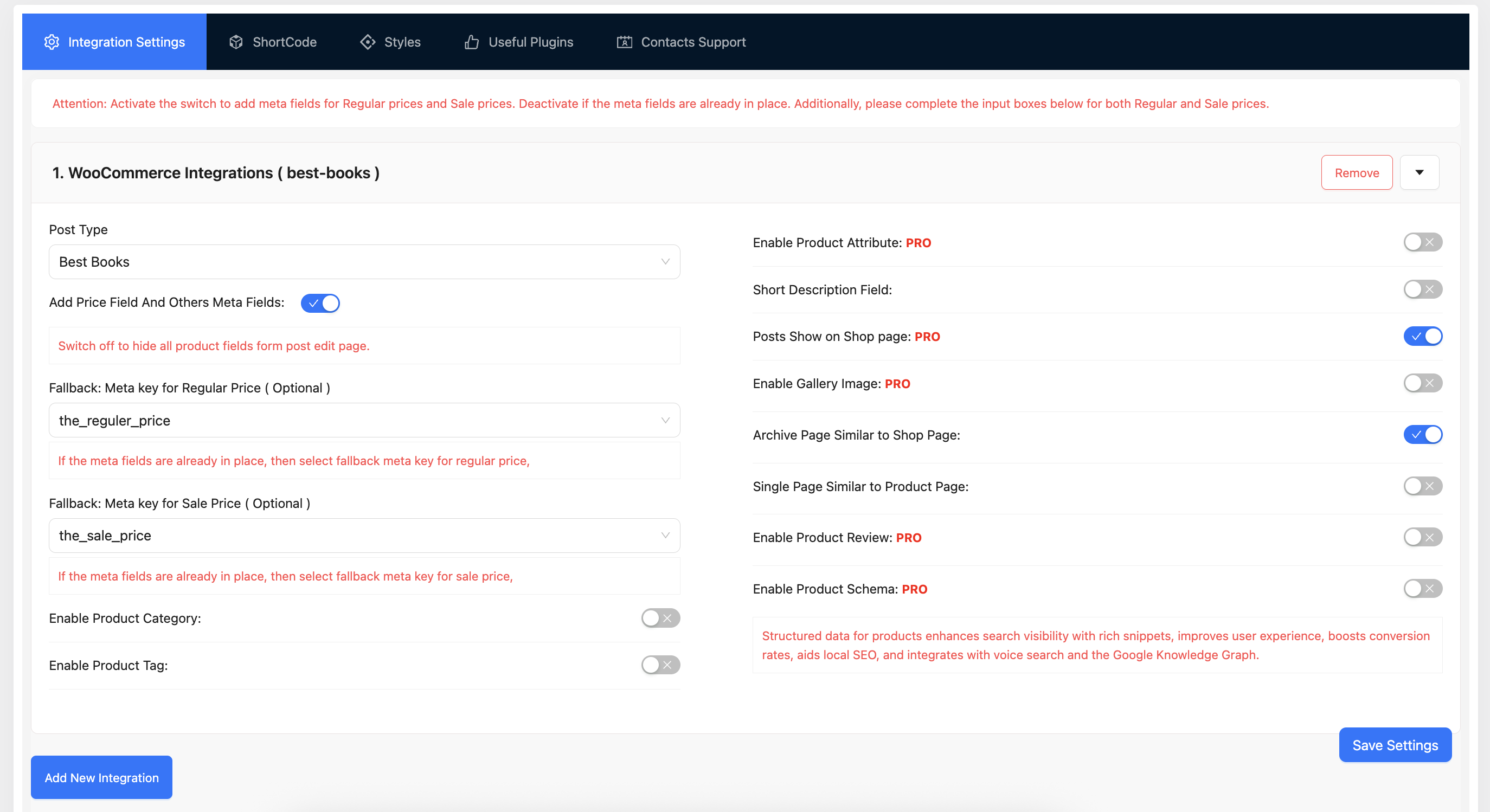
Integration settings — select your CPT and configure the price meta.
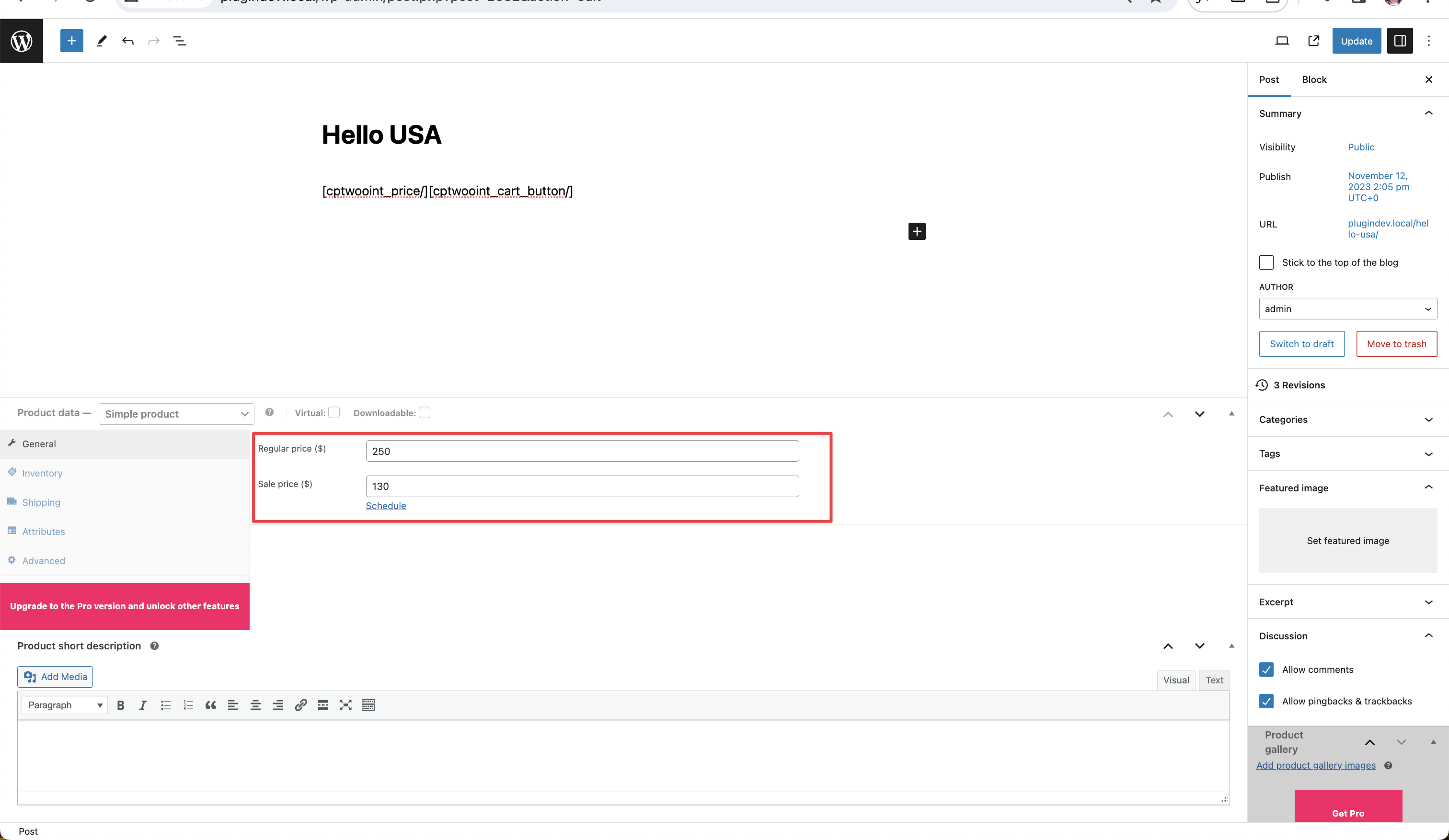
Price meta field — enable default fields or map existing meta keys.
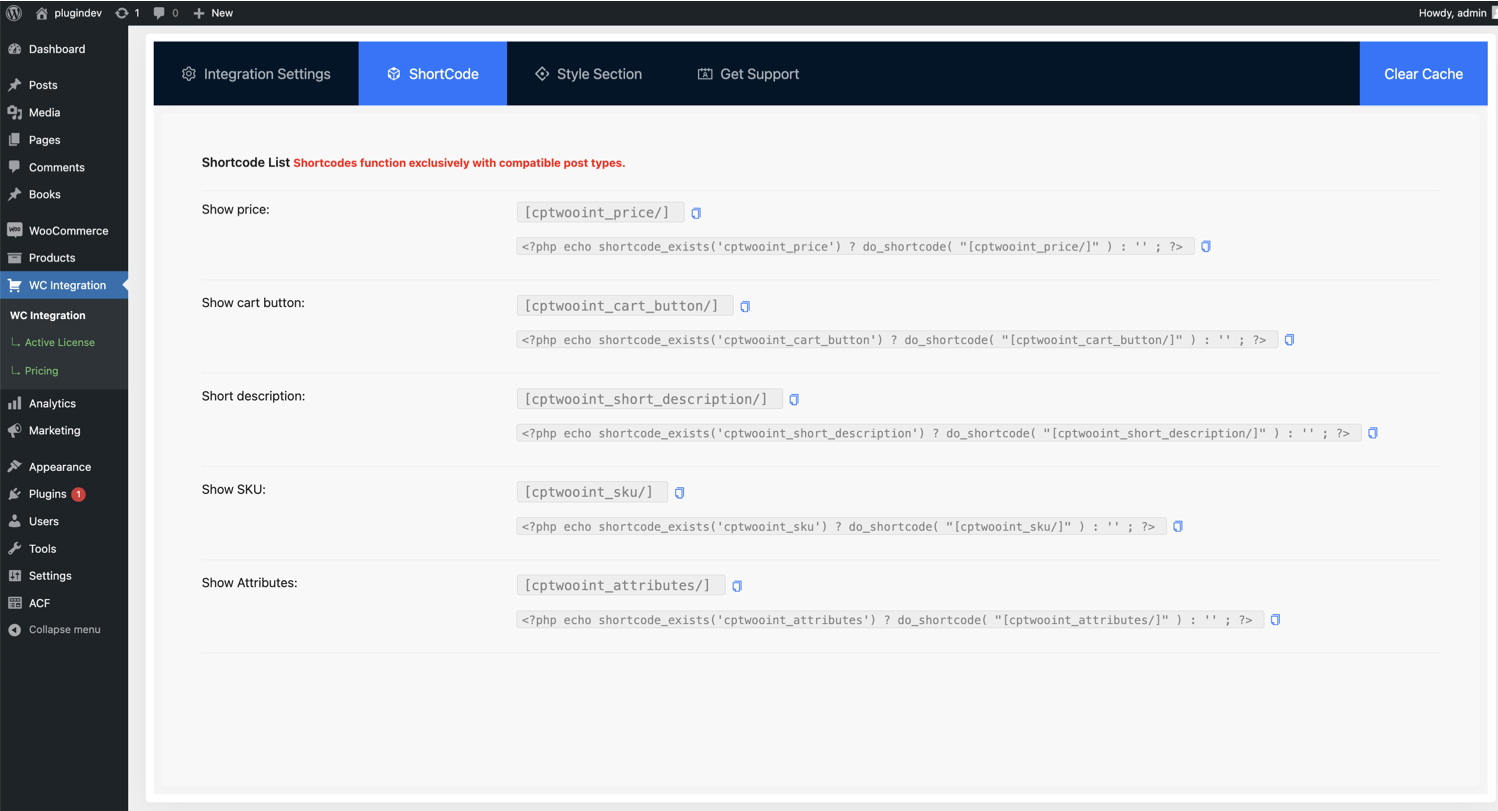
Shortcode generator — copy-ready shortcodes for price and cart.
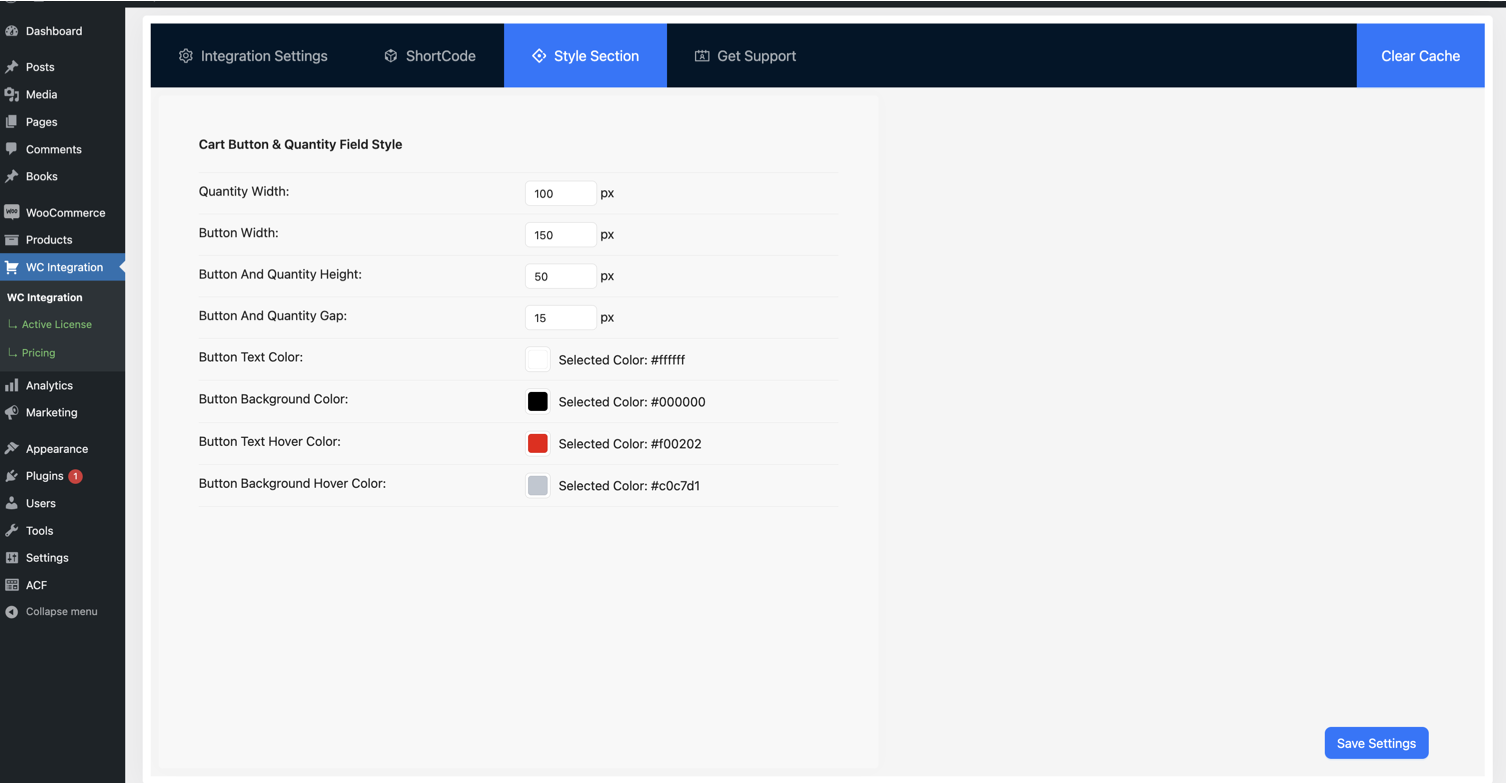
Button style customizer — adjust color, background, and size.
Plugins semelhantes

Do mesmo author (Tiny Solutions)

AI-powered bulk rename, bulk edit metadata, find duplicate images, clean up unused media, and more.