ACF helps customize WordPress with powerful, professional and intuitive fields. Proudly powering over 2 million sites, WordPress developers love ACF.

Blocks for ACF Fields — Display Custom Fields in the Block Editor
Hospedagem WordPress com plugin Blocks for ACF Fields
Onde devo hospedar o plugin Blocks for ACF Fields?
Este plugin pode ser hospedado em qualquer servidor que possua WordPress instalado. Recomendamos fortemente escolher um provedor de hospedagem confiável, com servidores otimizados para WordPress, como o serviço de hospedagem de sites da MCO2.
Hospedando o plugin Blocks for ACF Fields em um provedor confiável
A MCO2, além de instalar o WordPress na versão mais nova para seus clientes, disponibiliza o plugin WP SafePress, um mecanismo singular que salvaguarda e melhora seu site simultaneamente.
Por que a Hospedagem WordPress funciona melhor na MCO2?
A Hospedagem WordPress funciona melhor pois a MCO2 possui servidores otimizados para WordPress. A instalação de WordPress é diferente de uma instalação trivial, pois habilita imediatamente recursos como otimização automática de imagens e fotos, proteção da página de login, bloqueio de atividades maliciosas diretamente no firewall, cache avançado e HTTPS ativado por padrão. São plugins que potencializam seu WordPress para a máxima segurança e o máximo desempenho.
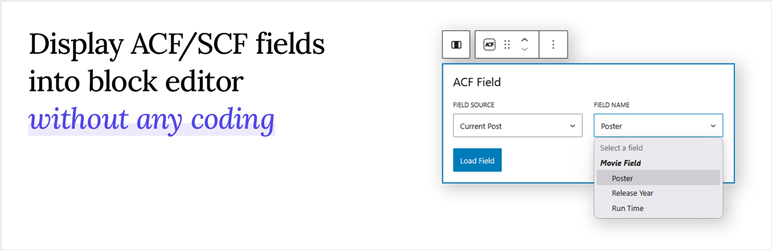
Blocks for ACF Fields lets you effortlessly load and display Advanced Custom Fields (ACF) or Secure Custom Fields (SCF) inside the WordPress block editor using a single, flexible block. Whether you’re dealing with text, images, URLs, or complex field types, this plugin makes it simple — all without writing a single line of code.
How to Use it
Just create your custom fields with the ACF or SCF plugin, then open the WordPress block editor. Add the “ACF Field” block to your page or template, select the field you want to display from the dropdown, and you are done! Your custom field will now appear right inside the editor, exactly where you want it.
Want to see it in action? Watch the short demo video below to learn how it works in real time.
Features
- No Code Needed – Display your ACF & SCF fields directly in the editor without building a custom block.
- One Block for All Fields – Load almost any field type using just a single, versatile block.
- Smart Field Picker – No need to type field names. Choose from a dropdown that automatically shows only the ACF & SCF fields available for the post, page, or template you’re editing.
- Flexible Output Control – Style and format your field values directly in the editor, with output that always works correctly regardless of the field’s return setting.
- Works With Most Field Types – From plain text and numbers to images, links, embeds, dates, and icons — most commonly used ACF/SCF field types render right out of the box.
- Supports All Field Locations – Works with post fields, options pages, term fields, and user fields.
- Full Site Editing Ready – Fully compatible with the WordPress Site Editor for building custom templates and theme parts.
- Dynamic Layouts Ready – Seamlessly works inside Query Loops and reusable patterns for dynamic layouts.
In addition to choosing which field to display, you also have control over how it appears. Text-based fields (including multiple-value fields like Select or Checkbox) can be shown as plain text or formatted with typography options. Image fields can be displayed as actual images with the same styling options as core Image blocks. For URL-return fields (such as Link or Post Object), you can render them as clickable buttons that automatically match your theme’s design.
Where Your Fields Come From
You also have control over where your fields are sourced from, making it easy to connect content dynamically based on the template you’re editing.
- Post (any post type) – Load fields attached to the post you’re currently editing, whether it’s a post, page, or any custom post type.
- Option – Pull global option fields, perfect for site-wide settings like logos, contact info, or social links.
- User – Display fields attached to a user profile. Available when editing author templates, making it easy to showcase author bios, avatars, or custom user data.
- Taxonomy – Load fields attached to taxonomy terms. Available when editing term archive templates, ideal for creating custom category, tag, or taxonomy layouts.
Full documentation and usage guides are available at:
https://www.acffieldblocks.com/documentation/
PRO Version – Unlock the Full Power of ACF & SCF
Love the free version? PRO works exactly the same way — pick a block, pick a field, and you’re done. Nothing you’ve already learned changes. PRO simply gives you more to pick from: more supported field types, more layout options, and new ways to choose where your content comes from.
Sooner or later you’ll hit a field the free version can’t display on its own — a Repeater, a Gallery, a list of related posts, an interactive Map, or a nested Group. Normally that’s where the fun stops and the PHP begins. PRO lets you build all of it right in the editor instead. Here’s what you get:
Support for Advanced Field Types (no PHP required)
- Repeater – Turn repeater rows into a styleable layout you compose right in the editor. Each sub field becomes its own block, styled with the controls you already know. Display rows as a List, Grid, Carousel, Accordion, or Tabs.
- Gallery – Render gallery fields as a Grid, Masonry, or interactive Carousel, complete with a built-in lightbox and responsive options for different screen sizes.
- Group – Access and display sub fields inside group fields individually, no matter how deeply nested.
20+ Advanced Display Formats
PRO doesn’t just add new field types — it unlocks powerful new ways to render the fields you already have.
- Post Object & Relationship – Display as dynamic post loops (List, Grid, or Carousel), similar to the Query Loop block, with the ability to load custom fields within each post. Also supports Single Post display — perfect for related posts sections and featured post displays.
- Taxonomy – Render as term loops (List, Grid, or Carousel) with access to custom fields on each term, plus Single Term display. Ideal for flexible category, tag, or custom taxonomy layouts.
- User – Display as user loops (List, Grid, or Carousel) with custom fields for each user, plus Single User display. Great for user directories, contributor listings, and team pages.
- Google Map – Display ACF Google Maps fields as an interactive map with custom markers and styling. Perfect for store locators, event venues, or property listings.
- Embed Popup – Show an oEmbed or URL field inside a lightbox popup that only loads on click — rich media without slowing your pages down.
Dynamic Field Sources
Lite blocks always read from the current post, term, user, or an Options Page. PRO frees them:
- Specific Post / Term / User – Pin a block to an entity you hand-pick at edit time. Build an editorially-chosen “Featured Page” promo or an “About the Founder” panel that lives anywhere and updates from a single source.
- URL Parameter – Let the URL decide the entity at render time. One
/profile/template can serve every user via?uid=42,?uid=99, and so on. Optional Match Rules validate the URL value as a Post ID, Post Slug, User ID, Username, Email, Term ID, or Term Slug — so one template powers profile pages, dynamic landing pages, and review tools without registering a custom route.
Block Visibility by ACF / SCF Value
Show or hide any block — not just ACF blocks, but every Group, Heading, Cover, and third-party block — based on the value of an ACF or SCF field. Build the rules visually in the block sidebar: pick a field, pick a comparison, give it a value. Combine multiple rules with AND (within a group) and OR (across groups), the same shape ACF’s own conditional logic uses. Rules are evaluated server-side at render time, so hidden blocks emit no HTML at all — no empty wrappers, no client-side flash. In the editor, every block stays visible so you can keep editing.
Start with the free version, build what you can, and upgrade only when you hit a wall. PRO is a standalone plugin — installing it automatically deactivates Lite to prevent conflicts, and your existing blocks, content, and field configuration are preserved.
Capturas de tela
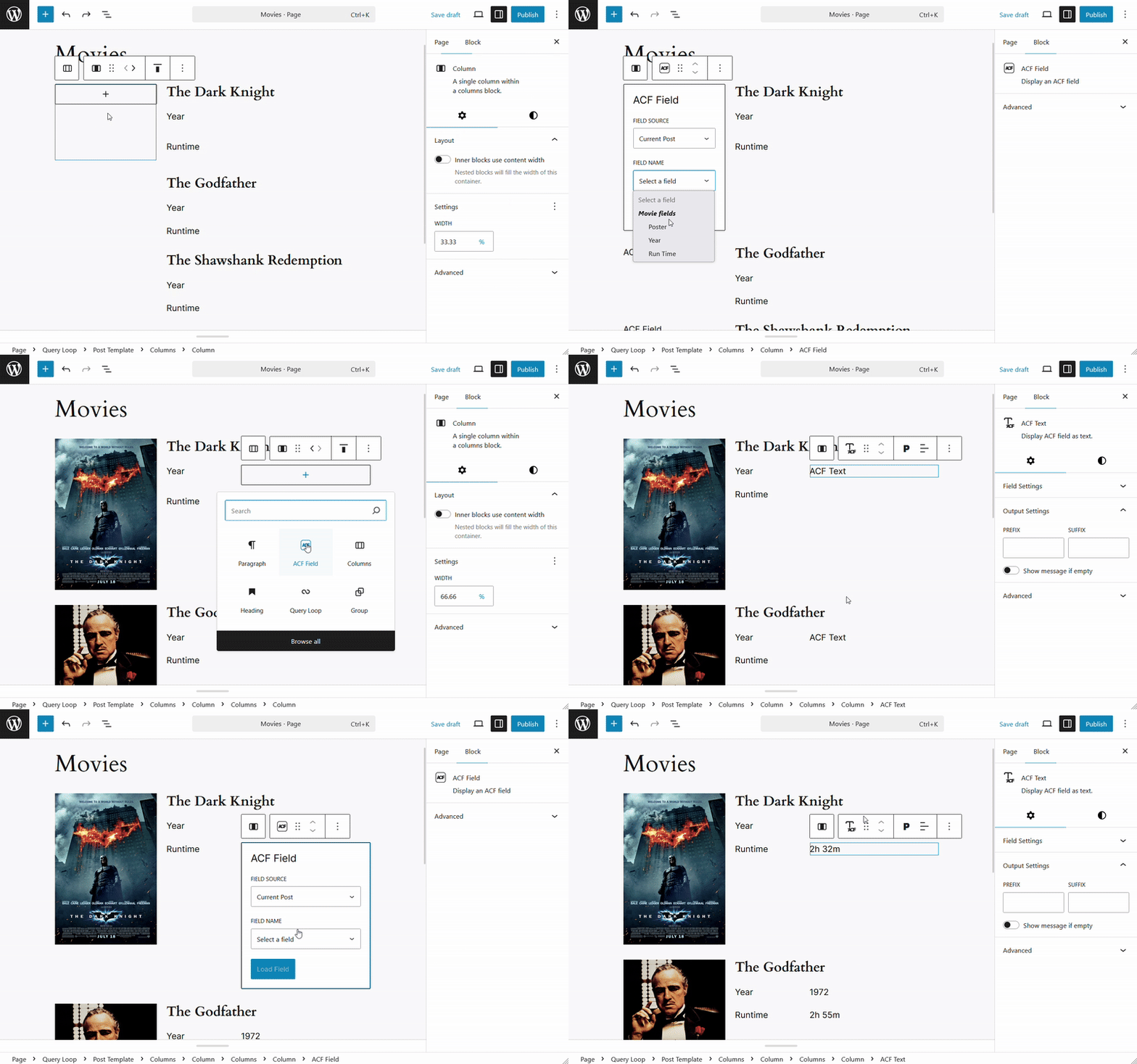
Load Fields Inside a Query Block
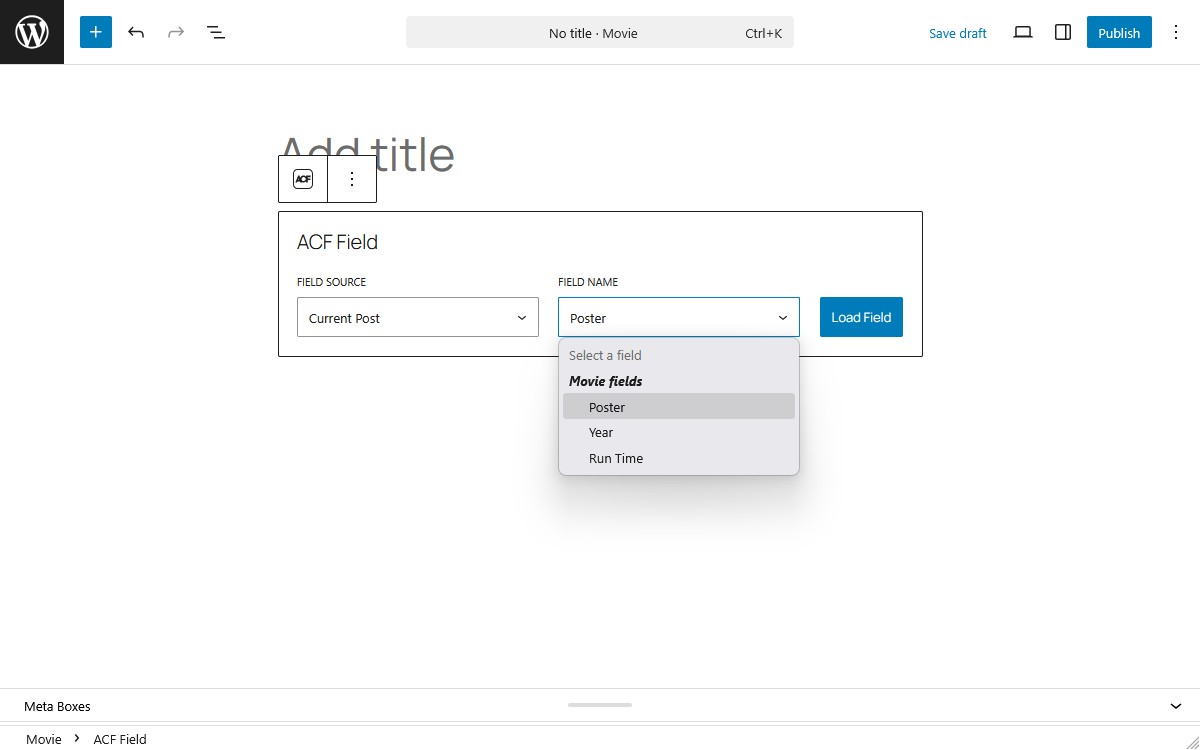
Select Field to Load
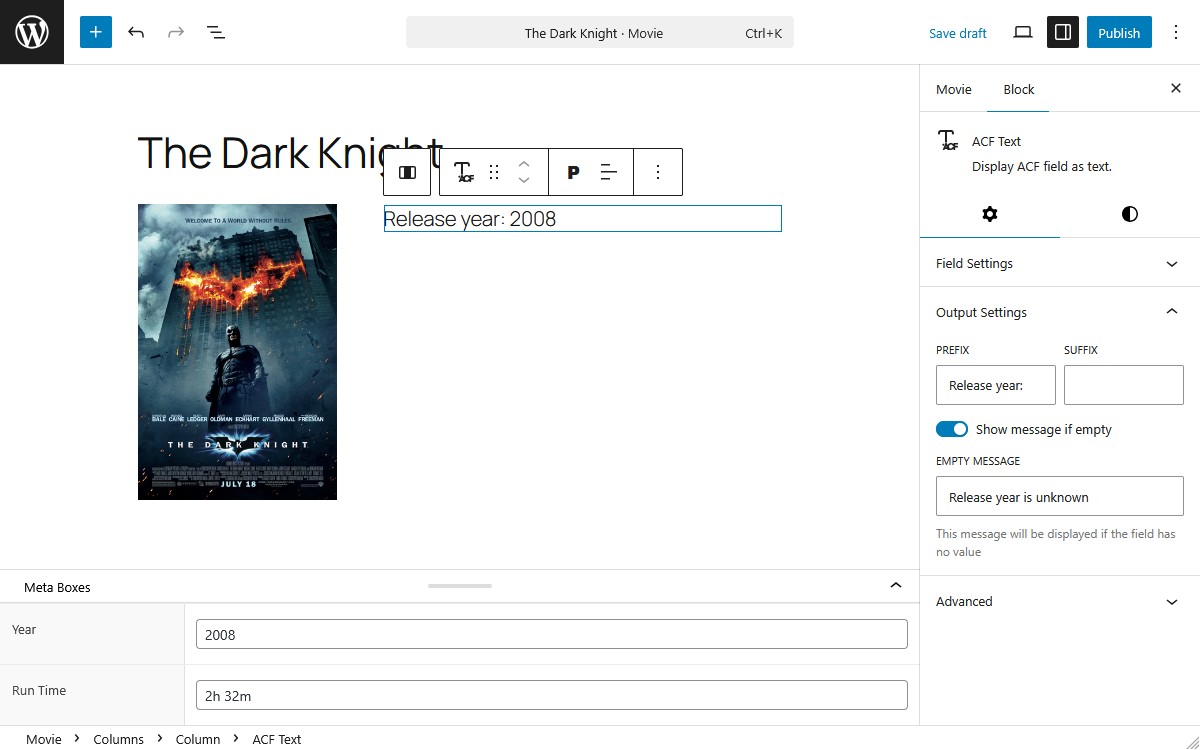
Field Settings
Plugins semelhantes


All-in-one enhancement suite that improves WordPress & Advanced Custom Fields.

WordPress plugin that adds the content of all ACF fields to the Yoast SEO score analysis.

Adds a new 'Font Awesome Icon' field to the popular Advanced Custom Fields plugin.

A lightweight extension of Advanced Custom Field (ACF) that adds Photo Gallery field to any post/pages on your WordPress website.

ACF field that allows user to crop image to a specific aspect ratio or pixel size