
Import your demo content, widgets and theme settings with one click. Theme authors! Enable simple theme demo import for your users.

WP-ShowHide
Hospedagem WordPress com plugin WP-ShowHide
Onde devo hospedar o plugin WP-ShowHide?
Este plugin pode ser hospedado em qualquer servidor que tenha WordPress instalado. Recomendamos optar por uma hospedagem de confiança, com servidores otimizados para WordPress, como o serviço de hospedagem da MCO2.
Hospedando o plugin WP-ShowHide em um provedor de confiança
A MCO2, além de instalar o WordPress na versão mais nova para seus clientes, oferece o WP SafePress, um mecanismo singular que assegura e aumenta a performance do seu site ao mesmo tempo.
Por que a Hospedagem WordPress funciona melhor na MCO2?
A Hospedagem WordPress funciona melhor pois a MCO2 possui servidores otimizados para WordPress. A instalação de WordPress é diferente de uma instalação trivial, pois habilita imediatamente recursos como otimização de imagens, proteção da página de login, bloqueio de atividades maliciosas diretamente no firewall, cache avançado e HTTPS ativado por padrão. São plugins que potencializam seu WordPress para a máxima segurança e o máximo desempenho.
By default the content is hidden and user will have to click on the “Show Content” link to toggle it. Similar to what Engadget is doing for their press releases. Example usage: [showhide type="pressrelease"]Press Release goes in here.[/showhide]
Usage
- By default, content within the showhide shortcode will be hidden.
- Example:
[showhide]Press release content goes in here.[/showhide] -
Default Values:
[showhide type="pressrelease" more_text="Show Press Release (%s More Words)" less_text="Hide Press Release (%s Less Words)" hidden="yes"] -
You can have multiple showhide content within a post or a page, just by having a new type.
-
Example:
[showhide type="links" more_text="Show Links (%s More Words)" less_text="Hide Links (%s Less Words)"]Links will go in here.[/showhide] -
If you want to set the default visibility to display.
-
Example:
[showhide hidden="no"]Press release content goes in here.[/showhide] -
You can style the content via CSS that is generated by the plugin. Here is a sample of the generated HTML. Note that pressrelease is the default type.
<div id="pressrelease-link-1" class="sh-link pressrelease-link sh-hide">
  <button type="button" class="sh-toggle" aria-expanded="false" aria-controls="pressrelease-content-1"
          data-sh-more="Show Press Release (4 More Words)"
          data-sh-less="Hide Press Release (4 Less Words)">Show Press Release (4 More Words)</button>
</div>
<div id="pressrelease-content-1" class="sh-content pressrelease-content sh-hide" hidden>Content</div>
- With the example above, here are the following styles you can use in your CSS:
.sh-link { }
.sh-toggle { }
.sh-content { }
.pressrelease-link { }
.pressrelease-link.sh-hide .sh-toggle { }
.pressrelease-link.sh-show .sh-toggle { }
.pressrelease-content { }
.pressrelease-content.sh-hide { }
.pressrelease-content.sh-show { }
Desenvolvimento
https://github.com/lesterchan/wp-showhide
Créditos
Doações
Eu passo a maior parte do meu tempo livre na criação, atualização, manutenção e suporte desses plugins, se você realmente ama meus plugins e pode me enviar alguns dólares, eu realmente aprecio isso. Mas do contrário, sinta-se livre para usá-los sem quaisquer obrigações.
Breaking Changes
Version 2.0.0 rewrites the front-end JavaScript. The shortcode and its attributes are unchanged, so your posts do not need editing — but the generated HTML is different, so custom CSS and JavaScript may need updating.
- The toggle is now a
<button class="sh-toggle">instead of<a href="#">. CSS targeting.sh-link Amust become.sh-link .sh-toggle. The plugin ships a small inline style so the button still renders as a plain text link rather than a native button. - The inner
<span id="{type}-toggle-{post_id}">has been removed. The label now sits directly on the button, so anything targeting that ID should target.sh-toggleinstead. - Hidden content now uses the
hiddenattribute instead ofstyle="display: none;". If your CSS setsdisplayon.sh-contentit will now win over[hidden]; add.sh-content[hidden] { display: none; }or raise your specificity. - jQuery is no longer enqueued by this plugin. If your theme was relying on WP-ShowHide to pull jQuery onto the page, enqueue it yourself.
- The global
showhide_toggle()function has been removed. Nothing replaces it. To toggle a block programmatically, click its.sh-togglebutton; to react to a toggle, listen for thesh-link:toggleevent. - Internet Explorer is no longer supported. The script uses
Element.closest()and theCustomEventconstructor. - Repeating the same
typewithin one post now appends a counter to the element IDs (pressrelease-content-1,pressrelease-content-1-2, …). The first occurrence keeps its original ID, so this only affects posts that were previously emitting duplicate IDs anyway. Style by class rather than ID if you use this pattern.
The sh-link:more, sh-link:less and sh-link:toggle events are not a breaking change — they still fire on the .sh-link element and still bubble, so existing jQuery( ... ).on( 'sh-link:toggle', ... ) handlers keep working.
Capturas de tela

Show More - Press Release
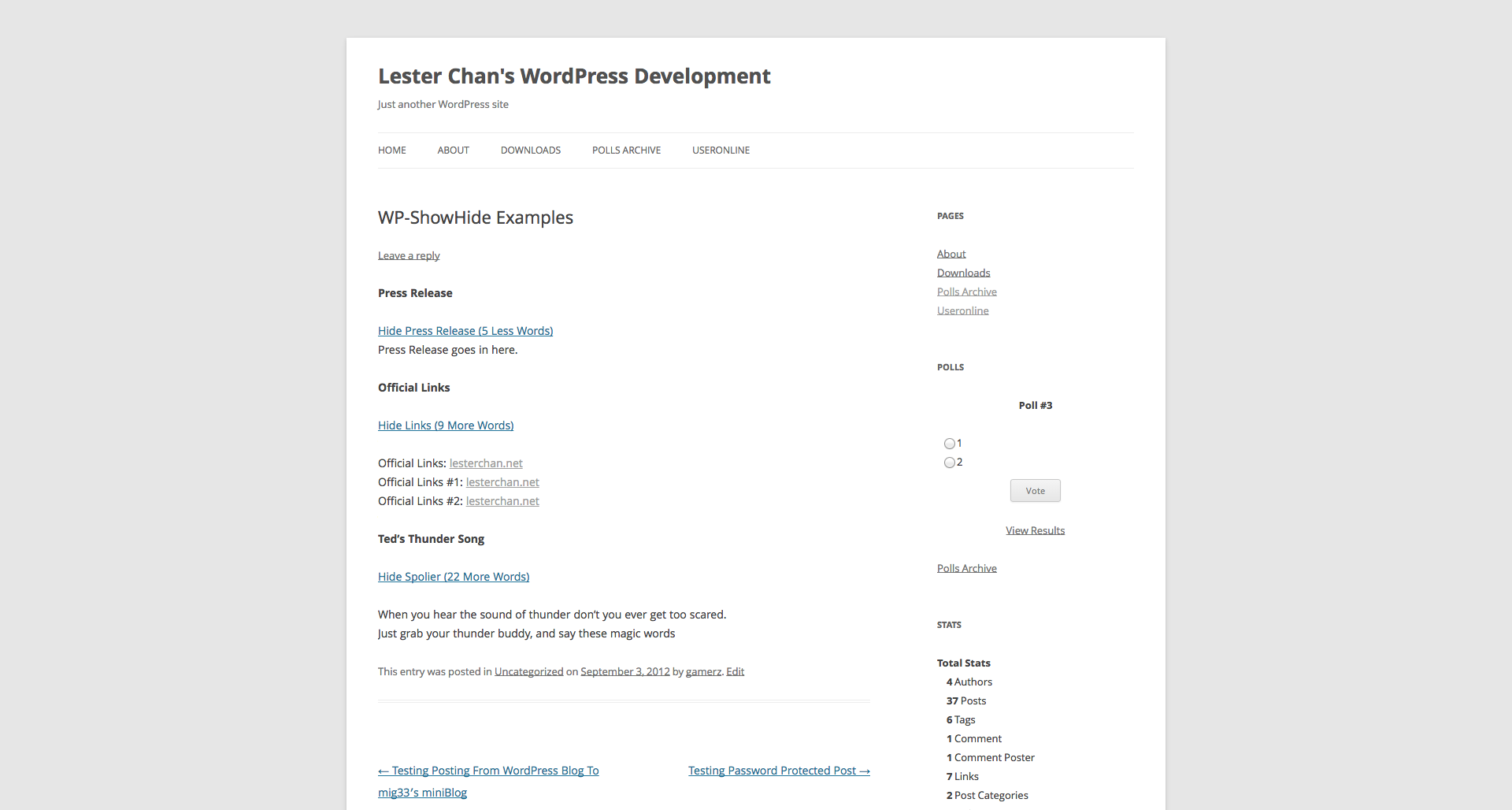
Hide More - Press Release

Editor - Short Code
Plugins semelhantes


Manage your WordPress site with AI - create content, install plugins, and perform site management tasks effortlessly.

This WP plugin protects posts from being copied (content copy protection). Keep your content safe from unauthorized distribution!

Oculte e proteja os caminhos do WordPress com o pacote completo de proteção, para reforçar a segurança do site. Inclui firewall 8G, proteção contra ataques de força bruta e chaves de acesso.

Protect email addresses and phone numbers on your site and hide them from spambots. Easy to use & flexible.

Control the appearance of WordPress post excerpts
Do mesmo author (Lester Chan)

Adiciona uma interface de navegação de páginas mais avançada.

WP-Sweep allows you to clean up unused, orphaned and duplicated data in your WordPress. It also optimizes your database tables.

Enables you to display how many times a post/page had been viewed.

Manages your WordPress database.

Adds an AJAX poll system to your WordPress blog. You can also easily add a poll into your WordPress's blog post/page.

Adds an AJAX rating system for your WordPress site's content.