
Take control of the cron events on your WordPress website or WooCommerce store with WP Crontrol.

WP Debugging
Hospedagem WordPress com plugin WP Debugging
Onde hospedar o plugin WP Debugging?
Este plugin pode ser hospedado em qualquer servidor que possua WordPress instalado. Recomendamos fortemente utilizar um provedor de hospedagem seguro, com servidores especializados para WordPress, como o serviço de hospedagem WordPress da MCO2.
Hospedando o plugin WP Debugging em uma empresa de hospedagem confiável
A MCO2, além de configurar e instalar o WordPress na versão mais atualizada para seus clientes, fornece o plugin WP SafePress, um sistema exclusivo que protege e melhora seu site simultaneamente.
Por que a Hospedagem WordPress funciona melhor na MCO2?
A Hospedagem WordPress funciona melhor pois a MCO2 possui servidores otimizados para WordPress. A instalação de WordPress é diferente de uma instalação trivial, pois habilita imediatamente recursos como otimização de imagens, proteção da página de login, bloqueio de atividades suspeitas diretamente no firewall, cache avançado e HTTPS ativado por padrão. São plugins que potencializam seu WordPress para a máxima segurança e o máximo desempenho.
This plugin sets the following debug constants in wp-config.php on plugin activation and removes them on plugin deactivation. Any errors will result in a PHP Exception being thrown. Debug constants per Debugging in WordPress.
Default settings:
define( 'WP_DEBUG_LOG', true );
define( 'SCRIPT_DEBUG', true );
define( 'SAVEQUERIES', true );
@ini_set( ‘display_errors’, 1 ); is set when the plugin is active. WP_DEBUG is set to true when the plugin is first run, thereafter it can be turned off in the Settings.
The Settings page allows the user to set the following.
define( 'WP_DEBUG', true ); // Default on initial plugin installation.
define( 'WP_DEBUG_DISPLAY', false ); // Default when not declared is true.
define( 'WP_DISABLE_FATAL_ERROR_HANDLER', true ); // WordPress 5.2 WSOD Override.
When the plugin is deactivated best efforts are made to re-add pre-existing constants to their former state. When the plugin is activated the default settings and any saved settings are restored.
This plugin uses the wp-cli/wp-config-transformer command for writing constants to wp-config.php.
Debug Quick Look from Andrew Norcross is included with this plugin to assist in reading the debug.log file. If you already have this plugin installed you should delete it when WP Debugging is not active.
Query Monitor and Debug Bar plugins are optional dependencies to aid in debugging and troubleshooting. The notice for installation will recur 45 days after being dismissed.
If you have a non-standard location for your wp-config.php file you can use the filter wp_debugging_config_path to return the file path for your installation.
The filter wp_debugging_add_constants allows the user to add constants to wp-config.php.
The filter returns an array where the key is the name of the constant and the value is an array of data containing the value as a string and a boolean to indicate whether or not the value should be passed without quotes.
$my_constants = [
    'my_test_constant' =>
    [
        'value' => 'abc123',
        'raw' => false,
    ],
    'another_test_constant' => [ 'value' => 'true' ],
];
The value option contains the constant’s value as a string.
The raw option means that instead of placing the value inside the config as a string it will become unquoted. The default is true. Set as false for non-boolean values.
Example:
add_filter(
    'wp_debugging_add_constants',
    function( $added_constants ) {
        $my_constants = [
            'my_test_constant'      => [
                'value' => '124xyz',
                'raw'   => false,
            ],
            'another_test_constant' => [ 'value' => 'true' ],
        ];
        return array_merge( $added_constants, $my_constants );
    },
    10,
    1
);
This will create the following constants.
define( 'MY_TEST_CONSTANT', '124xyz' );
define( 'ANOTHER_TEST_CONSTANT', true );
Development
PRs are welcome against the develop branch on GitHub.
Capturas de tela
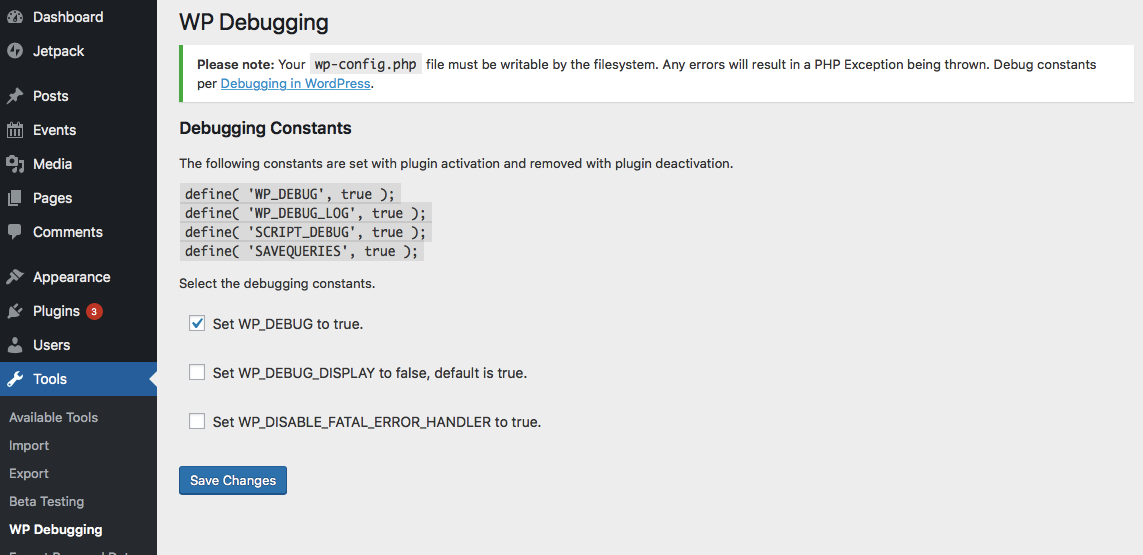
Settings Screen
Plugins semelhantes


O Query Monitor é um painel de ferramentas do desenvolvedor para WordPress e WooCommerce.

O bbPress é um programa de fórum para o WordPress.

Adicione um menu na barra de administração que exibe consulta, cache e outras informações úteis para testes e depuração.

Enhance your WordPress site with our AI Powered customer support ticket system. Manage customer support, tickets, and email tickets efficiently.

Registre erros de PHP, banco de dados e JavaScript através do WP_DEBUG com apenas um clique. Crie, visualize, filtre e limpe o arquivo debug.log de forma conveniente.
Do mesmo author (Andy Fragen)

Embed a PDF from the Media Library or elsewhere via oEmbed or as a block into an iframe tag.

Reversão perfeita dos arquivos básicos do WordPress para a versão mais recente ou para qualquer versão desatualizada e segura, usando a API de atualização do núcleo e os métodos de atualização dos arquivos básicos.

Allows you to easily upgrade for testing the next versions of WordPress.