Easy Drag & Drop Page Builder that adds a splash page to your site that it's perfect for a coming soon page, maintenance or landing page.

Disable Updates – Updates Manager, Disable Automatic Updates, Disable All Updates
Hospedagem WordPress com plugin Disable updates, Updates manager, Disable automatic updates
Onde posso hospedar o plugin Disable updates, Updates manager, Disable automatic updates?
Este plugin pode ser hospedado em qualquer servidor que possua WordPress instalado. Recomendamos escolher um provedor de hospedagem confiável, com servidores especializados para WordPress, como o serviço de hospedagem de sites da MCO2.
Hospedando o plugin Disable updates, Updates manager, Disable automatic updates em um provedor seguro
A MCO2, além de instalar o WordPress na versão mais atualizada para seus clientes, fornece o plugin WP SafePress, um mecanismo singular que protege e otimiza seu site simultaneamente.
Por que a Hospedagem WordPress funciona melhor na MCO2?
A Hospedagem WordPress funciona melhor pois a MCO2 possui servidores otimizados para WordPress. A instalação de WordPress é diferente de uma instalação trivial, pois habilita imediatamente recursos como otimização automática de imagens, proteção da página de login, bloqueio de atividades maliciosas diretamente no firewall, cache avançado e HTTPS ativado por padrão. São plugins que potencializam seu WordPress para a máxima segurança e o máximo desempenho.
Disable Updates is a lightweight updates manager that gives you full control over how and when updates run on your site. You can disable all updates, turn off automatic updates, or manage updates individually for WordPress core, plugins, and themes.
Key Features
Disable Plugin Updates
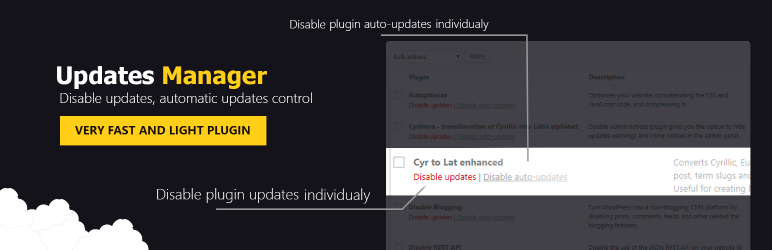
You can disable plugin updates globally or manage them on a per-plugin basis. This allows you to prevent update notifications for all plugins or selectively disable updates only for specific plugins you want to keep unchanged.
The plugin also lets you disable automatic plugin updates, giving you full control over which plugins update automatically and which ones require manual approval.
Disable Theme Updates
You can disable theme updates entirely or control them individually for each theme. This is especially useful if you are using custom themes or child themes where updates could overwrite changes.
You can also disable automatic theme updates or allow automatic updates only for selected themes, depending on your workflow.
Disable WordPress Core Updates
Take control of WordPress core updates by disabling them completely or managing how they are applied. You can choose to disable all core updates or fine-tune automatic updates by release type.
Options include:
- Disable WordPress core updates entirely
- Disable automatic core updates
- Allow automatic updates for major releases
- Allow automatic updates for minor releases
- Allow automatic development updates
This gives you full control over how WordPress itself updates on your site.
Additional Features
- Disable translation updates
- Hide update notices for all users except admins
- Get email notifications when updates are available or on successful update
- Disable core update notification emails
- Force automatic updates
Support
We’re here to help. Feel free to open a new thread on the Support Forum.
Useful Resources
- If you like this plugin, you’re sure to love our other plugins as well.
- Our blog is a great place to learn more about WordPress.
- Get the most out of your website with our helpful WordPress YouTube Tutorials.
Capturas de tela

General settings for disabling updates

Disable plugin updates individually

Disable theme updates individually
Do mesmo author (Themeisle)


Quickly create WordPress pages with 20+ blocks, 100+ ready-to-import designs, and advanced editor extensions. It’s website building, Lego-style!
Redirect to any page or URL, execute scripts after submission, save data to the database, and unlock additional submission actions for Contact Form 7.

Add icons to WordPress navigation menus easily — pick from Font Awesome, Dashicons, image icons & more. Style menu items with custom colors & sizes.

Add modules: share buttons, header/footer scripts, disable comments, reading progress, custom fonts, custom login & more in one plugin.

Disable admin notices and hide dashboard notifications from plugins, themes and core. Hide all notices, selected ones, or show them in a single line.