

VS Knowledge Base
Hospedagem WordPress com plugin VS Knowledge Base
Onde hospedar o plugin VS Knowledge Base?
Este plugin pode ser hospedado em qualquer servidor que possua WordPress instalado. Recomendamos escolher uma hospedagem de confiança, com servidores adaptados para WordPress, como o serviço de hospedagem de sites da MCO2.
Hospedando o plugin VS Knowledge Base em um provedor confiável
A MCO2, além de instalar o WordPress na versão mais nova para seus clientes, fornece o plugin WP SafePress, um mecanismo singular que assegura e melhora seu site simultaneamente.
Por que a Hospedagem WordPress funciona melhor na MCO2?
A Hospedagem WordPress funciona melhor pois a MCO2 possui servidores otimizados para WordPress. A instalação de WordPress é diferente de uma instalação trivial, pois habilita imediatamente recursos como otimização de imagens e fotos, proteção da página de login, bloqueio de atividades maliciosas diretamente no firewall, cache avançado e HTTPS ativado por padrão. São plugins que potencializam seu WordPress para a máxima segurança e o máximo desempenho.
About
With this lightweight plugin you can create a knowledge base that contains your categories and posts.
Main features of the plugin:
- Free and lightweight
- Support for Block Editor and Classic Editor
- Display your knowledge base with block, shortcode or widget
- Custom post types are supported (such as WooCommerce product categories and products)
- Customize your knowledge base with attributes
- Documentation at WP plugin page
- Active support from developer at WP forum
With this plugin you can also create a FAQ or wiki in the same way as a knowledge base.
How to use
After installation make sure you already have some categories and posts.
Go to the editor and add the VS Knowledge Base block or the shortcode [knowledgebase] to a page. This will display your knowledge base.
Or go to Appearance > Widgets and use the VS Knowledge Base widget.
Default settings categories:
- 4 columns when using block or shortode
- 1 column when using widget
- 2 columns in small screens
- Order by name
- Ascending order (A-Z)
- Empty categories are hidden
- Parent and subcategories are displayed separately
Default settings posts:
- Order by date
- Descending order (new to old)
- All posts are displayed
Customize your knowledge base with attributes.
Attributes
You can customize your knowledge base by adding attributes to the block, shortcode or widget.
- Add custom CSS class to knowledge base:
class="your-class-name" - Change the number of columns:
columns="3" - Disable the columns:
columns="0" - Include certain categories:
include="1,3,5" - Exclude certain categories:
exclude="8,10,12" - Display empty categories too:
hide_empty="0" - Change the number of posts per category:
posts_per_category="5" - Reverse the order of posts:
order="ASC" - Display posts by title:
orderby="title" - Display posts in random order:
orderby="rand" - Disable category link:
category_link="false" - Display category description:
category_description="true" - Display post counter:
post_count="true" - Display post meta (date and author):
post_meta="true" - Display View All link:
view_all_link="true" - Change label of View All link:
view_all_link_label="your label" - Change label of post without title:
no_post_title_label="your label" - Change the “no categories are found” text:
no_categories_text="your text"
Example: [knowledgebase include="1,3,5" hide_empty="0" post_meta="true"]
When using the block or the widget, don’t add the main shortcode tag or the brackets.
Example: include="1,3,5" hide_empty="0" post_meta="true"
With the columns attribute you can set the number of columns between 1 and 4.
In small screens max 2 colums.
You can disable the columns in favour of your own styling.
The columns attribute will be ignored when using the block or widget. Because you can set the columns via the block or widget settings.
Post tags
Besides displaying posts by category you can also display posts by tag: taxonomy="post_tag"
Custom post types
It’s also possible to display categories and posts from a custom post type (such as WooCommerce product categories and products).
To display these categories and posts you should add 2 attributes: “taxonomy” and “post_type”
WooCommerce:
- Product categories and products:
taxonomy="product_cat" post_type="product" - Include product category image:
taxonomy="product_cat" post_type="product" woo_image="true" - Display by tag instead of category:
taxonomy="product_tag" post_type="product"
Have a question?
Please take a look at the FAQ section.
Tradução
Translations are not included, but the plugin supports WordPress language packs.
More translations are very welcome!
The translation folder inside this plugin is redundant, but kept for reference.
Créditos
Without help and support from the WordPress community I was not able to develop this plugin, so thank you!
Capturas de tela
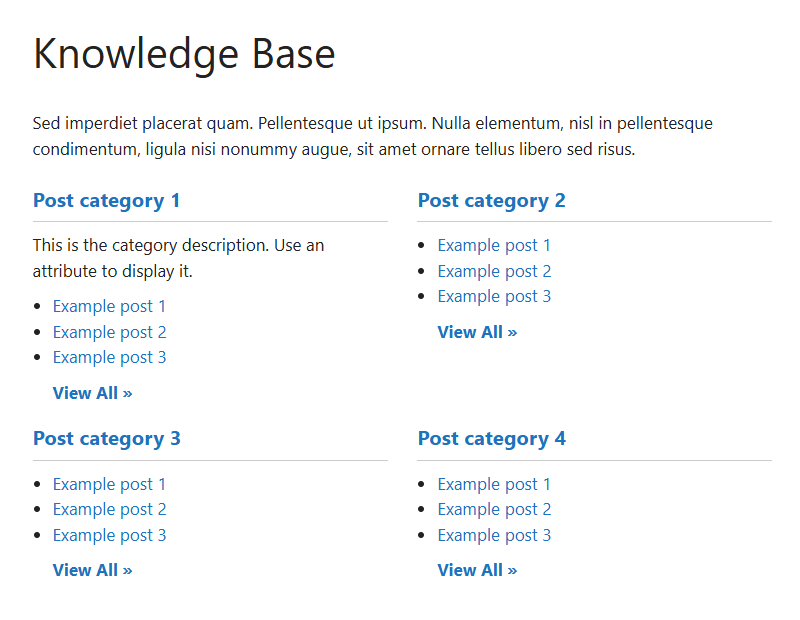
Knowledge Base
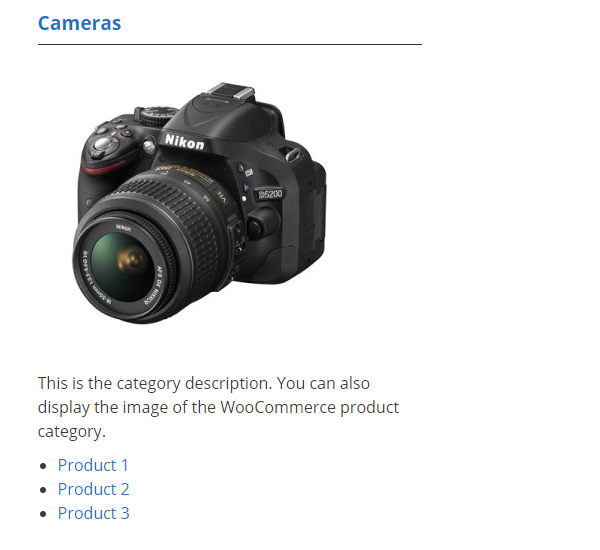
Knowledge Base WooCommerce products

Page with block (dashboard)

Widget (dashboard)