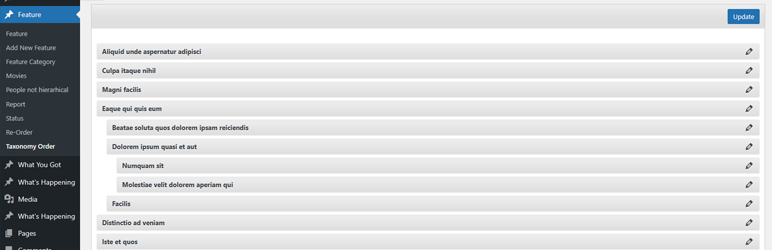
Sort posts and custom post type objects using a drag-and-drop, sortable JavaScript AJAX interface, or through the default WordPress dashboard

Category Order and Taxonomy Terms Order
Hospedagem WordPress com plugin Category Order and Taxonomy Terms Order
Onde devo hospedar o plugin Category Order and Taxonomy Terms Order?
Este plugin pode ser hospedado em qualquer hospedagem que tenha WordPress instalado. Recomendamos fortemente optar por um provedor de hospedagem de confiança, com servidores especializados para WordPress, como o serviço de hospedagem WordPress da MCO2.
Hospedando o plugin Category Order and Taxonomy Terms Order em uma empresa de hospedagem de confiança
A MCO2, além de instalar o WordPress na versão mais atualizada para seus clientes, oferece o plugin WP SafePress, um mecanismo exclusivo que salvaguarda e aumenta a performance do seu site conjuntamente.
Por que a Hospedagem WordPress funciona melhor na MCO2?
A Hospedagem WordPress funciona melhor pois a MCO2 possui servidores otimizados para WordPress. A instalação de WordPress é diferente de uma instalação trivial, pois habilita imediatamente recursos como otimização de imagens, proteção da página de login, bloqueio de atividades suspeitas diretamente no firewall, cache avançado e HTTPS ativado por padrão. São recursos que potencializam seu WordPress para a máxima segurança e o máximo desempenho.
Easily control the order of Categories and any hierarchical taxonomy with a simple drag-and-drop interface. Reorder parent and child terms visually in the admin and choose whether the plugin automatically applies your custom term order to front-end queries.
Key features
- Intuitive drag-and-drop reordering for Categories and all hierarchical taxonomies.
- Option to auto-apply the custom term order to front-end queries (no theme/plugin edits required).
- Keep the admin term lists in your new order (makes management and editorial workflows consistent).
- Works with multiple taxonomies per post type — switch between taxonomies from the same interface.
- Multisite aware and regularly updated for modern WordPress and PHP versions (see changelog for compatibility notes).
How it works
After activating the plugin, a new Taxonomy Order page becomes available under the custom post type menu. Simply open it and drag terms into the exact order you want — including parent/child hierarchy.
Use the plugin’s Taxonomy Order screen to drag terms into the order you want. To apply the custom order automatically across your site, enable the Autosort option — the plugin will adjust term queries on the fly so your chosen order shows without template changes. If you prefer to control ordering in code, include orderby => ‘term_order’ when calling get_terms() to use the plugin’s order programmatically.
This plugin is developed by Nsp-Code
See the Advanced Taxonomy Terms Order for advanced features.
Localization
Available in Catalan, Chinese (China), Chinese (Taiwan), Czech, Dutch, Dutch (Belgium), English (Australia), English (Canada), English (New Zealand), English (UK), English (US), French (France), Galician, German, Italian, Japanese, Norwegian (Bokmål), Polish, Portuguese (Portugal), Russian, Spanish (Chile), Spanish (Spain), Spanish (Venezuela), Swedish, and Turkish.
Whant to contribute with a translation to your language? Please check at https://translate.wordpress.org/projects/wp-plugins/taxonomy-terms-order
There isn’t any Editors for your native language on plugin Contributors? You can help to moderate! https://translate.wordpress.org/projects/wp-plugins/taxonomy-terms-order/contributors
Capturas de tela
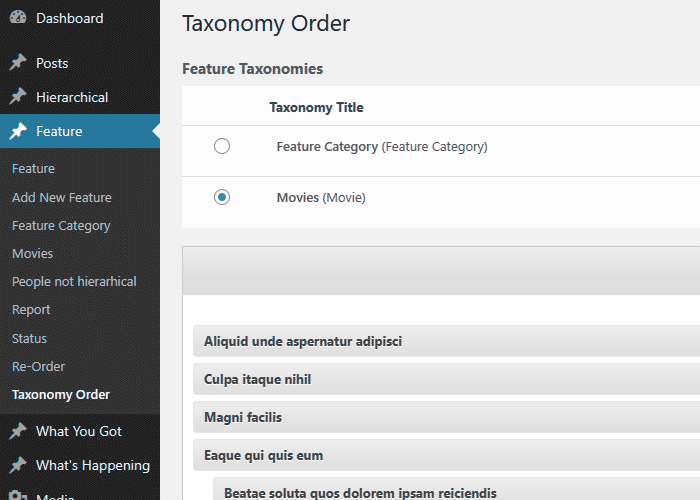
Category Order Interface.
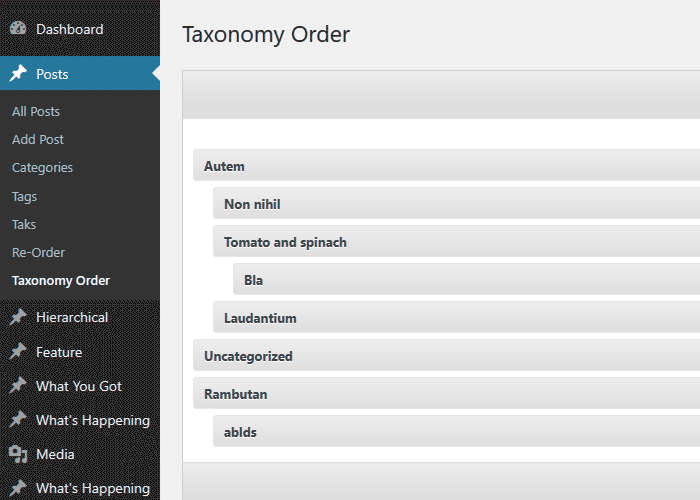
Multiple Taxonomies Interface.
Do mesmo author (nsp-code)
