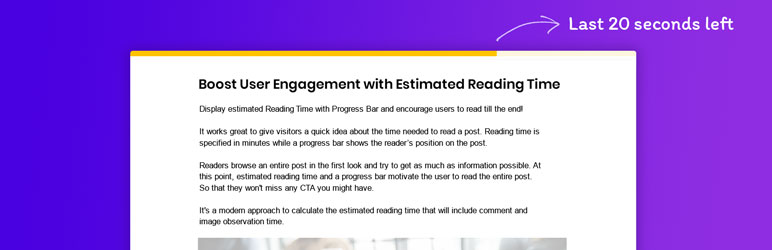
A reading position indicator that you can use where you want: top, bottom or custom position in differents templates or post types.

Read Meter – Reading Time & Progress Bar
Hospedagem WordPress com plugin Read Meter – Reading Time & Progress Bar
Onde devo hospedar o plugin Read Meter – Reading Time & Progress Bar?
Este plugin pode ser hospedado em qualquer servidor que possua WordPress instalado. Recomendamos escolher uma empresa de hospedagem confiável, com servidores otimizados para WordPress, como o serviço de hospedagem de sites da MCO2.
Hospedando o plugin Read Meter – Reading Time & Progress Bar em uma empresa de hospedagem seguro
A MCO2, além de configurar e instalar o WordPress na versão mais nova para seus clientes, oferece o WP SafePress, um sistema exclusivo que salvaguarda e aumenta a performance do seu site ao mesmo tempo.
Por que a Hospedagem WordPress funciona melhor na MCO2?
A Hospedagem WordPress funciona melhor pois a MCO2 possui servidores otimizados para WordPress. A instalação de WordPress é diferente de uma instalação trivial, pois habilita imediatamente recursos como otimização de imagens, proteção da página de login, bloqueio de atividades suspeitas diretamente no firewall, cache avançado e HTTPS ativado por padrão. São recursos que potencializam seu WordPress para a máxima segurança e o máximo desempenho.
People often skip reading posts with the fear of the time they’ll spend reading it. Are you losing readers too?
The Read Meter plugin displays the estimated reading time for blog posts along with a progress bar. It works great to give visitors a quick idea about the time needed to read a post and encourages them to go on till the end.
Usually, visitors try to scan the entire post at first glance and grasp as much as information possible from the post. Reading time specified in minutes motivates users to read the post.
A handy progress bar will show the reader’s position on the post. As the reader scrolls the page, the progress bar indicates the remaining part of the post. This lets readers know how far have they reached and how much more do they have to go on.
Try it out on a free dummy site
The plugin uses an advanced image time calculation technique. In case your post contains images, the plugin calculates the time to view those images as well. It adds 12 seconds for the first image, 11 seconds for the second image and so on till the 10th image. After that, it adds 3 seconds for each further image.
It works great to give visitors a quick idea about the time needed to read a post and encourages them to go on till the end.
Here are some key features of the plugin –
- A simple shortcode –
[read_meter], gives you the flexibility to add read time anywhere on the site. - A simple ID attribute to the shortcode can display reading time of that particular post/page irrespective of where the shortcode is added –
[read_meter id=47]. - Even if the post is updated multiple times, the plugin will calculate the read time for the most recent version of the post.
- You can choose to display the read time and a progress bar on various post types.
- You can decide whether you would like to include images and comments in the read time and progress bar.
That’s not all! Here are some more controls you get over Reading Time –
- Display the read time on a blog/archive page or single post page
- Show the estimated time it takes to read any blog/archive page or single post page, which can be displayed on any section of the website
- Set the read time position – i.e. Above/Below title or above content
- Set a read time Prefix and Postfix
- Use various read time styling options – Spacing, Background color, Font size, etc.
Specific controls for Progress Bar –
- Set a progress bar position – i.e. Top/ Bottom of the page.
- Use various progress bar styling options – Gradient Background color, Bar thickness, etc.
Capturas de tela
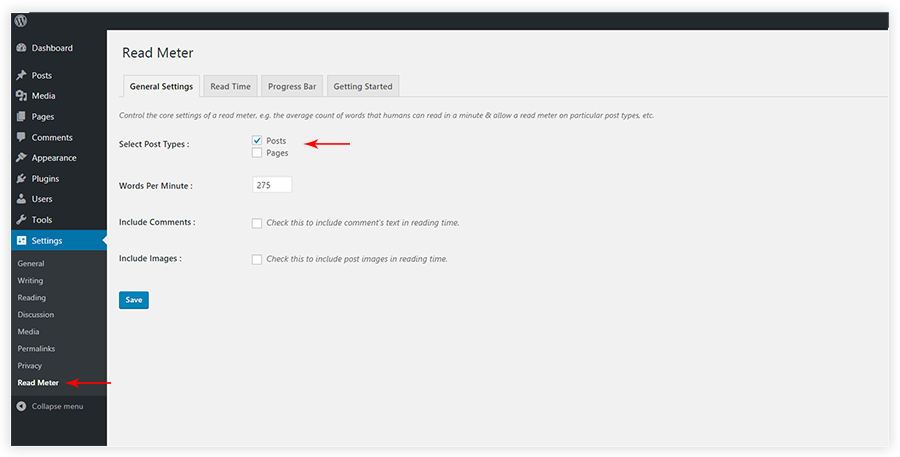
General Settings
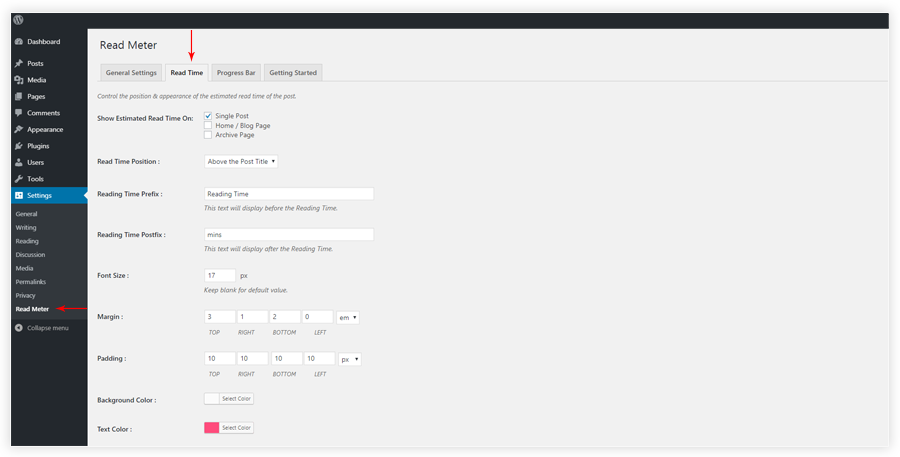
Read Time

Progress Bar
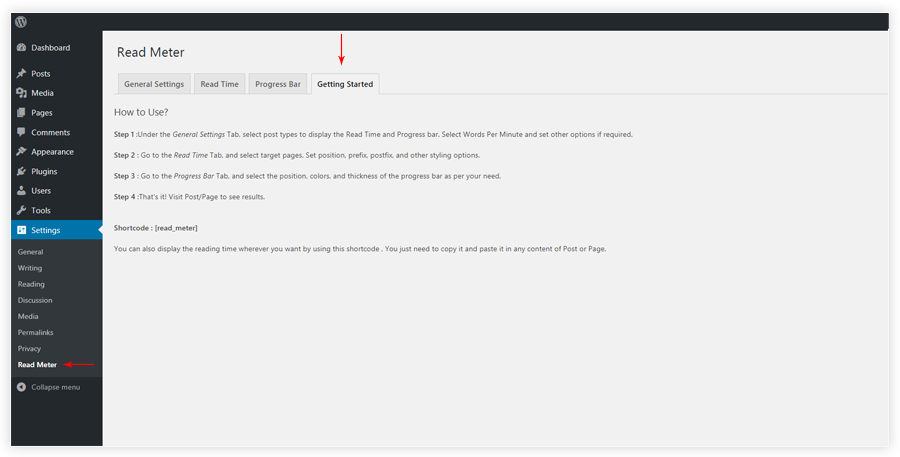
Getting Started
Plugins semelhantes

Do mesmo author (Brainstorm Force)

Elementor addons with 18+ free widgets, Header & Footer Builder, WooCommerce widgets & templates. Trusted by 2+ million websites.

The growing library of 300+ ready-to-use templates that work with all WordPress themes including Astra, Hello, OceanWP, GeneratePress and more

Gutenberg blocks for existing Spectra websites. Maintained, stable, and fully supported — no action needed on your part.

AI form generator and WordPress form builder for contact and Stripe payment forms, with surveys and quizzes in SureForms Business.

Custom Fonts is a powerful WordPress plugin that allows you to upload your own custom fonts or choose from a vast collection of Google Fonts, all host …

Every store loses sales to cart abandonment. But with Cart Abandonment Recovery for WooCommerce, you can win them back—automatically.