
Site Kit é uma solução completa para usuários do WordPress usarem tudo que o Google oferece para torná-los bem-sucedidos na web.

Quick Adsense
Hospedagem WordPress com plugin Quick Adsense
Onde posso hospedar o plugin Quick Adsense?
Este plugin pode ser hospedado em qualquer servidor que tenha WordPress configurado. Recomendamos fortemente escolher uma hospedagem confiável, com servidores adaptados para WordPress, como o serviço de hospedagem WordPress da MCO2.
Hospedando o plugin Quick Adsense em uma empresa de hospedagem seguro
A MCO2, além de configurar e instalar o WordPress na versão mais atualizada para seus clientes, disponibiliza o WP SafePress, um mecanismo exclusivo que salvaguarda e otimiza seu site simultaneamente.
Por que a Hospedagem WordPress funciona melhor na MCO2?
A Hospedagem WordPress funciona melhor pois a MCO2 possui servidores otimizados para WordPress. A instalação de WordPress é diferente de uma instalação trivial, pois habilita imediatamente recursos como otimização automática de imagens, proteção da página de login, bloqueio de atividades maliciosas diretamente no firewall, cache avançado e HTTPS ativado por padrão. São recursos que potencializam seu WordPress para a máxima segurança e o máximo desempenho.
Quick Adsense is an Ads management WordPress plugin. It offers a quicker & flexible way to insert Adsense or any Ads code into a blog post. Besides, it can randomly place the Ads anywhere within a post. It comes with a simple setting page, and it does not overwhelm you with complicated customizable options.
In general, placing Adsense randomly within a post is a good way to experiment a variety of ads formats & placements besides optimizing your Adsense. If you have many regular visitors who frequently revisit your blog, the randomization will likely catch their attention.
Here are some features that come with this plugin:
- Absolutely NO author revenue reward or revenue sharing from your Adsense or that kind of features.
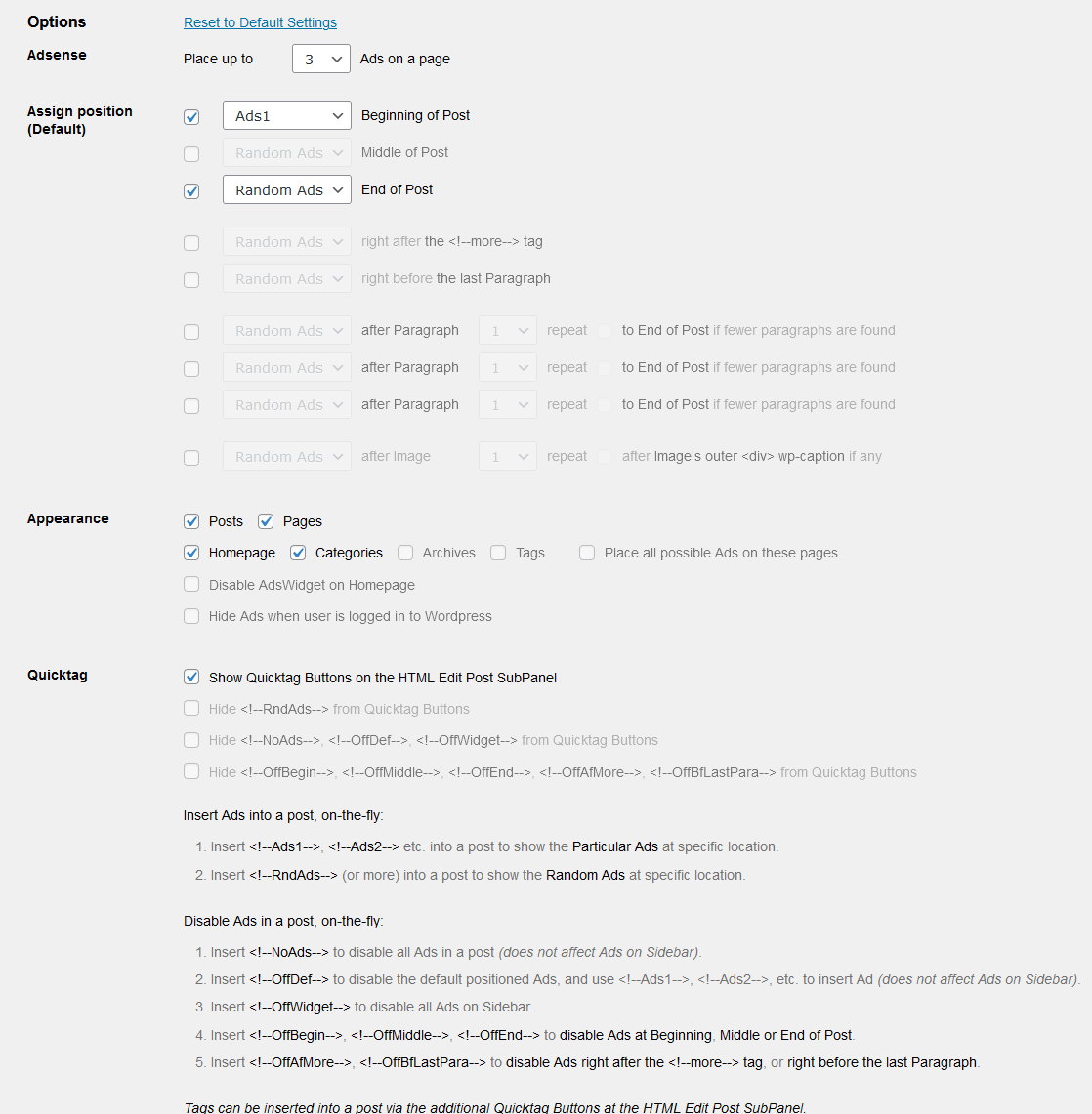
- Default Ads positioning: Assign Ads to the beginning of post, assign Ads to the middle of post, assign Ads to the end of post, assign Ads after ‘more’ tag, assign Ads before last paragraph, assign Ads after certain paragraphs (3 options available) & assign Ads after certain images.
- Flexible Ads placement, insert Ads specifically or randomly anywhere within a post.
- Simple configuration interface, requires no coding knowledge: Just copy and paste AdSense code, tick & select options, the plugin will then do the rest for you.
- Support any Ads code, not limited to Adsense code only.
- Display up to a maximum of 10 Ads on a page. Google allows publishers to place up to 3 Adsense for Content on a page. If you are using other Ads, you may display up to 10 Ads.
- Support up to a maximum of 10 Ads codes on Sidebar Widgets.
- Support up to a maximum of 10 Ads codes for specific placement & randomization within a post.
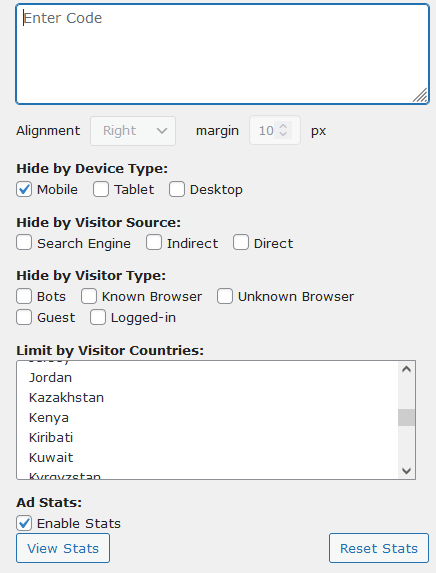
- Geotargeting : Limit Ads to Specific Countries.
- Device Targeting : Limit Ads to Specific Devices.
- Visitor Targeting : Limit Ads to Specific types / sources of Visitors.
- Ad Stats : Quick and easy way to judge your Ad performance.
- Insert Ads on-the-fly, simply insert <!–Ads1–>, <!–Ads2–> … , <!–RndAds–> to a post to accomplish this.
- Disable Ads on-the-fly, simply insert <!–NoAds–>, <!–OffDef–>, <!–OffWidget–>, <!–OffBegin–> … and more to a post to accomplish this.
- The above Tags can be inserted into a post easily via the additional Quicktag Buttons added to the HTML Edit Post SubPanel.
Sign up for a Google Adsense Account to generate revenue from your blog, if you don’t have one.
Installation | Screen Shots | Plugin Homepage
Privacy
Quick Adsense does not send telemetry or site data to its authors. Optional ad click and impression statistics are stored locally in the WordPress database for up to 30 days.
The administrator-provided ad and tracking snippets execute in visitors’ browsers and may contact the third-party providers selected by the site owner. Those providers may collect data under their own terms and privacy policies. Site owners are responsible for choosing, configuring, disclosing, and obtaining any consent required for those snippets.
Capturas de tela
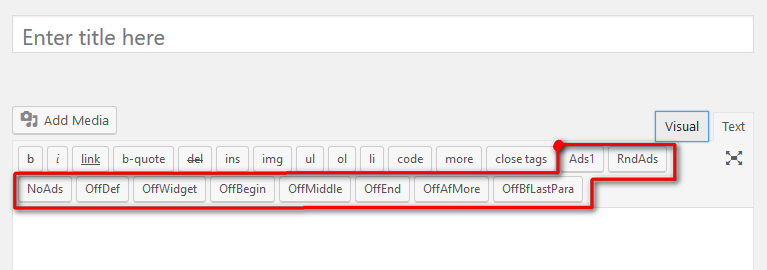
Screen shot showing the additional Quicktag Buttons added to the HTML Edit Post SubPanel.
The Settings page from Quick Adsense plugin. There are many ways to configure your Ads display, specifically or randomly as you wish.
Plugins semelhantes


Gerencie anúncios do Google AdSense, banners, rotação de anúncios, widgets fixos, anúncios AMP, ads.txt, rastreamento, código de cabeçalho e rodapé, código PHP, campos globais personalizados

The only complete toolkit for all ad types. Grow your revenue with AdSense, Amazon—or any affiliate network. Get pinpoint targeting and best support!

Insert PHP, JavaScript, CSS, HTML, ads & tracking code into WordPress headers, footers, pages & content with conditional logic — no theme editing.

The Ultimate Adsense / Ad-Management Plugin for WordPress.
Do mesmo author (Namith Jawahar)
The Ultimate Adsense / Ad-Management Plugin for WordPress.