
MaxiBlocks Builder | 17,000+ Design Assets, Patterns, Icons & Starter Sites
Hospedagem WordPress com plugin MaxiBlocks Builder | 17,000+ Design Assets, Patterns, Icons & Starter Sites
Onde hospedar o plugin MaxiBlocks Builder | 17,000+ Design Assets, Patterns, Icons & Starter Sites?
Este plugin pode ser hospedado em qualquer servidor que possua WordPress configurado. Recomendamos optar por um provedor de hospedagem de confiança, com servidores especializados para WordPress, como o serviço de hospedagem de sites da MCO2.
Hospedando o plugin MaxiBlocks Builder | 17,000+ Design Assets, Patterns, Icons & Starter Sites em um provedor confiável
A MCO2, além de instalar o WordPress na versão mais atual para seus clientes, disponibiliza o WP SafePress, um sistema exclusivo que protege e aumenta a performance do seu site ao mesmo tempo.
Por que a Hospedagem WordPress funciona melhor na MCO2?
A Hospedagem WordPress funciona melhor pois a MCO2 possui servidores otimizados para WordPress. A instalação de WordPress é diferente de uma instalação trivial, pois habilita imediatamente recursos como otimização automática de imagens e fotos, proteção da página de login, bloqueio de atividades suspeitas diretamente no firewall, cache avançado e HTTPS ativado por padrão. São plugins que potencializam seu WordPress para a máxima segurança e o máximo desempenho.
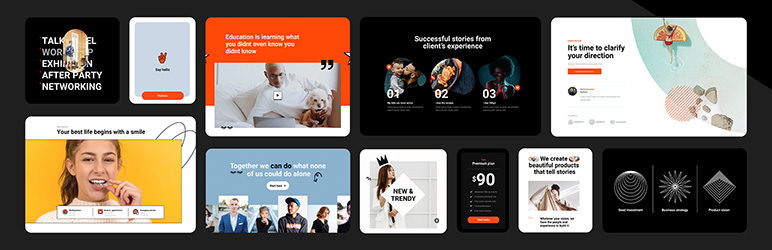
Build professional WordPress sites faster with MaxiBlocks.
All features free forever. No locked blocks. Optional Cloud Library saves you time.
The Challenge
As a WordPress creator, you might be facing:
- Frustration with complex, time-consuming design tools
- Page builders that lock essential features behind paywalls
- Difficulty finding and customising suitable templates
- Pressure to create unique, professional-looking websites efficiently
No one wants to produce generic-looking websites or pay monthly fees just to access basic functionality.
The Complete MaxiBlocks Ecosystem 🎈
MaxiBlocks is a complete website building solution with three components that work together:
MaxiBlocks Builder (Free)
The core plugin with everything unlocked from day one.
- 19 powerful foundation blocks
- Visual style controls
- Advanced design tools
- Dynamic content
- Animations and scroll effects
- Custom CSS
- No feature restrictions
MaxiBlocks Go Theme (Free)
Our Full Site Editing theme, available on WordPress.org.
- Complete site editing
- Responsive templates
- Performance optimised
- Works with any starter site
MaxiBlocks Cloud Library (Free + Paid)
A design library to speed up your workflow.
- 2,180+ block patterns
- 231 page templates
- 379 theme templates
- 14,417 SVG icons and shapes
- 100 style cards
- 11 starter sites
- 17,342 total assets
The Builder and Go Theme are free and open source forever. The Cloud Library offers both free and premium designs to save you time.
11 Starter Sites — Live in Minutes
Complete websites ready to install with one click:
- Interior Design
- Acupuncture
- Coffee Shop
- Cafe
- Business
- SaaS
- Invest
- Conference
- Architecture
- Co-working
- Hair Dresser
Each starter site includes homepage, about, services, contact, blog templates, archive pages, search results, and 404 pages. Install one and start customising immediately.
Get Started in Three Steps
- Install the MaxiBlocks Builder plugin and Go Theme
- Choose a starter site or browse patterns from the Cloud Library
- Customise with style cards and launch your site
Design websites that stand out. Save time doing it.
Key Features
Powerful Blocks
Build anything with 19 flexible, customisable foundation blocks. No complexity, no limits.
Instant Designs
Choose from 2,180+ patterns to create pages in seconds. Drag, drop and personalise.
Massive Icon Library
Enhance your design with 14,417 built-in SVG icons and shapes. No extra plugins needed.
No-Code Editing
See changes instantly with a visual editor. Experiment freely, never touch code.
One-Click Styles
Transform your entire site with style cards. Instantly swap between 100 professional designs.
Design Tools
Use background layers, image masks and scroll effects. Achieve bold visuals without extra software.
Dynamic Content
Display custom fields and real-time updates. Create dynamic, interactive pages.
Full Site Editing
Go beyond pages with the MaxiBlocks Go Theme. Edit headers, footers and templates visually.
Lightning Fast
Clean, optimised code. No domain limits. Zero hidden fees. Freedom on every site.
Who It’s For
MaxiBlocks works for:
- WordPress developers seeking efficient design tools
- Designers transitioning from other page builders
- Beginners looking to create professional sites without coding
- Agencies and freelancers delivering client projects
- Anyone moving from Elementor, Divi or other builders to Gutenberg
What’s Free vs What Requires a Cloud Account
Always Free (Open Source):
- MaxiBlocks Builder plugin (19 foundation blocks)
- MaxiBlocks Go Theme (Full Site Editing)
- 542 free patterns and 17 pages
- Free starter sites
- 14,417 icons and shapes
- 100 style cards
- All features unlocked (animations, dynamic content, custom CSS)
- Unlimited websites
- No restrictions
Optional Cloud Library:
- 2,180+ patterns
- 231 complete pages
- Premium starter sites
- Regular new designs
- Priority support
The Cloud Library saves you 10+ hours per project. You can build the same sites with free tools. Cloud just makes it faster.
Success Stories
Here’s what creators are saying:
“MaxiBlocks is one of the best WordPress plugins I’ve found, and I’m in love with this tool.” – Muhammad Ali Iqbal
“I know this category of plugins very well — I have probably tested all Gutenberg add-ons available on the market and I must admit that MaxiBlocks is really top shelf and top league!” – Peter
“It’s great to see that a lot of the new designs come from special requests from MaxiBlocks users and the developers listen to their user base!” – MeditatingSurgeon
“Easy, clean, and responsive designs with great support. They’re always adding new designs on top of what they already offer.” – Verdant
“After some more time poking around I see a lot of potential in your product. It has the ability to be the Elementor in Gutenberg field.” – Kazi Mahbub
Ready to build?
Install MaxiBlocks for free and start creating today.
Not sure yet? Explore the demo library to see MaxiBlocks in action, or browse starter sites for complete website examples.
Resources & Support
Learn and master MaxiBlocks:
- Documentation – Step-by-step guides and troubleshooting
- Video Tutorials – From basics to advanced techniques
- Support Forum – Get help from our team
- Changelog – Latest improvements
Join Our Community
MaxiBlocks is more than a plugin—it’s a growing community of creators:
- Twitter – Follow for updates and tips
- Discord – Connect with other users
- GitHub – Contribute to our open-source project
Share your creations with #maxiblocks or #madewithmaxi
“We’re on a mission to make website creation faster, easier, and more enjoyable. Can’t wait to see what you’ll create!”
– Kyra, Design Lead & Co-founder
Capturas de tela

Learn to change style cards: Find out how to switch style cards to improve the appearance of your website with our helpful guide.

Explore the template library: Discover a variety of block patterns and pages in our extensive library, designed to help you build your website more efficiently.

Customize button styles with presets: Quickly adjust your button styles using our selection of presets, making it easier to achieve the look you want on your website.

Create background layers for images: Follow our guide to layer images, enhancing the visual interest of your website with this design technique.

Improve efficiency with custom block toolbars: Work more effectively using our convenient block toolbars, designed to streamline your website design process.

Access the 100 style card library: Choose from a wide range of style cards in our library, featuring global styles to suit various design requirements.

Browse the SVG shape library: View our comprehensive collection of SVG shapes, offering versatile design elements to enhance your website's aesthetics.

Discover the SVG icons library: Search through our extensive SVG icons library, providing a broad selection of icons to give your website a polished appearance.

Customize your style cards: Use our guide to personalize your style cards, giving your website a unique touch.

Use the transform function for shape mask layers: Learn to manipulate design elements effectively with our guide on using the transform function for shape mask layers.
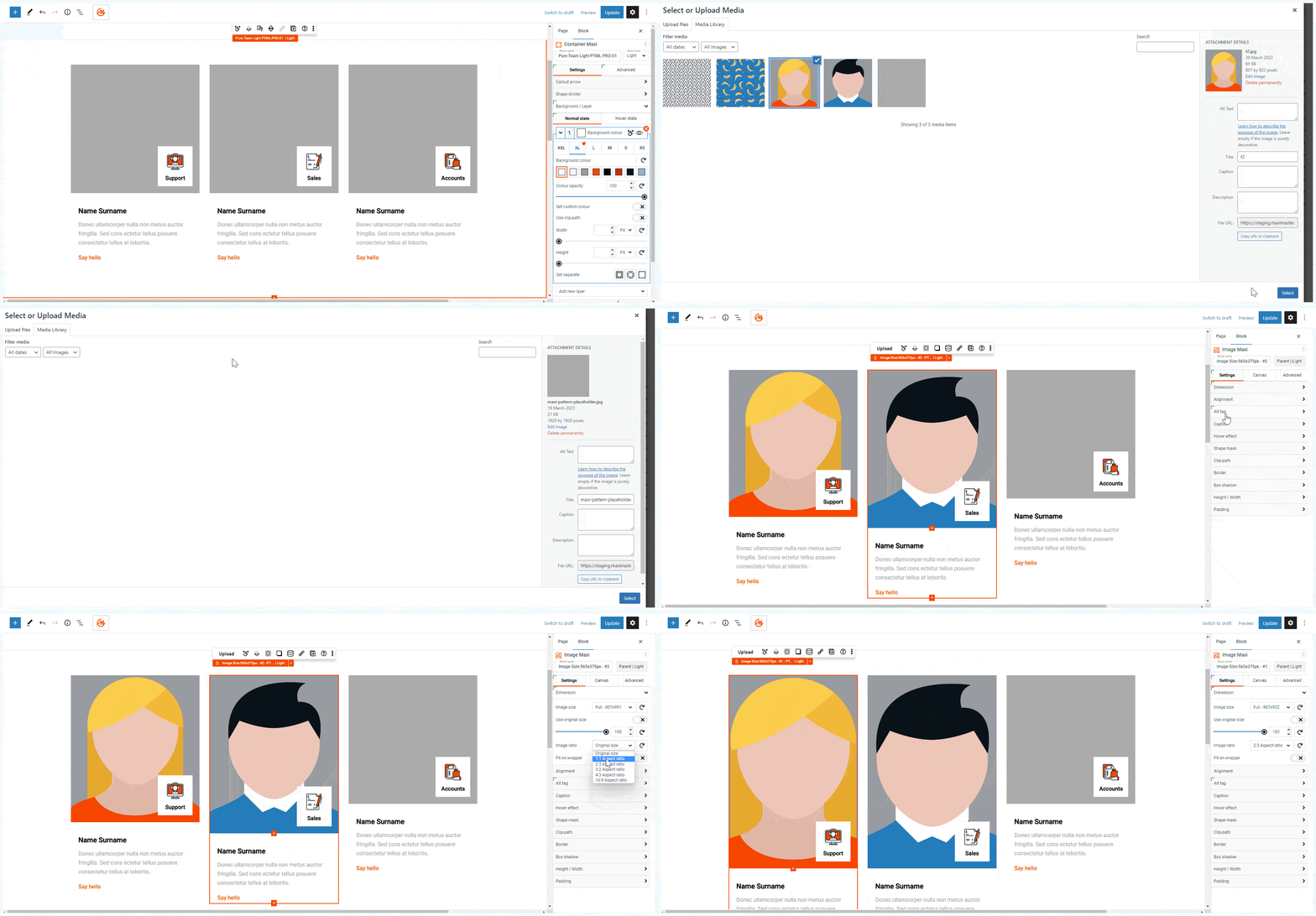
Set automatic image size ratios: See how to set automatic image size ratios to maintain consistent visuals throughout your entire website.

Load an icon from the editing experience: Simplify your design process with our easy-to-follow method for loading icons directly from your editing experience.