
Tudo em um: aceleração imbatível, melhoria no PageSpeed, armazenamento em cache, otimização de imagem/CSS/JS e muito mais...
Leverage Browser Caching
Hospedagem WordPress com plugin Leverage Browser Caching
Onde hospedar o plugin Leverage Browser Caching?
Este plugin pode ser hospedado em qualquer provedor que tenha WordPress configurado. Recomendamos fortemente escolher uma hospedagem confiável, com servidores otimizados para WordPress, como o serviço de hospedagem da MCO2.
Hospedando o plugin Leverage Browser Caching em um provedor de confiança
A MCO2, além de instalar o WordPress na versão mais atual para seus clientes, fornece o plugin WP SafePress, um mecanismo exclusivo que assegura e otimiza seu site conjuntamente.
Por que a Hospedagem WordPress funciona melhor na MCO2?
A Hospedagem WordPress funciona melhor pois a MCO2 possui servidores otimizados para WordPress. A instalação de WordPress é diferente de uma instalação trivial, pois habilita imediatamente recursos como otimização de imagens, proteção da página de login, bloqueio de atividades suspeitas diretamente no firewall, cache avançado e HTTPS ativado por padrão. São plugins que potencializam seu WordPress para a máxima segurança e o máximo desempenho.
Leverage Browser Caching is a lightweight, zero-configuration WordPress plugin that dramatically improves your website’s loading speed by instructing visitors’ browsers to cache static files locally.
With a single activation, the plugin writes optimized browser caching rules to your .htaccess file. When you deactivate the plugin, those rules are cleanly removed — leaving your .htaccess exactly as it was.
Why Browser Caching Matters
Every time a visitor loads a page, their browser downloads CSS, JavaScript, images, and fonts. Without caching, those same files are re-downloaded on every single visit — wasting bandwidth and slowing down your site.
Browser caching tells the visitor’s browser to store those static files locally for a set period. On their next visit, the browser serves them from its local cache instead of fetching them from the server again. The result: faster page loads, lower server load, and a better user experience.
What This Plugin Does
- Adds browser caching expiry headers to your
.htaccessfile on plugin activation. - Removes them cleanly on plugin deactivation — no leftover code.
- Requires zero configuration — install, activate, and it works.
- Covers all major static asset types:
- Images — JPEG, PNG, GIF, WebP, AVIF, SVG, ICO
- Web Fonts — WOFF, WOFF2, TTF
- Stylesheets — CSS
- Scripts — JavaScript
- Documents — HTML, XHTML, PDF
- Data — JSON
- Other — SWF
Improve Your PageSpeed Score
This plugin directly fixes the “Leverage Browser Caching” or “Serve static assets with an efficient cache policy” warning shown by:
- Google PageSpeed Insights
- GTmetrix
- Pingdom Website Speed Test
- WebPageTest
- YSlow
Cache Expiry Periods
Asset Type
Cache Duration
Images (JPEG, PNG, GIF, WebP, AVIF, SVG, ICO)
1 Year
Web Fonts (WOFF, WOFF2, TTF)
1 Year
CSS, JavaScript
1 Month
HTML, PDF, JSON
1 Month
Everything else
1 Month
Requirements
- Apache web server with
mod_expiresmodule enabled. - A writable
.htaccessfile in your WordPress root directory. - This plugin does not work on Nginx or IIS servers.
Capturas de tela
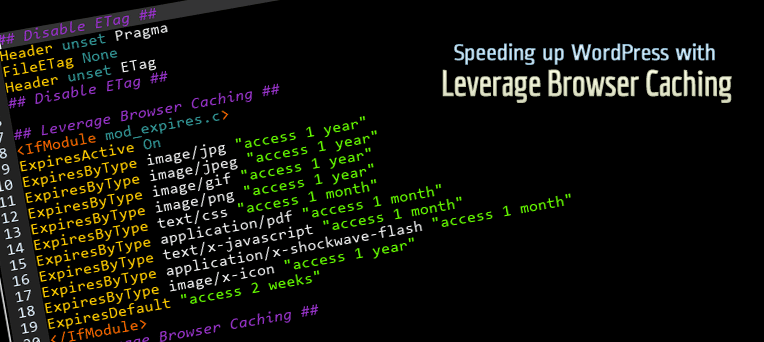
Browser caching rules added to .htaccess after plugin activation.
Plugins semelhantes

Get caching and more with this powerful cache plugin. Cache, optimize images, clean your database and minify for maximum performance.
Uma ferramenta rápida para cache no WordPress que gera arquivos de HTML estático.

Boost your website performance and page speed, and increase conversions with powerful caching, frontend, media, and environment optimizations.

Search Engine (SEO) & Performance Optimization (WPO) via caching. Integrated caching: CDN, Page, Minify, Object, Fragment, Database support.

O Breeze é um plugin de cache desenvolvido por Cloudways. O Breeze usa sistemas avançados de cache para melhorar exponencialmente os tempos de carregamento.