
Improve your SEO with real-time feedback, schema, and clear guidance. Upgrade for AI tools, Google Docs integration, and 24/7 support, no hidden fees.

Kraken.io Image Optimizer
Hospedagem WordPress com plugin Kraken.io Image Optimizer
Onde posso hospedar o plugin Kraken.io Image Optimizer?
Este plugin pode ser hospedado em qualquer servidor que tenha WordPress configurado. Recomendamos fortemente utilizar uma hospedagem confiável, com servidores otimizados para WordPress, como o serviço de hospedagem WordPress da MCO2.
Hospedando o plugin Kraken.io Image Optimizer em um provedor de confiança
A MCO2, além de instalar o WordPress na versão mais atualizada para seus clientes, oferece o plugin WP SafePress, um mecanismo singular que protege e aumenta a performance do seu site ao mesmo tempo.
Por que a Hospedagem WordPress funciona melhor na MCO2?
A Hospedagem WordPress funciona melhor pois a MCO2 possui servidores otimizados para WordPress. A instalação de WordPress é diferente de uma instalação trivial, pois habilita imediatamente recursos como otimização de imagens e fotos, proteção da página de login, bloqueio de atividades maliciosas diretamente no firewall, cache avançado e HTTPS ativado por padrão. São recursos que potencializam seu WordPress para a máxima segurança e o máximo desempenho.
This plugin allows you to optimize and resize new and existing WordPress image uploads through Kraken.io Image Optimizer’s API. Both lossless and intelligent lossy optimization modes are supported. Supported filetypes are JPEG, PNG and GIF (including animated GIF). Maximum filesize limit is 32 MB. Even when using Kraken.io’s lossy optimization, our system goes the extra mile to ensure that the results are of high quality, every time. You can just install the plugin and stop worrying.
For more details, including detailed documentation and plans and pricing, please visit Kraken.io.
Get your FREE account with us, or a subscription starting from just USD $5 per month
Sign up for your FREE Kraken.io Account and try out our plugin with and the rest of our features now, including:
- 100MB of free testing quota
- API Access, with dozens of ready-to-use libraries and modules
- Web Interface PRO with Image Resizing and sync-to-Dropbox
- URL Paster
- Page Cruncher
- Optimization Stats and History
- …and more.
Quick start tutorial:
About the plugin
- You can use your Kraken.io API key and secret on as many sites/blogs as you like. We have no per-site license.
- All images uploaded throught the media uploader are optimized on-the-fly. All generated thumbnails are optimized too.
- The main image upload can be optionally resized – this is useful for preventing user uploads with unnecessarily large dimensions. You can specify the maximum width and/or height in Kraken.io->Settings.
- When restricting the maximum dimensions of the main image using the resizing feature, the resulting image is enhanced using various advanced techniques, to help prevent downsample artifacts and “haloing” and produce a sharper result.
- You can optionally preserve one or more of the Date, Copyright, Geotag, Orientation, Profile EXIF metadata tags.
- Images can be automatically oriented according to their EXIF Orientation value – no need to manually rotate images.
- All images already present in the media library can be optimized individually, or using the Bulk Action menu “Krak ‘em all” feature.
- This plugin does not require any root or command-line access. No compilation and installation of any binaries is necessary.
- All optimization is carried out by sending images to Kraken.io’s infrastructure, and pulling the optimized files to your WordPress installation.
- To use this plugin, you must obtain a full API key and secret from https://kraken.io/plans. Our free account comes with a limited quota for testing our premium features, including this plugin.
- Works great with WPEngine hosted blogs, including the staging area.
- Since version 1.0.4, the plugin will work with local WordPress installations; the client site does not need to be published on the web.
★★★★★ Excellent Option for Image Optimization
“The real power of Kraken is their “intelligent lossy” optimization. I use it on all my sites and have never once needed to roll back an image because of too much quality degredation. While I hope to see some more advanced settings added to the WordPress plugin in the future, it is a perfect solution as is.” – collin★★★★★ Quality results, quality service
“The plugin works really well and effortlessly, and the support is prompt, thoughtful, and thorough. I’m hooked.” — illustrata★★★★★ Optimize according to Google Pagespeed
“Kraken was instrumental in optimizing images to comply with Google’s Pagespeed analyzing tool. Our travel blog travelmemo.com now sports Google’s ‘mobile friendly’ tag for mobile searches” — Walter Schaerer★★★★★ Perfect solution to speed up site!
“I love this plugin! All the questions I had are quickly responded to and I see a huge saving with image size without losing the quality. I highly recommend this plugin!” — ezone69
Once you have obtained your credentials, from your WordPress admin, go to the Kraken.io settings page. The from there you can enter your API credentials, and select your optimization preferences. Once you have done this, click on Save. If everything is in order, it will simply say “settings saved” and give you a reassuring green tick that your credentials are valid. You can now start optimizing images from within Media Library. Any image you upload from now on, through any of the media upload screens will be optimized on-the-fly by Kraken.io.
For advanced users, there is a third party WordPress Command Line Interface (CLI) tool to allow image optimization from the command line, or by using cron. For details, visit: https://github.com/tillkruss/wp-cli-kraken
Please send bug reports, problems, feature requests and so on to support (at) Kraken dot io, or directly to the author of this plugin.
Connect with Kraken.io
Notes and Incompatible plugins
If you use the WP Super Cache plugin, you must disable the plugin prior to performing any image optimization, as it is known to cause strange and buggy behaviour with the Kraken.io Image Optimizer plugin.
Any Questions?
We love to hear from you! Just shoot an email to support (at) kraken dot io and let’s talk.
Capturas de tela

This screenshot shows the Kraken.io Settings page. You must enter your credentials, and select your optimization mode from there, then hit save. Advanced options are also available.
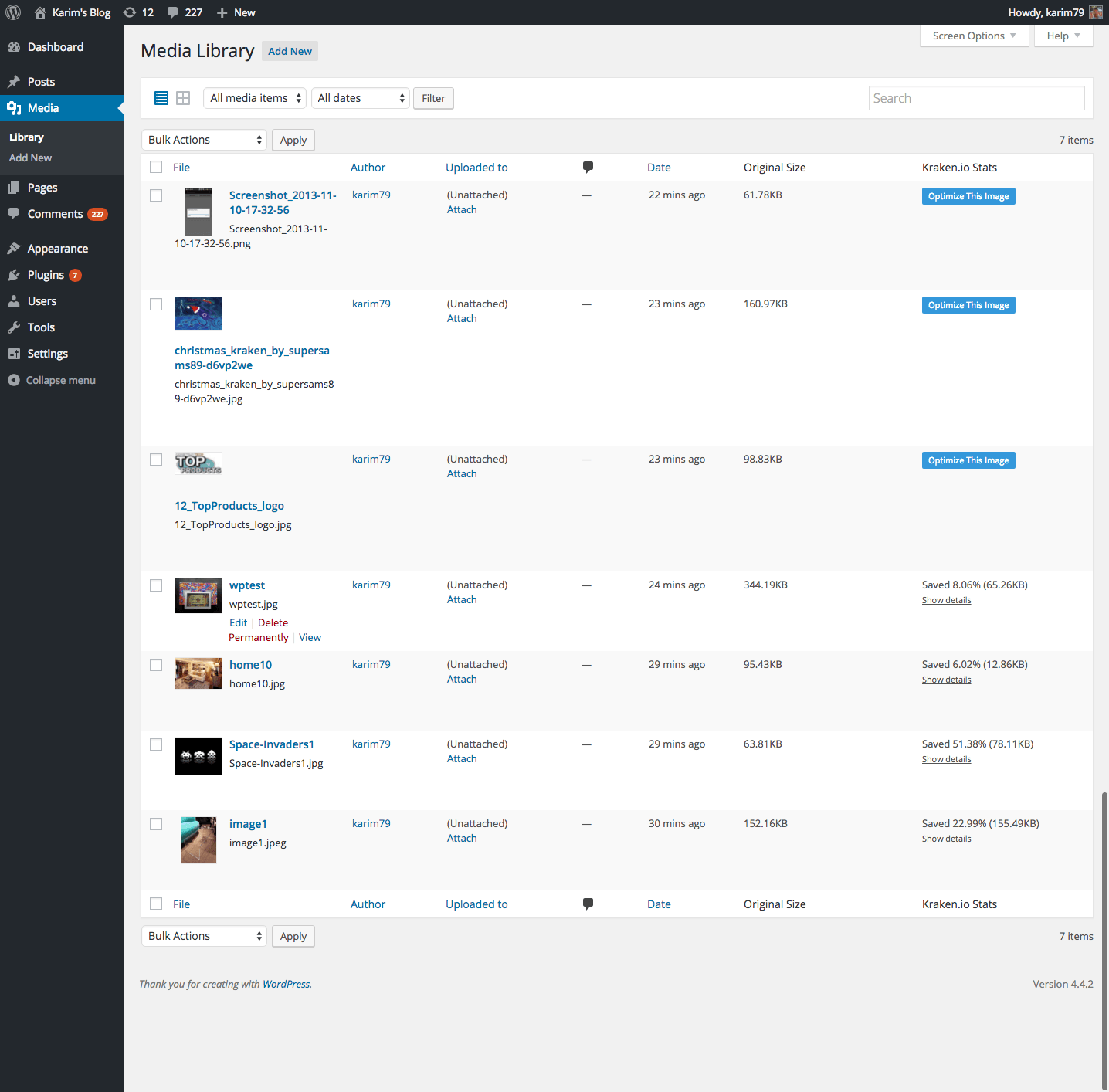
This screenshot shows the two columns added by Kraken.io Image Optimizer: original image and Kraked size, as well as the new Optimize This Image button which is present for images which already exist in your media library. Stats and optimization type are shown for optimized images.
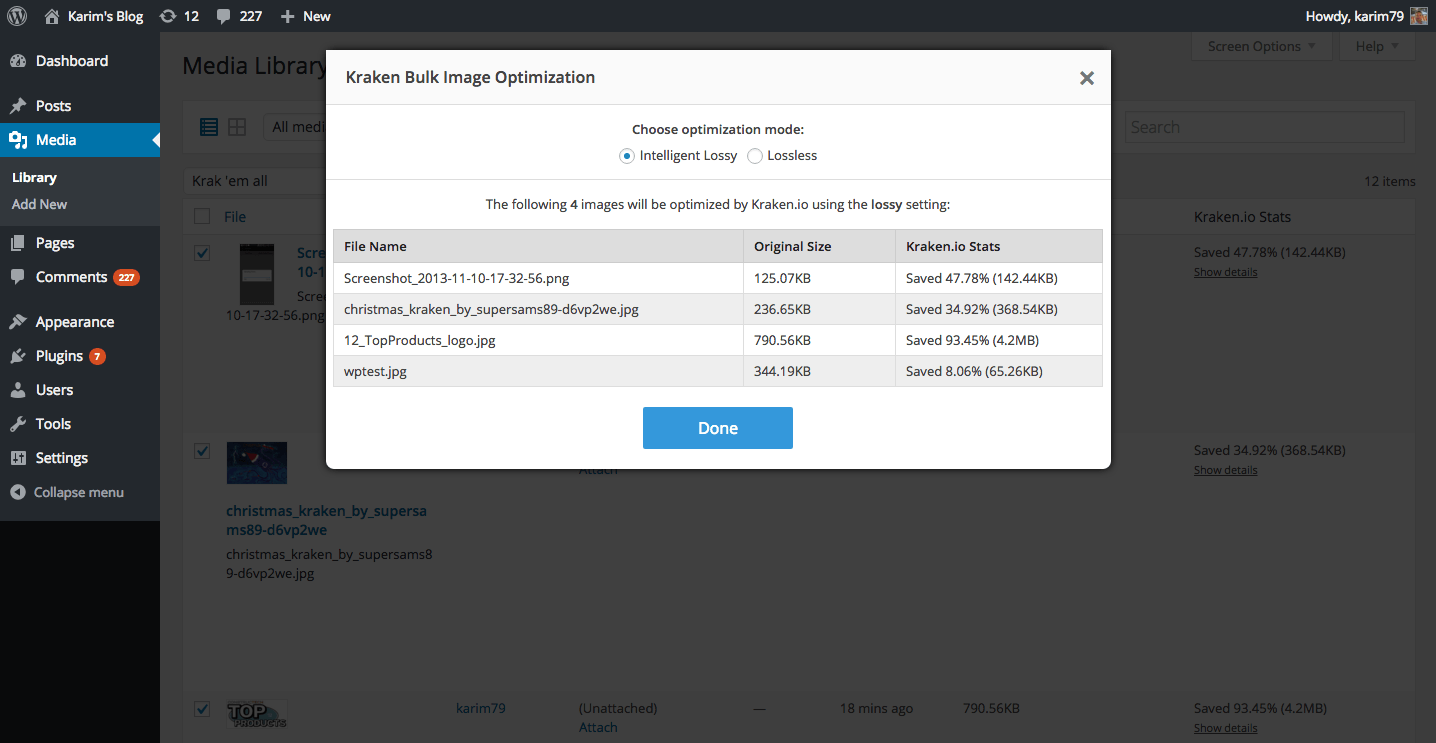
This screenshot shows the bulk optimizer aka the "Krak 'em all" feature which appears as an overlay.
Plugins semelhantes


Tudo em um: aceleração imbatível, melhoria no PageSpeed, armazenamento em cache, otimização de imagem/CSS/JS e muito mais...

O Rank Math SEO é o melhor plugin de SEO para WordPress, com os recursos de muitas ferramentas de SEO e SEO com IA em um único pacote, para ajudar a multiplicar seu tráfego de SEO.

O AIOSEO é o mais avançado plugin de SEO para o WordPress. Melhore as classificações e o tráfego de SEO com ferramentas de SEO abrangentes e otimizações inteligentes de IA SEO!

Gerencie redirecionamentos 301, monitore erros 404 e melhore seu site, sem precisar entender de Apache ou Nginx.

O mais simples e mais rápido sistema de cache para o WordPress.