
Import your demo content, widgets and theme settings with one click. Theme authors! Enable simple theme demo import for your users.
Import XML and RSS Feeds
Hospedagem WordPress com plugin Import XML and RSS Feeds
Onde hospedar o plugin Import XML and RSS Feeds?
Este plugin pode ser hospedado em qualquer servidor que tenha WordPress instalado. Recomendamos fortemente optar por um provedor de hospedagem seguro, com servidores adaptados para WordPress, como o serviço de hospedagem de sites da MCO2.
Hospedando o plugin Import XML and RSS Feeds em uma empresa de hospedagem de confiança
A MCO2, além de configurar e instalar o WordPress na versão mais atualizada para seus clientes, oferece o WP SafePress, um sistema exclusivo que salvaguarda e otimiza seu site conjuntamente.
Por que a Hospedagem WordPress funciona melhor na MCO2?
A Hospedagem WordPress funciona melhor pois a MCO2 possui servidores otimizados para WordPress. A instalação de WordPress é diferente de uma instalação trivial, pois habilita imediatamente recursos como otimização automática de imagens e fotos, proteção da página de login, bloqueio de atividades maliciosas diretamente no firewall, cache avançado e HTTPS ativado por padrão. São recursos que potencializam seu WordPress para a máxima segurança e o máximo desempenho.
Import content from any XML or RSS file or URL.
You can import the content to any post type in your WordPress install. You can also import taxonomies.
Our plugin is especailly useful for importing content from Wix websites.
Step by Step process
- Select the source ( URL or FILE UPLOAD ).
- Select your repeated XML element you want to import – this should be the node in your XML file which will be considered a post upon import.
- Select the post type you want to import the content to.
- Match the fields from the XML node you’ve selected (step 2) to the corresponding fields you have available on the post type.
Supported files and URLs
- The XML source file should be a valid XML file. You can check your feed validation here.
- JSON feeds needs to be first converted to RSS or XML file using tools such as this.
- The plugin will then check if the URL source or the uploaded file is valid before the import and processing starts
- If you use URL source for import, please ensure the URL is not password protected
- Supported formats: XML 1.0, XML 2.0, Atom 1, RSS
Features
-
XML Preview – After successfully uploading an XML file or reading an external URL, the plugin will present you with an XML preview of the selected node. This can be used to check if you’ve selected the correct node and ensure that the data are read correctly by the plugin. The preview presents one item from the selected node but it is paginated so you can navigate back and forward between the elements.
-
Linking Taxonomies to Posts – You can import categories and taxonomies from the XML file and link the imported posts to these taxonomies. First you need to have the taxonomies created in WordPress to allow the plugin to import into these taxonomies. By default WordPress has two taxonomies: categories and tags.
-
Limit posts – In the “Import Settings” area you can set limits for the import. You can use multiple patterns to include posts in the import. Use semicolon to separate the values, for example: 1-8;10;14-
-
Importing and linking multiple taxonomies to one post – To import and link one post to multiple taxonomies, you need to have an XML element in your selected node with a list of categories separated by commas. These elements will be recognized and imported separately as taxonomy terms.
-
Save & Load templates – Once the fields are matched, you can save the matching as a template, and use it again for another import.
-
Support for tag attributes
-
Custom Fields & ACF support
Demo Video
Testimonials
★★★★★
“Excelent” – mediadocena
★★★★★
“Works as expected, smooth process” – Sunfire
★★★★★
“Excellent! Finally a plugin that does exactly what I need” – golfinsa
Capturas de tela

Import XML feed - Select XML/RSS feed from URL

Import XML feed - Select XML/RSS feed from File Upload

Import XML feed - Select the repeat element from feed
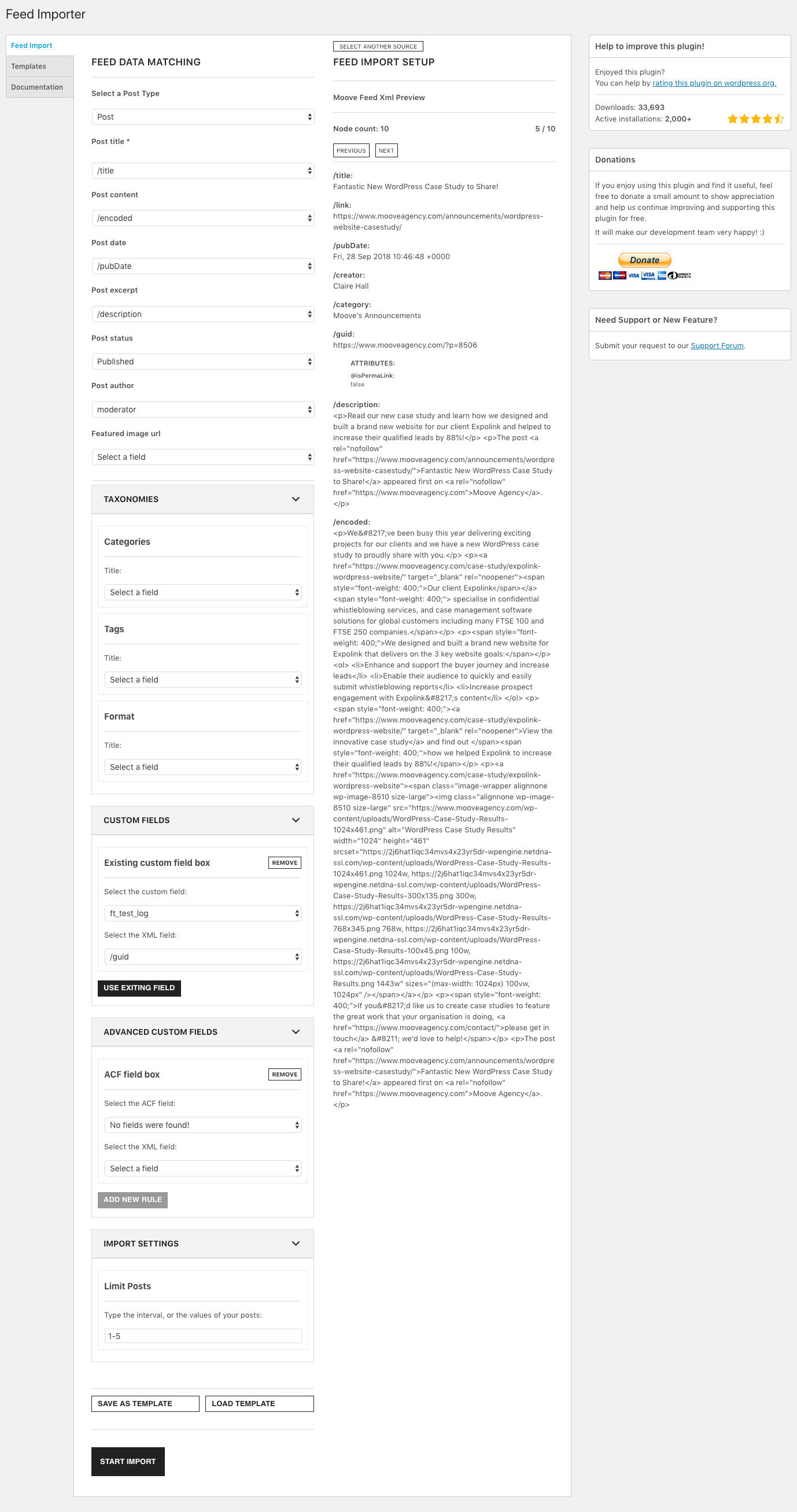
Import XML feed - Matching elements

Import XML feed - Import finished

Import XML feed - Templates
Plugins semelhantes


Import and export your widgets.
Easily import any file of any size into any plugin, post type, custom field, or taxonomy. Supports WooCommerce, ACF, images, galleries, users, real es …

Adicionar do servidor is designed to help ease the pain of bad web hosts, allowing you to upload files via FTP or SSH and later import them into WordPress.

Easily export or import your WordPress customizer settings!

Search & Replace data in your database with WordPress admin, replace domains/URLs of your WordPress installation.
Do mesmo author (Moove Agency)

Cookie notice banner for GDPR, CCPA, EU cookie law, data protection and privacy regulations and other cookie law and consent notice requirements on yo …