Comprehensive image optimization with WebP, AVIF, Lazy Load, and more. Optimize images automatically for Faster Sites and Happy Visitors.

Inline Image Upload for BBPress
Hospedagem WordPress com plugin Inline Image Upload for BBPress
Onde posso hospedar o plugin Inline Image Upload for BBPress?
Este plugin pode ser hospedado em qualquer servidor que tenha WordPress instalado. Recomendamos optar por uma hospedagem de confiança, com servidores adaptados para WordPress, como o serviço de hospedagem da MCO2.
Hospedando o plugin Inline Image Upload for BBPress em uma empresa de hospedagem de confiança
A MCO2, além de instalar o WordPress na versão mais nova para seus clientes, disponibiliza o WP SafePress, um sistema singular que assegura e aumenta a performance do seu site simultaneamente.
Por que a Hospedagem WordPress funciona melhor na MCO2?
A Hospedagem WordPress funciona melhor pois a MCO2 possui servidores otimizados para WordPress. A instalação de WordPress é diferente de uma instalação trivial, pois habilita imediatamente recursos como otimização automática de imagens, proteção da página de login, bloqueio de atividades suspeitas diretamente no firewall, cache avançado e HTTPS ativado por padrão. São plugins que potencializam seu WordPress para a máxima segurança e o máximo desempenho.
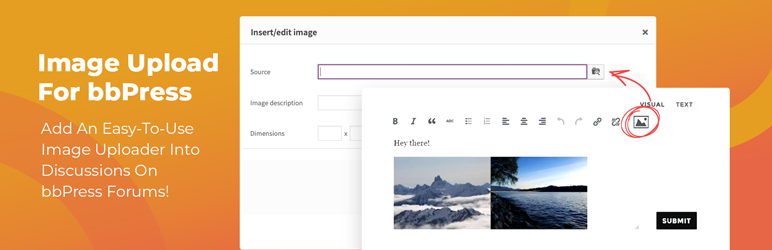
This plugin enables the TinyMCE WYSIWYG editor for BBPress forum topics and replies and adds a button to the editor’s “Insert/edit image” dialog that allows forum users to upload images from their computer and insert them inline into their posts.
Image storage and compatibility
Uploaded images can be stored using a pluggable storage engine, selectable under Forum Images in the BerryPress menu:
- Filesystem (default) – images are stored in your WordPress uploads directory. You can change the storage directory path and URL in the settings (use
{uploads}as a placeholder for the uploads directory). Changing it only affects future uploads; existing images stay where they are. - Infinite Uploads – when the Infinite Uploads plugin is active, forum images are automatically offloaded to cloud storage, served through its CDN and optimized. No extra setup is required, and the “Cleanup Unnecessary Files” tool also removes unused images from the cloud.
- Amazon S3™ – available with the optional S3 Image Storage for bbPress add-on (paid).
The plugin also works with BuddyPress.
Maintenance
The “Cleanup Unnecessary Files” button removes temporary uploads older than 24 hours, images that were removed from existing topics and replies, and image folders of deleted posts, on whichever storage engine is active.
A pro version with the following additional features is also available:
- Limit which user roles are permitted to upload images.
- Limit the number of uploaded images allowed per post.
- Automatically downsize images to fit specified maximum dimensions.
- Convert all uploaded images to the same image format, if desired.
- Set PNG and JPEG compression levels so images take up less disk space.
- Allow users to view enlarged images in a lightbox by clicking on them within the post.
- View total image count and file size statistics.
- Use Amazon S3™ to store and serve uploaded images in submitted forum posts (optional; requires add-on plugin purchase).
Amazon Web Services, the “Powered by Amazon Web Services” logo, AWS, Amazon Simple Storage Service, and Amazon S3 are trademarks of Amazon.com, Inc. or its affiliates in the United States and/or other countries. Potent Plugins is not affiliated with Amazon.com, Inc. or Amazon Web Services.
If you like this plugin, please consider leaving a comment or review.
You may also like these plugins
BerryPress has built a range of powerful plugins for WooCommerce and WordPress. Check out some of our favorites below – and don’t forget to leave a ⭐⭐⭐⭐⭐ review to help others in the community discover them!
- Ninjalytics – Report, analyze, and visualize your store’s data to gain actionable insights for growth, support operations, and satisfy customers!
- Live Carts for WooCommerce – Free plugin to view and analyze live shopping carts in real time to understand user behavior and optimize conversions (Pro version also available). Integrates with Ninjalytics to add 4 specialized cart reporting templates.
- Export Order Items for WooCommerce – Export detailed order data for every sale in your WooCommerce store. Simplify fulfillment, create accounting reports in just a few clicks, and download CSV files for easy sharing and compatibility.
- PhotoBerry Studio – A complete solution to enhance and streamline your photography workflow, with tools for image organization, gallery management, and client proofing.
- Automatic Product Categories – Available as a free version and Pro. Automatically assign products to categories and tags, based on custom rules, saving you time and keeping your store organized.
- Advanced Order Editor for WooCommerce – Add editable Paid date, Completed date and Payment method fields in the WooCommerce order admin screen.
- LoginBerry – Bundles account verification, two-factor authentication (2FA), passwordless login, and login logs. Each feature can be enabled or disabled independently.
- Customer Address Change Notification for WooCommerce – Get instant notifications when customers update their shipping or billing address, helping you stay on top of changes and prevent delivery issues.
To view BerryPress’s premium WordPress plugins and themes, visit our WordPress products catalog page.
Capturas de tela

The Image toolbar icon in the TinyMCE editor for forum topics and replies.
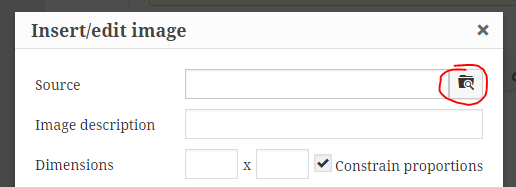
The Browse button in the Image dialog, which allows the user to select and upload an image from their computer for inline insertion into their forum topic or reply.
Plugins semelhantes


Autoptimize acelera seu siste ao otimizar JS, CSS, imagens (incluindo carregamento tardio), HTML e fontes do Google, deixando JS assíncronos, removendo os emojis e mais.

Easily replace any attached image/file by simply uploading a new file in the Media Library edit view - a real time saver!

Ofereça imagens WebP autogeradas ao invés de JPEG/PNG para navegadores que suportam WebP.

Otimize imagens automaticamente com compressão em massa, carregamento tardio, conversão para WebP e AVIF, e o CDN de imagens CloudFront. Melhore o Core Web Vitals e aumente suas conversões!

Automatically resizes huge image uploads. Are contributors uploading huge photos? Tired of manually resizing your images? Imsanity to the rescue!
Do mesmo author (BerryPress)

Use reCaptcha v2 by Google to combat spam at your login and registration forms, WooCommerce account forms, contact forms, and more!

A lightweight social sharing plugin for showing social networks when users highlight text, share images, headlines, or use Click to Share.