
O Rank Math SEO é o melhor plugin de SEO para WordPress, com os recursos de muitas ferramentas de SEO e SEO com IA em um único pacote, para ajudar a multiplicar seu tráfego de SEO.

HTML Page Sitemap (Block and Shortcode)
Hospedagem WordPress com plugin HTML Page Sitemap
Onde devo hospedar o plugin HTML Page Sitemap?
Este plugin pode ser hospedado em qualquer provedor que possua WordPress instalado. Recomendamos escolher uma hospedagem confiável, com servidores adaptados para WordPress, como o serviço de hospedagem da MCO2.
Hospedando o plugin HTML Page Sitemap em um provedor confiável
A MCO2, além de configurar e instalar o WordPress na versão mais atual para seus clientes, disponibiliza o plugin WP SafePress, um sistema exclusivo que assegura e otimiza seu site ao mesmo tempo.
Por que a Hospedagem WordPress funciona melhor na MCO2?
A Hospedagem WordPress funciona melhor pois a MCO2 possui servidores otimizados para WordPress. A instalação de WordPress é diferente de uma instalação trivial, pois habilita imediatamente recursos como otimização de imagens, proteção da página de login, bloqueio de atividades maliciosas diretamente no firewall, cache avançado e HTTPS ativado por padrão. São plugins que potencializam seu WordPress para a máxima segurança e o máximo desempenho.
This simple plugin adds an HTML (Not XML) sitemap of your pages (not posts) by using the shortcode [html_sitemap]. This plugin can display a sitemap with specific depths, from a specific parent page and include/exclude specific pages by ID. The sitemap uses the unordered HTML list tags <ul> and <li>.
New for 2.0 is the HTML Sitemap Block, now you can add a HTML Sitemap using the WordPress Block Editor.
Attributes include sort_column, sort_order, exclude, include, depth, child_of, meta_key, meta_value, authors, number, offset, post_type, and post_status parameters from the wp_list_pages function. In addition you can also set class, id, and ordered_list_type to further customize the html page sitemap.
This plugin is perfect for those who use WordPress as a CMS.
Block / Shortcode Tag Attribute Options
The following wp_list_pages tag attribute options are supported:
authors— Comma-separated list of author IDs. Default empty (all authors).child_of— ID of child page, ‘CURRENT’, or ‘PARENT’. The value ‘CURRENT’ will use the current page ID. The value ‘PARENT’ will use the current page parent ID.depth— -1 (any depth), 0 (all pages), 1 (top-level pages only), 2 (top-level and 2nd level pages only), etc.date_format— e.g. ‘l, F j, Y’. See WordPress Date Formatexclude— Comma-separated list of page IDs to exclude.include— Comma-separated list of page IDs to include.item_spacing— Whether to preserve whitespace within the menu’s HTML. Accepts ‘preserve’ or ‘discard’.meta_key— Limits output to pages having a specific custom field key.meta_value— Limits output to pages having a specific custom field value.number— Limits the number of links displayed (SQL LIMIT).offset— Skips a specific number of pages before displaying the list.post_type— Post type to query for. Default ‘page’post_status— Comma-separated list or array of post statuses to include. Default ‘publish’show_date— Whether to display the page publish or modified date for each page. Accepts ‘modified’ or any other value. An empty value hides the date.sort_column— Comma-separated list of column names to sort the pages by. Accepts ‘post_author’, ‘post_date’, ‘post_title’, ‘post_name’, ‘post_modified’, ‘post_modified_gmt’, ‘menu_order’, ‘post_parent’, ‘ID’, ‘rand’, or ‘comment_count’. Default ‘post_title’.sort_order— ‘ASC’ or ‘DESC’. Default ‘ASC’.
Please see documentation for the wp_list_pages function for reference.
Demos
In addition the following tag attributes are available exclusively for this plugin:
class— Specify class values for the initial HTML Page Sitemap<ul>list tag.id— Specify ID values for the initial HTML Page Sitemap<ul>list tag.ordered_list_type— Specify the ordered list type. Accepts ”, ‘1’, ‘A’, ‘a’, ‘I’, and ‘i’. Default empty value will display an unordered list.
The ordered_list_type attribute options in more detail:
ordered_list_type=""— The list items will be unorderedordered_list_type="1"— The list items will be numbered with numbersordered_list_type="A"— The list items will be numbered with uppercase lettersordered_list_type="a"— The list items will be numbered with lowercase lettersordered_list_type="I"— The list items will be numbered with uppercase roman numbersordered_list_type="i"— The list items will be numbered with lowercase roman numbers
Note: This plugin only works with Hierarchical Custom Post Types such as pages. This plugin will not work if your post type is not hierarchical. Not setting an ordered_list_type will use an unordered list (default).
Examples
First example shows how to add a sitemap for the entire site.
[html_sitemap]
Example shortcode will add a sitemap to a page displaying a depth limit of 3 and exclude page ID 708.
[html_sitemap depth=3 exclude=708]
Example shortcode will add a sitemap to a page displaying only children and grandchildren of the current page.
[html_sitemap depth=2 child_of=CURRENT]
Example shortcode will add a sitemap to a page displaying children and grandchildren of the parent page (would include the curent page as well).
[html_sitemap depth=2 child_of=PARENT]
Example shortcode will add a sitemap displaying the page modified date with the pages sorted by the menu order number.
[html_sitemap show_date=modified sort_column=menu_order]
Example shortcode excluding multiple pages with ids 708, 1024 and 42.
[html_sitemap exclude="708,1024,42"]
Example shortcode will add a class attribute to the <ul> tag.
[html_sitemap class="custom-class"]
Example shortcode will add an id attribute to the <ul> tag.
[html_sitemap id="custom-element-id"]
Example shortcode will display an ordered list using lowercase letters with a depth of 1.
[html_sitemap ordered_list_type="a" depth=1]
Example shortcode with roman numbering in capitalization, with custom field “featured-list” and custom value “yes”
[html_sitemap ordered_list_type="I" meta_key=featured-list meta_value=yes sort_column=post_date]
For the latest information visit the website.
http://www.pluginspodcast.com/plugins/html-page-sitemap/
Contributors
Angelo Mandato, founder of Painless Analytics and FrontPup – Plugin author
Capturas de tela
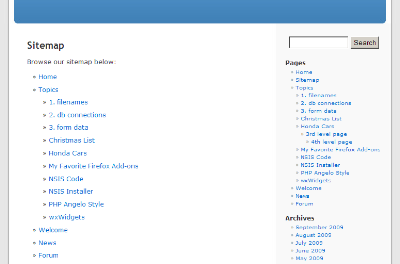
HTML Page Sitemap in the Default WordPress theme.
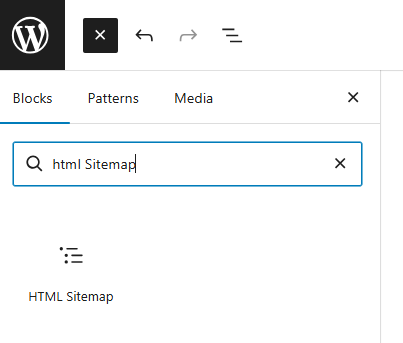
HTML Sitemap Block found in widgets category.
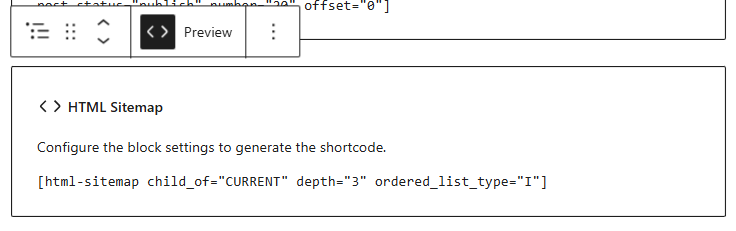
HTML Sitemap Block in editor.
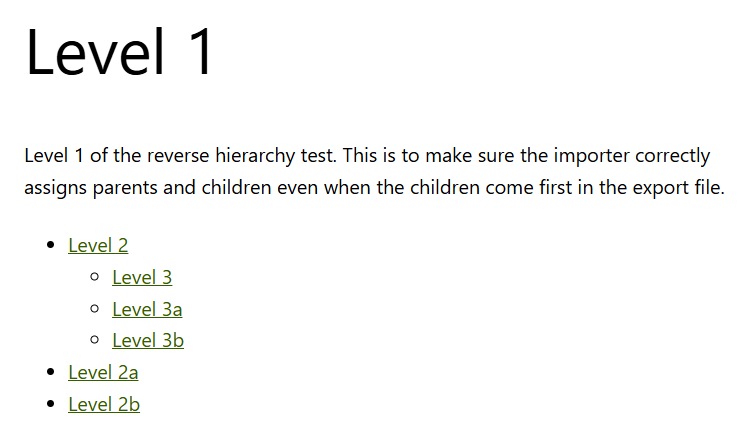
Preview of Sitemap block in page "Level 1" with child_of set to CURRENT.
Plugins semelhantes


Generate multiple types of sitemaps to improve SEO and get your website indexed quickly.

Adiciona uma interface de navegação de páginas mais avançada.

A comprehensive collection of visual components for your site

Add a sitemap on any of your page using the simple shortcode [wp_sitemap_page]. Improve the SEO and navigation of your website.

A powerful yet user friendly plugin that automatically creates a table of contents. Can also output a sitemap listing all pages and categories.