
Real-time SEO guidance, schema, and AI built in. Help search engines and AI systems understand your content. All AI tools included, no hidden fees.

Hierarchical HTML Sitemap
Hospedagem WordPress com plugin Hierarchical HTML Sitemap
Onde posso hospedar o plugin Hierarchical HTML Sitemap?
Este plugin pode ser hospedado em qualquer hospedagem que tenha WordPress configurado. Recomendamos fortemente optar por uma hospedagem confiável, com servidores otimizados para WordPress, como o serviço de hospedagem da MCO2.
Hospedando o plugin Hierarchical HTML Sitemap em uma empresa de hospedagem confiável
A MCO2, além de instalar o WordPress na versão mais atualizada para seus clientes, fornece o plugin WP SafePress, um mecanismo exclusivo que salvaguarda e aumenta a performance do seu site conjuntamente.
Por que a Hospedagem WordPress funciona melhor na MCO2?
A Hospedagem WordPress funciona melhor pois a MCO2 possui servidores otimizados para WordPress. A instalação de WordPress é diferente de uma instalação trivial, pois habilita imediatamente recursos como otimização de imagens e fotos, proteção da página de login, bloqueio de atividades suspeitas diretamente no firewall, cache avançado e HTTPS ativado por padrão. São recursos que potencializam seu WordPress para a máxima segurança e o máximo desempenho.
Hierarchical HTML Sitemap offers visitors an easy and intuitive way to navigate your blog.
This plugin generates an HTML sitemap of your WordPress blog. It displays a list of posts grouped by hierarchically sorted categories. By using a shortcode, you can display it on a page or anywhere else that supports shortcodes, such as a widget.
The output does not include CSS or JavaScript files. It is pure HTML, ready to inherit or receive your theme’s styles.
Features
- Short and easy shortcode:
[htmlmap]. - Categories sorted hierarchically.
- Displays posts and/or pages.
- Can exclude specified posts, pages, or categories.
- Displays category navigation above the posts list.
- Displays post publication dates.
- Clean HTML without scripts.
- Does not enqueue unnecessary JavaScript or CSS files.
- No ads or author links in the output.
Usage and options
The [htmlmap] shortcode accepts these optional attributes:
exclude: post or page IDs to omit, for example[htmlmap exclude="445,446"].exclude_cat: category IDs to omit, for example[htmlmap exclude_cat="1,34"].showpages: display the list of pages, for example[htmlmap showpages].hidecloud: hide category navigation, for example[htmlmap hidecloud].showdescription: display category descriptions, for example[htmlmap showdescription].hidedate: hide post publication dates, for example[htmlmap hidedate].hidecount: hide post counts in category headings, for example[htmlmap hidecount].
You can combine attributes, for example:
[htmlmap exclude="3546,7398" exclude_cat="1,34" showpages hidecloud]
HTML structure and CSS classes
The shortcode preserves existing category heading IDs (cat_<term-id>), the
category navigation class (cat), and the empty-category class (null).
Additional classes are available for theme customisation:
htmlmap-post-list: each category’s post list.htmlmap-post: each post list item.htmlmap-children: the list item containing child categories.htmlmap-empty-category: added alongside the legacynullclass.htmlmap-category-description: a displayed category description.htmlmap-page-list: the optional pages list.htmlmap-page: each page list item.
Child categories are rendered after their parent category’s posts inside a
dedicated list item, rather than inside the final post item.
Extra
- GitHub repository for issues and contributions.
Capturas de tela
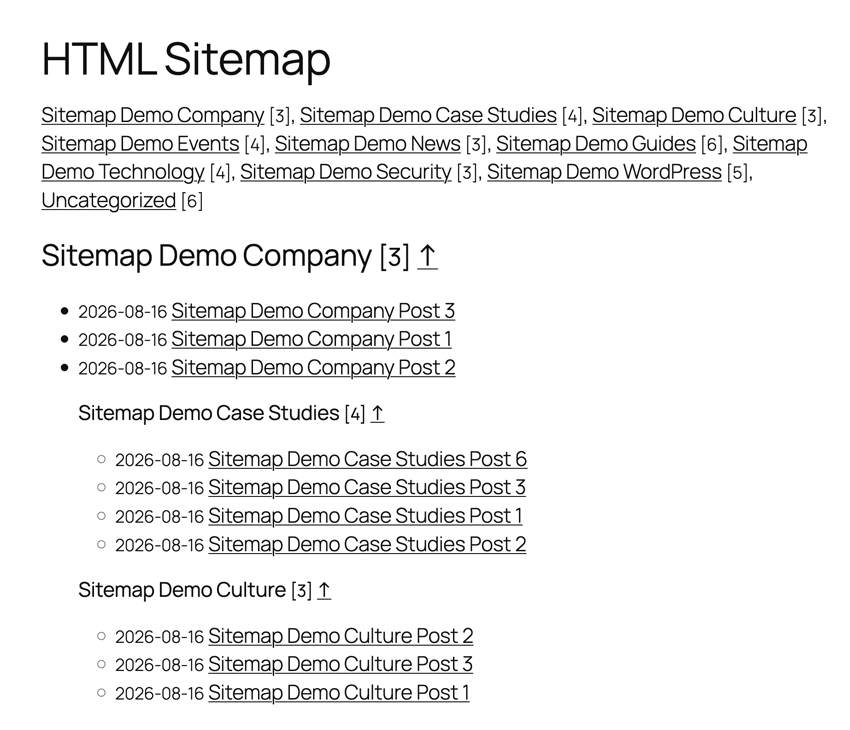
Example of a sitemap.
Plugins semelhantes


Aumente seu tráfego orgânico e sua visibilidade com IA, usando ferramentas poderosas de SEO, sitemaps XML, automação de dados estruturados (schemas) e SEO com IA integrado, tudo em um só lugar.

AIOSEO is the WordPress SEO plugin. Boost SEO rankings with AI SEO tools, schema, meta descriptions, XML sitemaps & rank tracking.

Gerencie redirecionamentos 301, monitore erros 404 e melhore seu site, sem precisar entender de Apache ou Nginx.

Generate multiple types of sitemaps to improve SEO and get your website indexed quickly.

Search Engine (SEO) & Performance Optimization (WPO) via caching. Integrated caching: CDN, Page, Minify, Object, Fragment, Database support.