
Apenas um outro plugin de formulário de contato. Simples, mas flexível.

WPBruiser – No CAPTCHA Anti-Spam & Login Protection
Hospedagem WordPress com plugin WPBruiser – No CAPTCHA Anti-Spam & Login Protection
Onde devo hospedar o plugin WPBruiser – No CAPTCHA Anti-Spam & Login Protection?
Este plugin pode ser hospedado em qualquer hospedagem que tenha WordPress instalado. Recomendamos optar por um provedor de hospedagem de confiança, com servidores adaptados para WordPress, como o serviço de hospedagem da MCO2.
Hospedando o plugin WPBruiser – No CAPTCHA Anti-Spam & Login Protection em um provedor seguro
A MCO2, além de configurar e instalar o WordPress na versão mais atualizada para seus clientes, fornece o plugin WP SafePress, um mecanismo singular que salvaguarda e melhora seu site ao mesmo tempo.
Por que a Hospedagem WordPress funciona melhor na MCO2?
A Hospedagem WordPress funciona melhor pois a MCO2 possui servidores otimizados para WordPress. A instalação de WordPress é diferente de uma instalação trivial, pois habilita imediatamente recursos como otimização automática de imagens, proteção da página de login, bloqueio de atividades suspeitas diretamente no firewall, cache avançado e HTTPS ativado por padrão. São plugins que potencializam seu WordPress para a máxima segurança e o máximo desempenho.
WPBruiser stops automated form submissions before WordPress ever processes them. Every protected form gets a hidden token, which the visitor’s browser requests in the background. A real person never sees it or has to do anything. A bot that posts straight to your login, registration or comment endpoint arrives without a valid token and is turned away.
Because bad submissions are rejected at the door, they never land in your moderation queue and never create junk user accounts. You also don’t have to ask visitors to solve a puzzle, which is often the step where real people give up on a form.
Everything runs on your own server. WPBruiser does not call remote APIs, does not load outside scripts or fonts and does not send your visitors’ data anywhere.
Notice: WPBruiser was created by Mihai Chelaru. As of version 3.2.0, it is maintained by WPZOOM.
Forms you can protect
Turn protection on or off for each form on the plugin’s settings screens:
- WordPress login
- WordPress registration
- WordPress lost password
- WordPress comments, with an optional character limit for the comment, name, email and website fields
Supported third-party plugins
- Ultimate Member: login, registration and password reset forms
- WP-Members: login and registration forms
- Login With Ajax: its AJAX login, registration and lost password forms
- Jetpack: the Jetpack contact form
- MailChimp for WordPress: every sign-up form you build with it
- WPZOOM Forms: every form you build with it, placed as a block, a shortcode or an Elementor widget
- HTML Forms: every form you build with it
- wpDiscuz: comments posted through its AJAX comment system
Brute-force and hardening tools
- Detects a login brute-force attack in progress and can email you when one starts
- Automatically blocks IP addresses that keep hammering your login
- Optionally rejects login attempts from IP addresses on the bundled lists of known web attackers and anonymous proxies, including Tor exit nodes
- Stops user enumeration through
/?author=Nscans, the oEmbed endpoint and the REST API - Turns off XML-RPC completely (Jetpack’s own XML-RPC requests are still allowed), or removes only the pingback methods
- Sends an email whenever an account with administrator rights signs in
- Hides the WordPress version and removes the RSD and Windows Live Writer header links
- Hides the website field and the notes text on the comment form
IP address management
- Allow list and block list for single addresses and ranges, IPv4 and IPv6
- Finds the visitor’s real IP address behind CloudFlare, Incapsula, Amazon CloudFront, AWS ELB, Rackspace and Sucuri, and lets you register other trusted proxy headers
Reports
- Every blocked attempt is logged to a database table of its own
- Charts show which forms are attacked most, and a world map shows where attempts come from (the country lookup is done locally)
- Block or unblock an address straight from the reports screen
- Old log entries are deleted automatically after the number of days you choose, or you can turn logging off
Everyday details
- Test Mode, which emails you about every check so you can confirm protection works before you rely on it
- Network admin screens for WordPress Multisite
- Works with full-page caching: the token is requested fresh on every page view
- The front-end script is a single small file, loaded deferred so it doesn’t hold up page rendering
External services
WPBruiser does not connect to any external service. It makes no remote API requests, collects no telemetry, runs no license or update checks of its own and loads no third-party fonts or scripts. All detection happens on your server, and the IP reputation and country data it uses ship inside the plugin.
Support
Found a bug or have a question? Start a topic on the WordPress.org support forum. It helps us a lot if you include your WordPress and PHP versions, the form or plugin involved, and the steps that reproduce the problem.
Copyright
WPBruiser, Copyright (C) 2014-2018 Mihai Chelaru.
Modifications and continued development, Copyright (C) 2026 WPZOOM.
WPBruiser (formerly GoodBye Captcha) was originally created by Mihai Chelaru and is distributed under the terms of the GNU General Public License, version 2 or (at your option) any later version. The original author’s copyright notices are kept in the source files.
WPBruiser bundles the following third-party resources, each under its own license:
- phpCrypt, Copyright (C) 2005 Ryan Gilfether (GPLv3 or later)
- phpseclib 0.3.10 (BigInteger), Copyright Jim Wigginton (MIT)
- Bootstrap 3.4.1 and Glyphicons Halflings, Copyright Twitter, Inc. (MIT)
- Flot 0.8.3, Copyright IOLA and Ole Laursen (MIT)
- flot.tooltip 0.8.5, Krzysztof Urbas and Evan Steinkerchner (MIT)
- jVectorMap 1.2.2, Copyright Kirill Lebedev (MIT)
- Raphaël 2.3.0, Copyright Dmitry Baranovskiy (MIT)
- morris.js 0.5.1, Copyright Olly Smith (BSD-2-Clause)
- Multiselect 2.2.6, Copyright Adrian Crisan (MIT)
The Integrations screen shows the icons the integrated plugins publish on WordPress.org (Gravity Forms: the icon of its official Gravity Forms CLI add-on). Plugin names and logos are trademarks of their owners and are used only to identify the integrations.
Capturas de tela

General settings, including Test Mode and log retention

Security screen with the brute-force options

Adding trusted addresses to the allow list

Adding addresses and ranges to the block list

Choosing which core WordPress forms to protect

WordPress hardening options

Jetpack contact form protection

Ultimate Member form protection

Protection settings for other supported plugins

Inspecting a blocked comment in the reports

Blocking an IP address from the reports
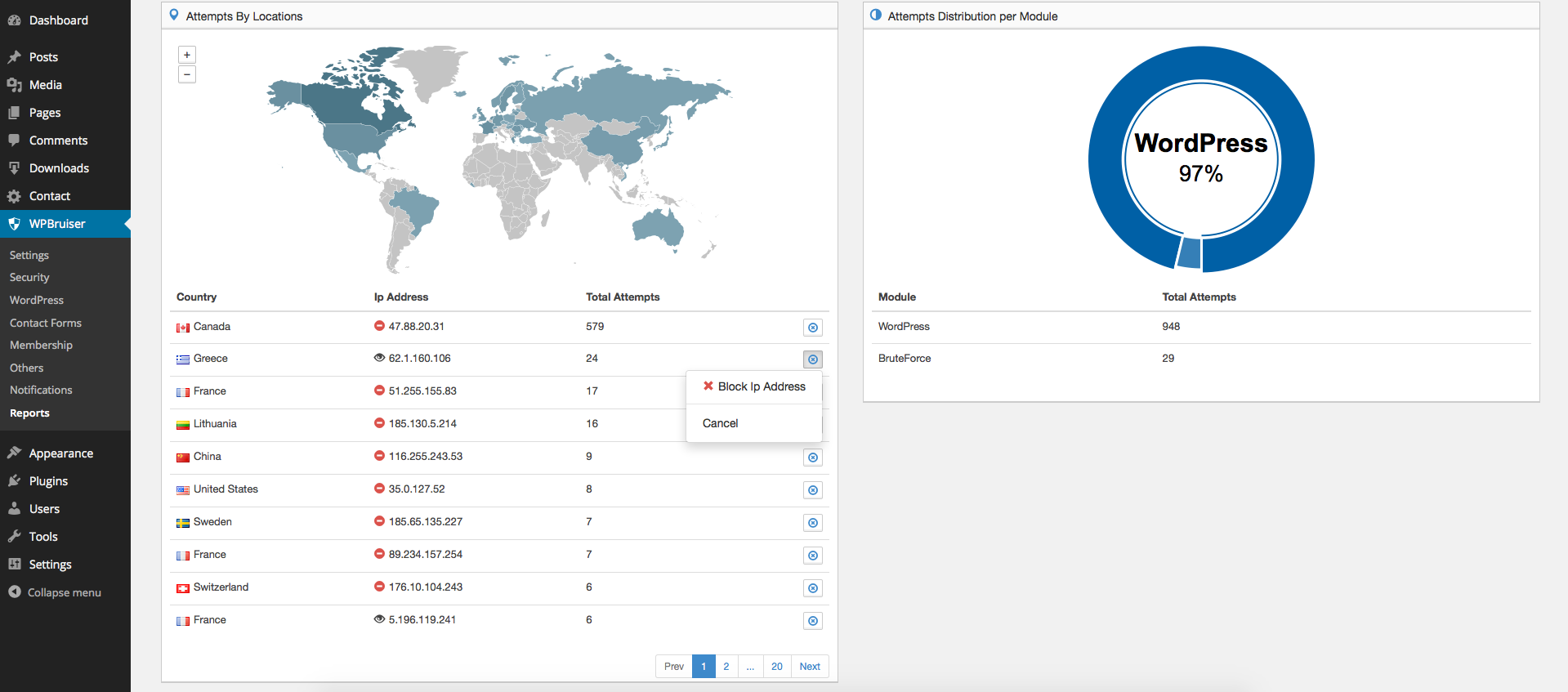
Blocked attempts by country

Detailed report of blocked attempts
Plugins semelhantes


O melhor plugin de formulário de contato para o WordPress. Arraste e solte o editor de formulários para criar incríveis formulários de contato, de pagamento e outros formulários personalizados.

The best anti-spam protection to block spam comments and spam in a contact form. The most trusted antispam solution for WordPress and WooCommerce.

WordPress login security with brute force protection, Two-factor authentication (2FA/MFA), firewall, IP/country blocking, and login monitoring

Obtenha um plugin de formulário de contato rápido. Crie formulários avançados usando o construtor de formulários de arrastar e soltar com todos os recursos inteligentes.

Sophisticated antispam plugin for effective daily comment and trackback spam-fighting. Built with data protection and privacy in mind.
Do mesmo author (WPZOOM)

AI chat that answers visitors from your own pages, Click to Chat for WhatsApp & Telegram, social icons & share buttons — one floating button.

Recipe Card Blocks with Schema Markup — create SEO-optimized recipes with Gutenberg, Elementor & AMP support