Contact Form 7 Signature Addon making autographs of people who want to get an E-signature in the system. We build too easy to access and use for users …

Free Gift Product For WooCommerce
Hospedagem WordPress com plugin Free Gift Product For Woocommerce
Onde posso hospedar o plugin Free Gift Product For Woocommerce?
Este plugin pode ser hospedado em qualquer hospedagem que possua WordPress configurado. Recomendamos utilizar uma empresa de hospedagem de confiança, com servidores adaptados para WordPress, como o serviço de hospedagem de sites da MCO2.
Hospedando o plugin Free Gift Product For Woocommerce em uma empresa de hospedagem seguro
A MCO2, além de instalar o WordPress na versão mais nova para seus clientes, oferece o WP SafePress, um mecanismo singular que salvaguarda e otimiza seu site simultaneamente.
Por que a Hospedagem WordPress funciona melhor na MCO2?
A Hospedagem WordPress funciona melhor pois a MCO2 possui servidores otimizados para WordPress. A instalação de WordPress é diferente de uma instalação trivial, pois habilita imediatamente recursos como otimização automática de imagens, proteção da página de login, bloqueio de atividades maliciosas diretamente no firewall, cache avançado e HTTPS ativado por padrão. São plugins que potencializam seu WordPress para a máxima segurança e o máximo desempenho.
Free Gift Product For WooCommerce is the easiest way to reward your WooCommerce customers with free gift products — automatically added to the cart when shoppers meet your custom conditions.
Whether you want to offer a free gift when a customer adds specific products, shops from a certain category, or reaches a cart total threshold, this plugin has you covered with three powerful rule types — all manageable from a clean, modern admin panel.
No coding required. Works out of the box.
🎬 Live Demo | 💬 Support | ⭐ Get Pro Version
Why Use Free Gift Product For WooCommerce?
Free gifts are one of the most effective eCommerce incentives. They increase average order value, reduce cart abandonment, and create loyal, happy customers. This plugin makes it simple to run gift promotions with zero technical overhead.
FREE FEATURES
🎁 Three Flexible Gift Rule Types
Choose exactly how customers earn their free gift:
1. Products Rule
Trigger a free gift based on the quantity of specific products added to the cart. Set a minimum and maximum quantity range, define which products qualify, and select one or more gift products to offer. Supports simple products, variable products, and product variations.
2. Category Rule
Trigger a free gift when a customer adds a set quantity of products from one or more selected categories. Ideal for running category-wide promotions or clearing slow-moving inventory.
3. Cart Price Rule
Trigger a free gift when the cart subtotal falls within a defined price range. Perfect for “Spend $X, get a free gift” promotions. Coupon discounts are automatically factored into the cart total calculation.
🖥️ Flexible Gift Display on Cart Page
Choose how gift products are presented to eligible customers on the cart page:
- List View — Display gift products in a clean, responsive grid. Control how many items appear per row on desktop, tablet, and mobile independently.
- Popup — Show gift product options in a popup overlay, keeping the cart page clean and reducing distraction.
✏️ Full Message & Text Customisation
Control all text displayed to customers:
- Gift Block Title — Set a custom heading (e.g. “Choose Your Free Gift”) and adjust the font size.
- Gift Product Label in Cart — Customise the label shown next to gift items in the cart (default: “Gift Product”).
- Add to Cart Button Text — Customise the button text on gift product cards.
- Eligibility Message — Show a personalised message when a customer qualifies for a gift. Use the
{allowed_gifts}placeholder to dynamically display the number of gifts they can claim. - Eligibility Button Text — Customise the “Get Your Gift” call-to-action button.
💬 Motivation Messages
Encourage customers who haven’t yet qualified for a gift with dynamic, rule-aware motivation messages. Enable or disable them globally, and customise the message text for each rule type using template tags:
- Products Rule message — uses
{minqty},{maxqty},{allow_gift} - Category Rule message — uses
{categories},{minqty},{maxqty},{allow_gift} - Cart Price Rule message — uses
{mincarttotal},{maxcarttotal},{allow_gift}
⚙️ General Settings
- Enable / Disable Plugin — Turn the entire gift system on or off with a single toggle.
- Allow Gifts Only to Logged-in Users — Restrict gift eligibility to registered, logged-in customers only.
- Auto-Remove Gifts When Rule Fails — Automatically remove a gift from the cart if the customer no longer meets the rule conditions (e.g. removes a qualifying product).
- Shortcode Support — Place the gift selection block anywhere on your site using the
[fgfwp_block_gift]shortcode.
📐 Responsive List View Control
When using List View display mode, independently configure the number of gift product columns shown on:
- Desktop
- Tablet
- Mobile
🔒 PRO VERSION FEATURES
The Pro version unlocks advanced capabilities that are visible but disabled in the free admin panel. Upgrade to remove all limits and access:
1. Enable Gifts on the Checkout Page
In the free version, gift selection is only available on the cart page. The Pro version unlocks the ability to display gift products on the WooCommerce checkout page as well, with its own independent display mode setting:
- List View on checkout
- Popup on checkout
This ensures customers who skip the cart page can still claim their free gift before completing their order — reducing missed gift opportunities and improving the checkout experience.
2. Include Tax in Minimum Cart Total Calculation (Cart Price Rule)
By default, the Cart Price Rule evaluates the cart subtotal excluding tax. The Pro version adds a setting to include tax in the minimum cart total calculation, so you can set gift thresholds that accurately reflect what the customer sees as the total — including VAT or sales tax. This is essential for stores that display tax-inclusive prices.
3. Multiple Rules Per Rule Type
The free version allows one rule per rule type (one Products Rule, one Category Rule, or one Cart Price Rule). The Pro version removes this restriction and lets you create unlimited rules for each rule type, making it possible to:
- Offer different gifts for different quantity ranges of the same product set
- Run simultaneous promotions across multiple product categories, each with its own gift
- Configure tiered cart total thresholds (e.g. spend $50 Gift A, spend $100 Gift B)
- Run multiple independent gift campaigns at the same time without conflict
⭐ Upgrade to Pro to unlock all Pro features.
Capturas de tela
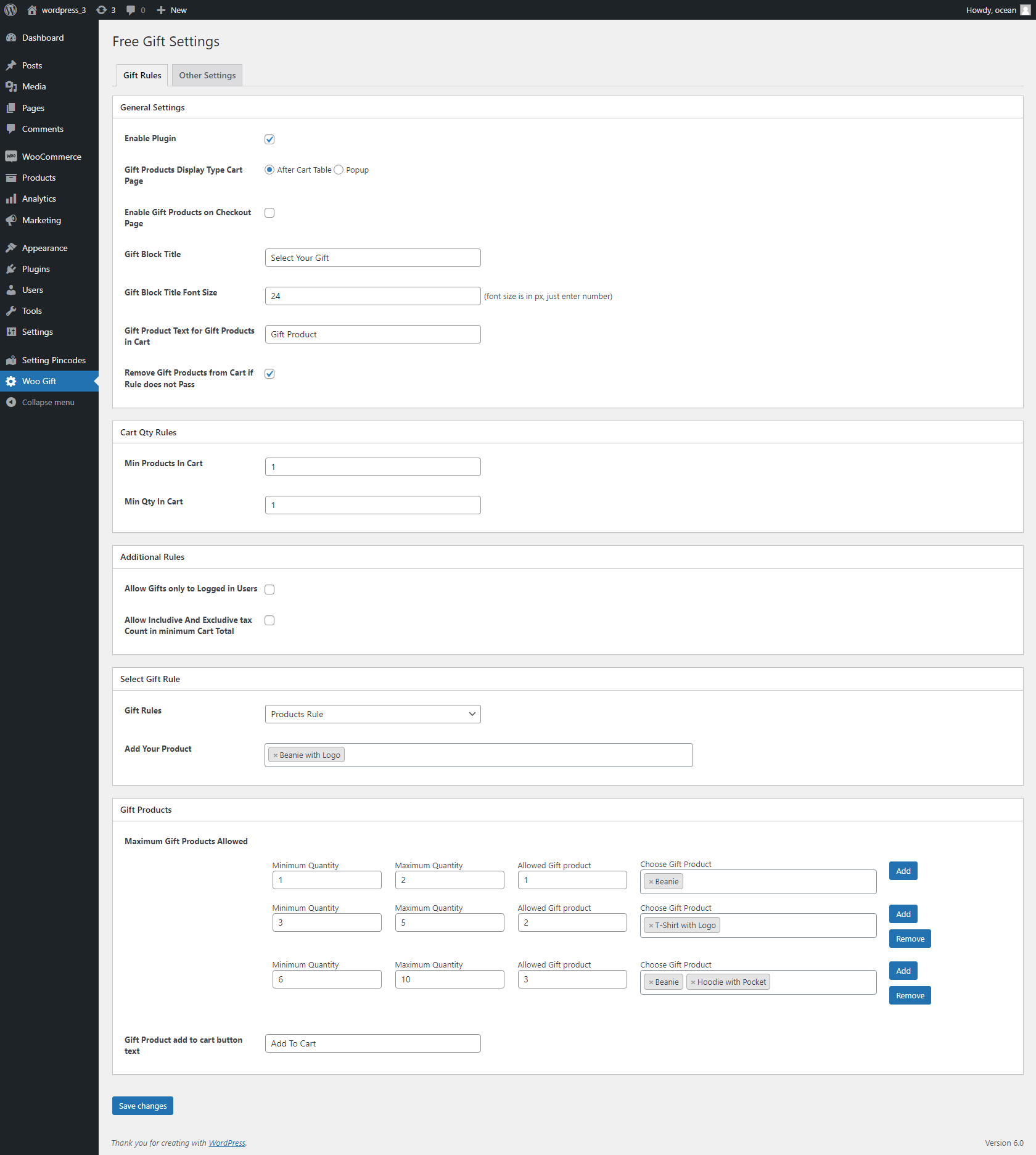
Gift Rule settings panel — configure Products, Category, or Cart Price rules.
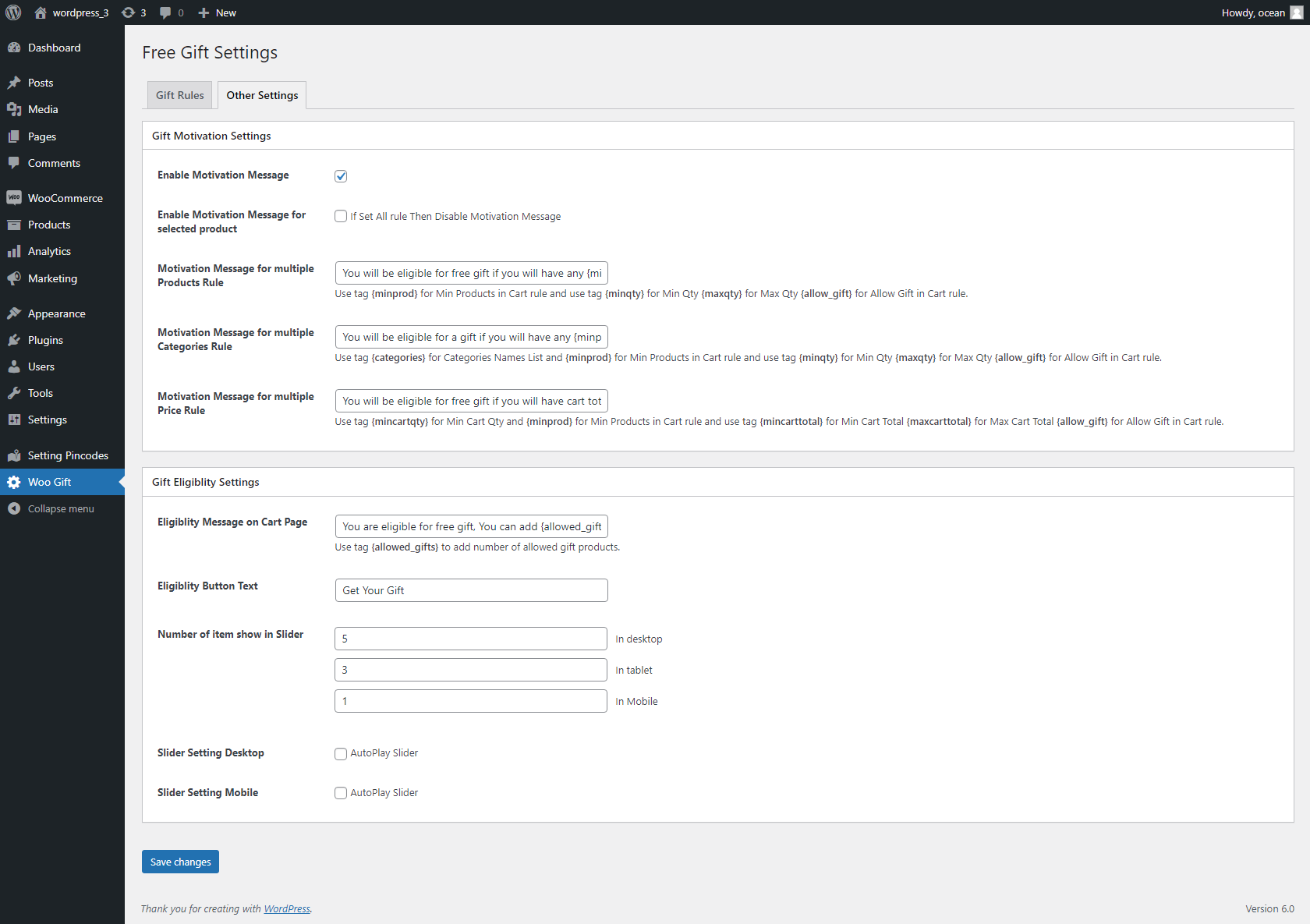
Motivation message and gift eligibility settings.
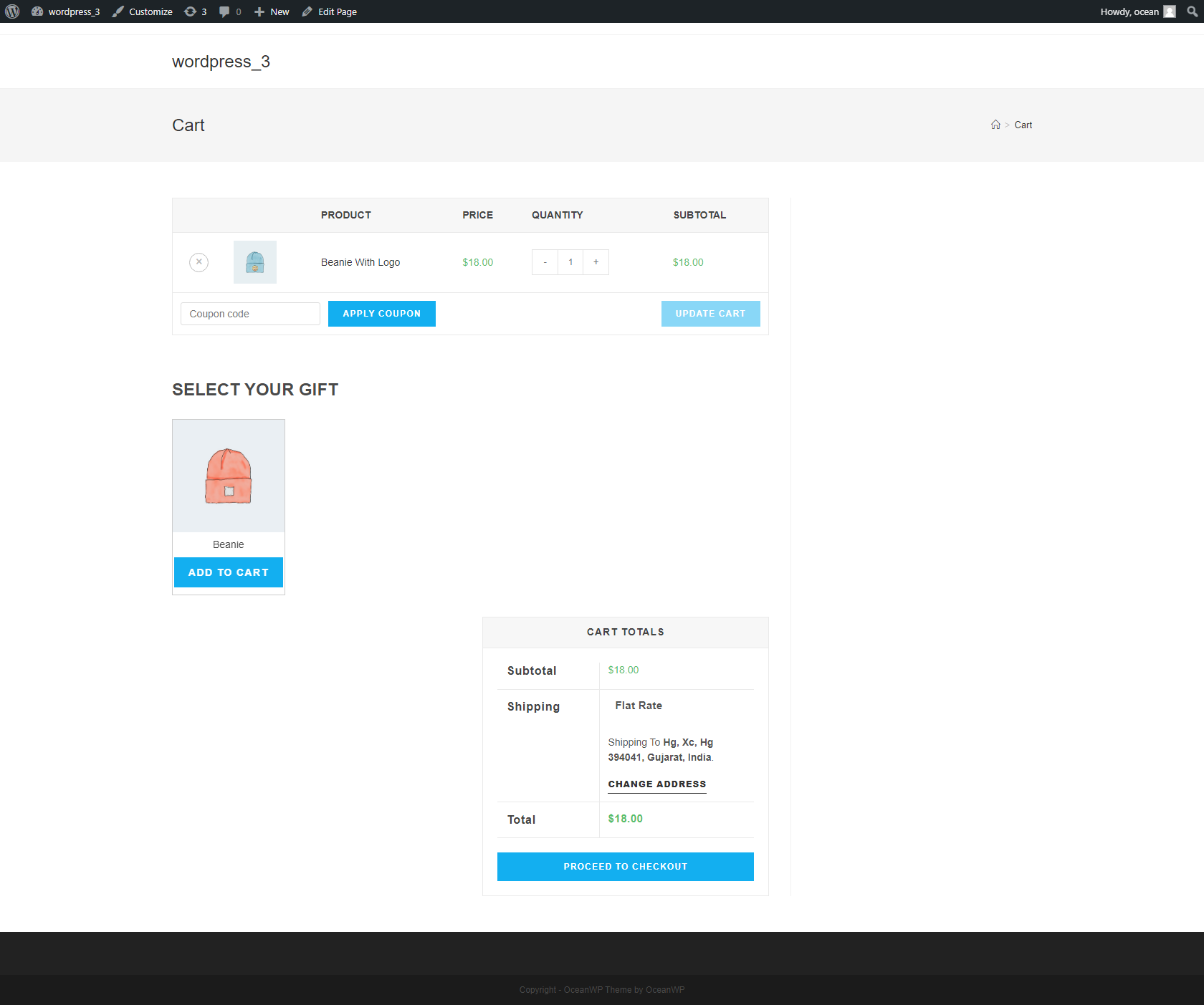
Gift product selection block displayed on the WooCommerce cart page.
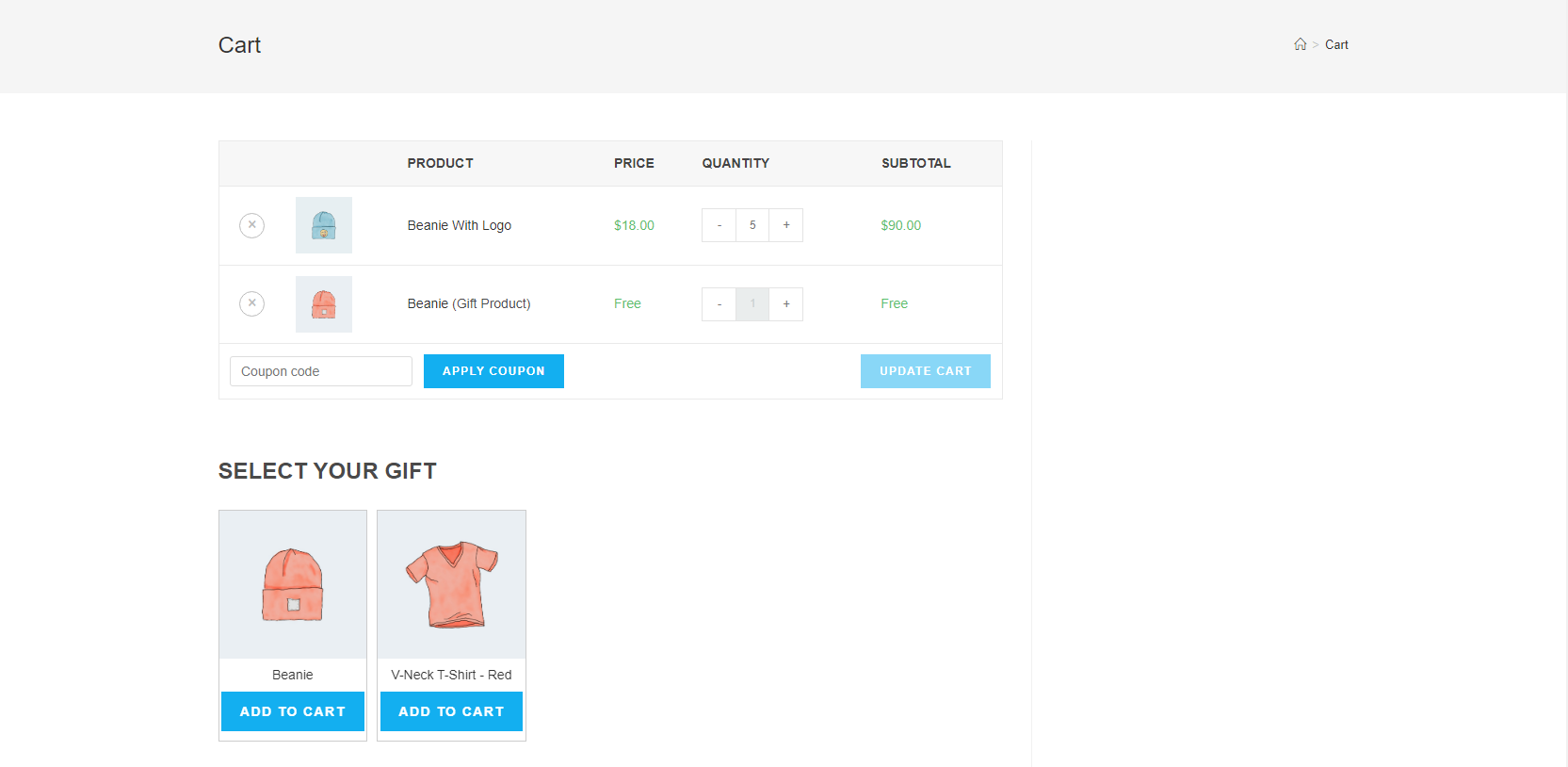
Multiple gift products shown in list view on the cart page.
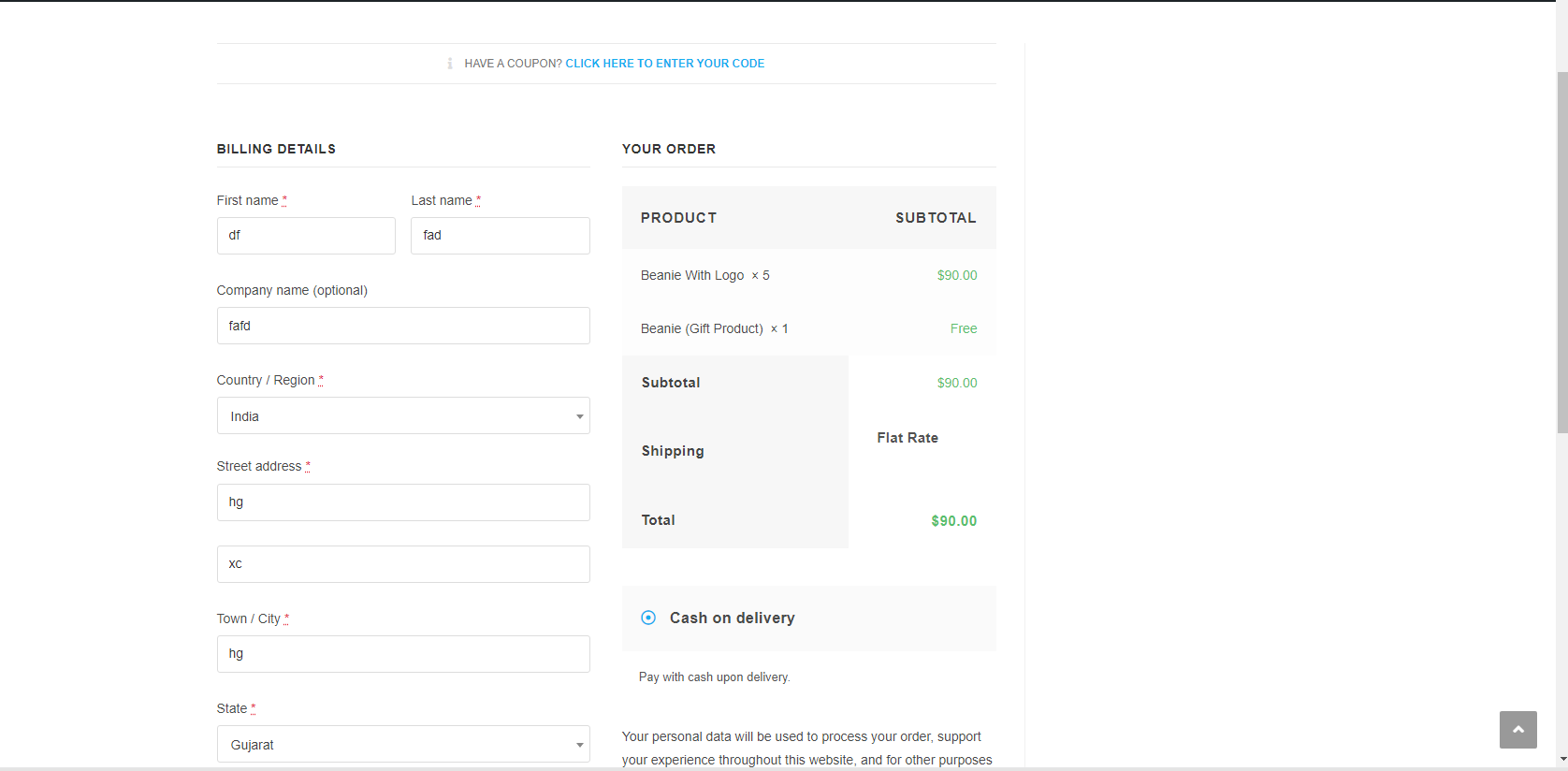
Gift product selection displayed on the WooCommerce checkout page (Pro).
Do mesmo author (silverplugins217)