Recrie as miniaturas para um ou mais de suas imagens enviadas. Útil para quando você alterar seus tamanhos ou seu tema.

Document Gallery
Hospedagem WordPress com plugin Document Gallery
Onde posso hospedar o plugin Document Gallery?
Este plugin pode ser hospedado em qualquer provedor que tenha WordPress instalado. Recomendamos fortemente optar por uma empresa de hospedagem seguro, com servidores adaptados para WordPress, como o serviço de hospedagem de sites da MCO2.
Hospedando o plugin Document Gallery em um provedor de confiança
A MCO2, além de configurar e instalar o WordPress na versão mais atualizada para seus clientes, fornece o plugin WP SafePress, um mecanismo singular que assegura e melhora seu site ao mesmo tempo.
Por que a Hospedagem WordPress funciona melhor na MCO2?
A Hospedagem WordPress funciona melhor pois a MCO2 possui servidores otimizados para WordPress. A instalação de WordPress é diferente de uma instalação trivial, pois habilita imediatamente recursos como otimização de imagens, proteção da página de login, bloqueio de atividades suspeitas diretamente no firewall, cache avançado e HTTPS ativado por padrão. São recursos que potencializam seu WordPress para a máxima segurança e o máximo desempenho.
Display your documents beautifully! Document Gallery creates thumbnail galleries for PDFs, Word documents, PowerPoint presentations, and other file types—just like WordPress does for images.
Key Features
- WordPress Block Editor – Insert galleries with a single click, configure visually
- Automatic Thumbnails – Generates preview images for documents (PDF, Office files, etc.)
- Modern Image Formats – Full support for WebP and AVIF images (WordPress 6.5+)
- Flexible Display – Grid or list layout with optional descriptions
- Smart Filtering – Show all attachments, current post only, or specific documents
- Pagination Support – Handle large document libraries efficiently
- Fully Customizable – Control columns, sorting, links, and styling
- Classic Shortcode –
[dg]shortcode available for template use
Perfect For
- Document libraries and resource centers
- Portfolio and work sample galleries
- Publication and whitepaper collections
- Course materials and downloads
- Legal document repositories
Block Editor Integration
Click the ‘+’ button in the editor and search for “Document Gallery” to insert a gallery block. All configuration options appear in the sidebar—no shortcode knowledge required. Select specific documents or let the gallery auto-populate based on your criteria.
Shortcode Support
The classic [dg] shortcode continues to work perfectly for template files, widgets, and power users who prefer code-based configuration. See the Installation tab for all available options.
Developer Friendly
Document Gallery provides extensive filters and actions for customizing thumbnail generation, HTML output, and gallery queries. See the Installation tab for complete developer documentation.
Partners
- WP Real Media Library: Document Gallery seamlessly integrates with RML by way of a
helper plugin.
Translation
Document Gallery has to-date been translated into 6 languages, listed below.
- Finnish — Thanks, villevetela!
- French — Thanks, Marc Liotard and Traffic Influence!
- Russian — Thanks, demur!
- Spanish — Thanks, Andrew Kurtis and WebHostingHub!
- Swedish — Thanks, mepmepmep!
- Ukrainian — Thanks, demur!
Developers
Document Gallery includes features intended to make integration with other plugins
simple. See the bottom of the Installation tab for specific documentation on
the various features provided.
If this plugin has helped you, please take a moment to rate it!
5.1.1
- Bug Fix: Address Cross-Site Scripting security vulnerability, identified by
João Ramos Maciel with WPScan.
5.1.0
- Feature: Restores support for the classic editor which was removed in 5.0.
Don’t worry – Block Editor support remains as well!
5.0.0
- Major Enhancement: Full WordPress Block Editor integration! Insert and configure
document galleries directly in the editor with an intuitive visual interface. - Enhancement: All gallery settings now available in the block settings panel with
real-time preview updates. - Enhancement: Added support for modern image formats: WebP (WordPress 5.8+) and
AVIF (WordPress 6.5+). Document Gallery now leverages WordPress core thumbnail
generation for these formats. - Removed: TinyMCE/classic editor integration has been removed in favor of modern
block editor. The[dg]shortcode remains fully supported. - Code Quality: Replaced deprecated WordPress functions (
get_option('blog_charset'),
improper use ofaddslashes()) with modern equivalents. - Code Quality: Improved AJAX response handling using WordPress best practices
(wp_send_json(), proper header checking). - Code Quality: Removed all dead code from legacy editor integrations.
- Compatibility: Minimum WordPress version updated to 6.1 (Block API v2 requirement).
- Compatibility: Minimum PHP version remains 5.6.
- Tested Up To: Document Gallery has been tested in WordPress 6.9.
4.4.4
- Bug Fix: We’re BACK! After 6+ years dormant, we’re working to make Document Gallery fully
functional with current WordPress versions. This initial minor release addresses major bugs.
Future more major revisions forthcoming, which will provide deeper integration with the current
WordPress editor.
4.4.3
- Bug Fix: The pagination logic was not working correctly, resulting in the gallery not returning to the
top after changing to a new page in some situations.
4.4.2
- Enhancement: When pagination is enabled for a gallery, navigating to another page will now scroll the page
back to the top of the gallery. - Enhancement: Added support for
%author%todg_icon templatefilter.
4.4.1
- Enhancement: Added support for
%date%and%time%todg_icon_template.
4.4
- Enhancement: Document Gallery updated to support integration with
WP Real Media Library.
Simply install the RML/DG helper plugin to use your RML
folders right from Document Gallery!
4.3.2
- Bug Fix: Bug in editing gallery from post editor has been resolved.
- Note: Minimum WordPress version has been bumped from 4.1 to 4.2.
4.3.1
- Enhancement: WordPress 4.7 includes native support for PDF thumbnails. Document Gallery was already using some
of this, but this update ensures that DG takes full advantage of the new core functionality, including some new
logic to allow older WordPress installs running Document Gallery to take advantage of some of the new goodies. - Tested Up To: Document Gallery has been tested in WP 4.7. Big thanks to
Bjarne for help with testing. - Reminder: Don’t forget that Thumber.co can integrate with Document Gallery to greatly
expand supported file types (eg: Word, PowerPoint, Publisher, and Photoshop). Thumber.co offers a free 1-week trial
if you want to try it before you buy it!
4.2.6
- Bug Fix: Document Gallery was impossible to uninstall on some WordPress systems. This is addressed now.
4.2.5
- Bug Fix: Resolves issue where visual editor gallery preview got stuck loading.
4.2.4
- Tested Up To: Document Gallery has been tested in WP 4.6.
- Bug Fix: Resolves bug in visual editor that would result in the gallery preview never loading in some circumstances.
4.2.3
- Bug Fix: Ghostscript thumbnail generation where the attachment name includes non-ASCII characters was failing
on some server configurations. Kevin Hock identified the bug AND provided the fix. Gold star!
4.2.2
- Bug Fix: Ghostscript-based thumbnail generation was failing in a rare corner case. Thanks
sigvevidnes for identifying this issue!
4.2.1
- Bug Fix: There was a bug in validating user secrets for Thumber.co that has now been addressed.
4.2
- Enhancement: Adding support for
tax_name_include_children attribute, as requested by
John. Thanks for the suggestion! - Enhancement: Thumber.co authentication secret is no longer output in the options
dump on the admin settings tab, removing the possibility of this information being inadvertently printed in the
support forum.
4.1.14
- Bug Fix: The handling of saving Thumber.co subscriptions was broken for some use cases.
The logic has been updated to work correctly in all cases.
4.1.13
- Enhancement: HostGator users were noticing an issue where HTTP connection failures would show up while Document
Gallery was enabled. This resulted in symptoms like not being able to update plugins. This release modifies behavior
to try and bypass this HostGator shortcoming. Work is still being done working with HostGator to try and identify
a more complete resolution.
4.1.12
- Bug Fix: Resolves issues where the visual editor gallery preview was missing for a small subset of shortcode types.
4.1.11
- Bug Fix: Resolves bug that resulted in various issues, including Jetpack and some core WordPress functionality
not working correctly.
4.1.10
- Bug Fix: Resolves drag/drop issues in the meida manager.
4.1.9
- Bug Fix: Addresses issues with the IMagick thumbnail generation.
- Enhancement: Handling thumbnail generation for image attachments better (should be faster & more reliable).
4.1.8
- Bug Fix: There was a minor bug in how thumbnails for image attachments were being generated. It has been addressed.
4.1.7
- Bug Fix: There was a minor issue on some admin pages that has been resolved.
4.1.6
- Enhancement: Added warning to plugins page when a PHP version < 5.3 is being used.
- Bug Fix: Resolves a “class not found” error.
4.1.5
- Bug Fix: For a subset of the users upgrading from
4.0to4.1.x, the thumbnail images will have been corrupted
during the upgrade process. This release addresses the problem.
4.1.1 & 4.1.2 & 4.1.3 & 4.1.4
- Bug Fix: Resolves various errors reported following
4.1release.
4.1
- Enhancement: At long last, support for Microsoft Office files (Word, PowerPoint, Publisher, Visio), as well as a
boat-load of other formats, has been re-added to Document Gallery by way of
integration with the Thumber.co service. For a small fee you can generate images for all of your
attachments using a service designed specifically to work well with Document Gallery. For a limited time,
Thumber.co is offering a free 7-day trial of the basic subscription. If you don’t like it, all you have to do is
cancel and you won’t pay a penny. - Enhancement: The pagination footer now includes more than just “prev” and “next”, allowing for quicker navigation
of long multi-page galleries. Additionally, the pagination footer will no longer be included if pagination is enabled,
but there are less than a page-length’s worth of attachments in the gallery. - Enhancement: Massive rewrite of some core logic that had become unmaintainable. This will mean nothing to most
users, with the noted exception that if you were using thedg_thumbersfilter you’ll need to change some things.
If this applies to you then you’ll want to hold off on upgrading until you’ve had a chance to rework your usage of the
filter to map to the new expected values.
4.0
- Enhancement: The WordPress visual editor now displays a full gallery preview.
- Enhancement: You can now paginate your galleries. This is especially useful in large multi-hundred item galleries.
To enable pagination in your galleries, simply uselimit=##. - Enhancement: All CSS & JavaScript is now served minified to ensure the fastest possible load time for your site.
- Enhancement: When using taxonomies to generate your galleries (eg: media categories) you can now use term slug
instead of the name. Thanks andremalenfant for suggesting this! - Enhancement: The structure of the gallery output has been cleaned up, making it easier to style if you chose to
use custom CSS. NOTE: This modified structure may break existing custom CSS or PHP filtering, so be sure to check
this if you’re using either of those features. - Bug Fix: The storage of the DG thumbnail cache was very broken. Due to how the cache was originally designed, it
ran into issues at large scale and on busy sites, which resulted in difficult to track bugs. The entire storage
mechanism for the cache has been rewritten from the ground up to address this issue, which will result in faster
gallery generation and more reliable performance. - Bug Fix: In the thumbnail management tab of the DG settings, sorting by title was broken. This has been fixed.
- Bug Fix:
Limitwas not working in cases where theidsorincludeattribute were present. This has been fixed. - Tested Up To: Document Gallery has been tested in WP 4.4 beta.
NOTE: All earlier changes may be found in the CHANGELOG.md file.
Capturas de tela
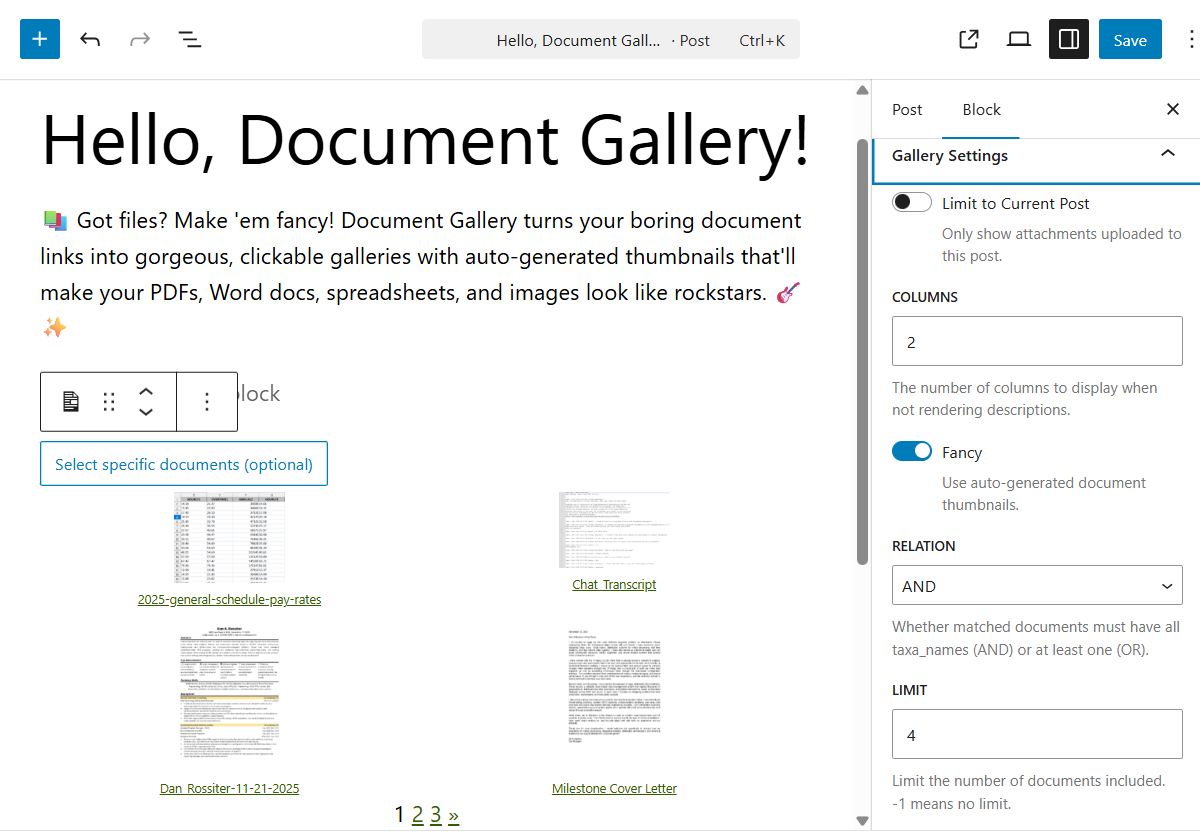
All gallery options are accessible through the block settings sidebar, with real-time preview updates as you make changes.
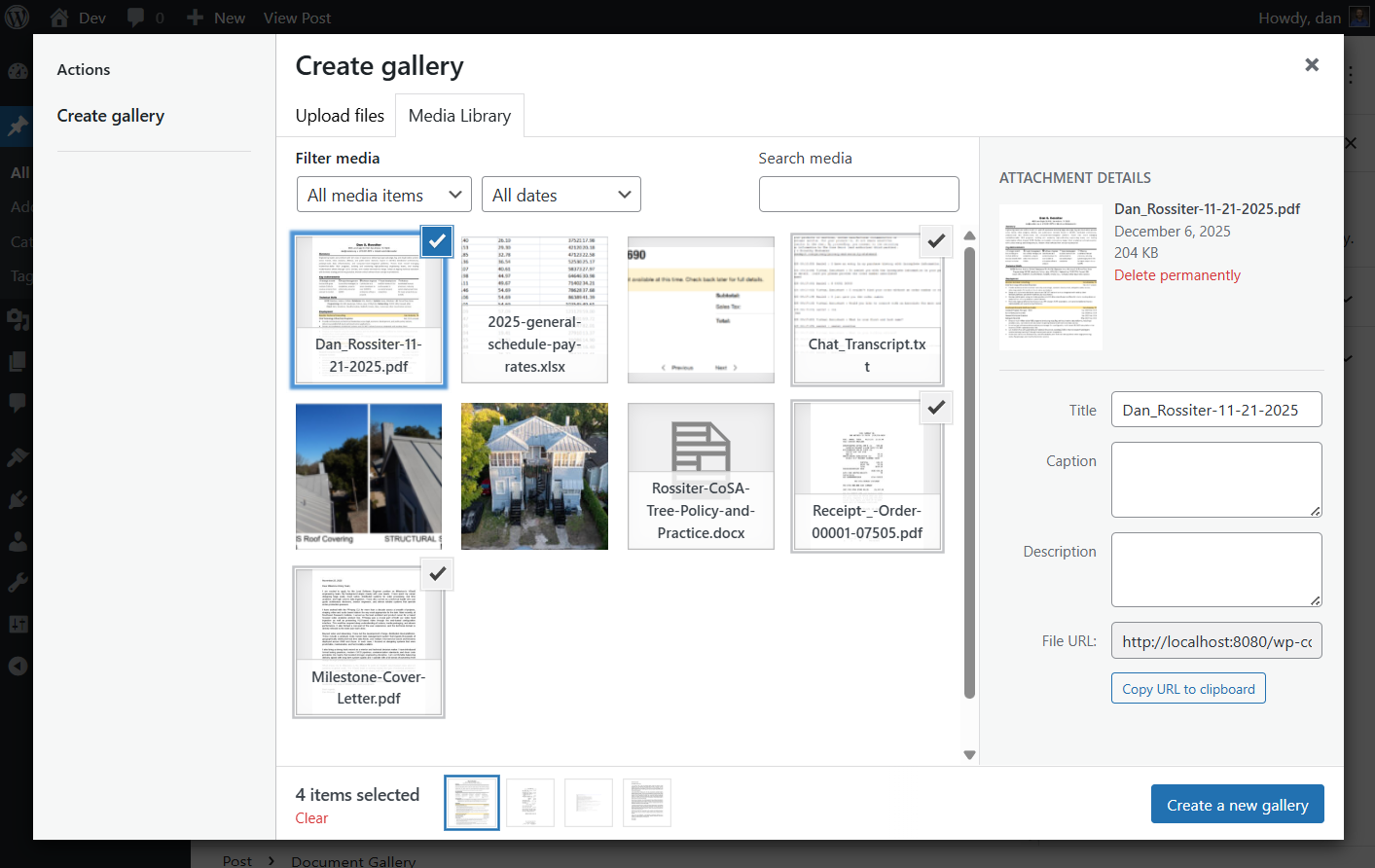
Document Gallery integrates seamlessly with the WordPress Block Editor, providing an intuitive interface for creating and configuring galleries.
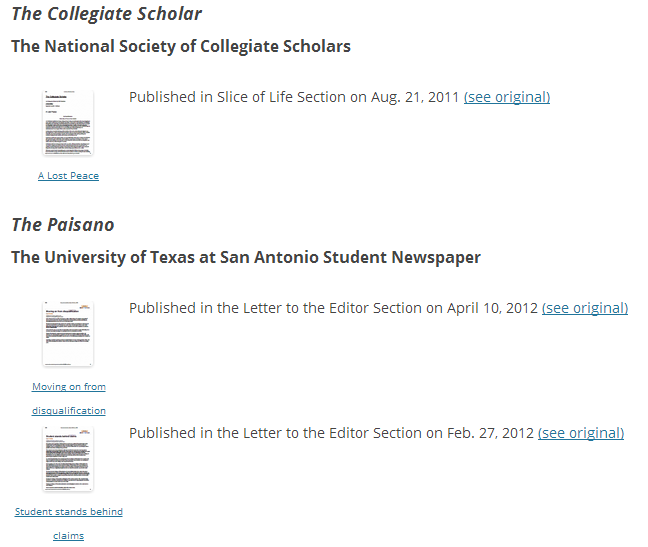
This is an example of "fancy" thumbnails. The images are a copy of the front page for each document.

This is an example of multiple Document Galleries on a single page (using
the ids attribute). It also shows how images will appear in a Document
Gallery. Note that the description field supports HTML markup, so the
possibilities are endless!
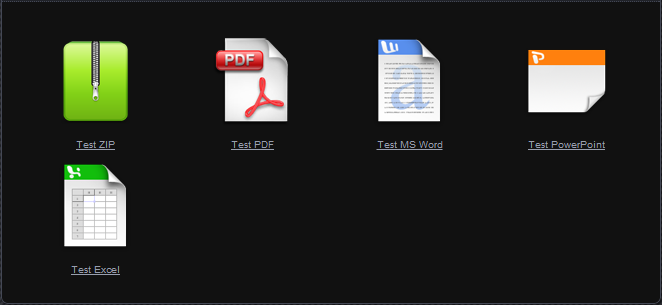
This is how the Document Gallery looks with descriptions=false (default).
Note that the display inherits styling from your active theme.
Plugins semelhantes


Slider, gallery, carousel plugin for WordPress. Build your image slider, video slider, post slider, YouTube slider, or WooCommerce product slider.

The most popular gallery plugin that lets you create galleries and albums in seconds.

Formerly Easy Fancybox. The most popular WordPress lightbox plugin. Simple, fast, and responsive. Opens images, videos, PDFs, and custom popups.

Photo Gallery is a powerful image gallery plugin with a list of advanced options for creating responsive image galleries with beautiful lightbox.

Delete and REALLY force thumbnail regeneration.