

Calculation for contact form 7
Hospedagem WordPress com plugin Calculation For Contact Form 7
Onde posso hospedar o plugin Calculation For Contact Form 7?
Este plugin pode ser hospedado em qualquer provedor que possua WordPress instalado. Recomendamos escolher uma hospedagem de confiança, com servidores especializados para WordPress, como o serviço de hospedagem de sites da MCO2.
Hospedando o plugin Calculation For Contact Form 7 em uma empresa de hospedagem confiável
A MCO2, além de configurar e instalar o WordPress na versão mais atual para seus clientes, disponibiliza o plugin WP SafePress, um sistema singular que assegura e melhora seu site ao mesmo tempo.
Por que a Hospedagem WordPress funciona melhor na MCO2?
A Hospedagem WordPress funciona melhor pois a MCO2 possui servidores otimizados para WordPress. A instalação de WordPress é diferente de uma instalação trivial, pois habilita imediatamente recursos como otimização de imagens e fotos, proteção da página de login, bloqueio de atividades suspeitas diretamente no firewall, cache avançado e HTTPS ativado por padrão. São recursos que potencializam seu WordPress para a máxima segurança e o máximo desempenho.
Calculation For Contact Form 7 adds a calculator field tag to Contact Form 7, letting you perform real-time calculations between form fields without reloading the page. Use it to build a cost calculator, price estimator, booking quote form, mortgage calculator, tax calculator, finance calculator, or any form that needs live math.
With this Contact Form 7 Calculator plugin, you can run summation, subtraction, multiplication, division, and many other formulas across two or more fields, and display the result instantly inside the form.
This Contact Form 7 Price Calculator add-on supports arithmetic expressions between more than two fields, so you can chain multiple calculations together to fit almost any pricing or quoting scenario, including weight calculators, hotel booking quotes, car rental pricing, mortgage calculators, and tax or finance calculators.
Features
- Easy to set up with a visual tag generator inside the Contact Form 7 editor
- Adds a dedicated calculator tag to Contact Form 7
- Supports addition, subtraction, multiplication, division, and modulus
- Built-in math functions: MOD, AVERAGE, MIN, MAX, RANDOM, POW, CEIL, ROUND, FLOOR, SIN, COS, ABS, SQRT
- Date calculations: count Days, Months, and Years between two date fields
- Add a prefix to the calculated value
- Choose the number of digits after the decimal point
- Build complex math equations across multiple fields
- Hide a calculator field from the visible form while still calculating
- Multiple total fields in one form (Pro)
- Custom labels for Radio, Select, and Checkbox fields (Pro)
- Left-side prefix for calculated values (Pro)
- Right-side prefix for calculated values (Pro)
- Custom decimal formatting (Pro)
- Thousand separator for large numbers (Pro)
- Custom decimal separator (Pro)
Pro Version
- Multiple Total Fields — display more than one calculator result in a single form, each with its own formula
- Custom Labels for Radio, Select & Checkbox — use the
"Label--value"syntax to set a visible label and a separate numeric value for each option, giving you full control over what users see vs. what gets calculated - Prefix Left — attach a symbol or text (e.g.
$,€,USD) to the left of the calculated result - Prefix Right — attach a symbol or text (e.g.
kg,%,hrs) to the right of the calculated result - Thousand Separator — format large numbers with a comma, dot, or space as the thousands separator (e.g.
1,000,000) - Decimal Separator — choose your preferred decimal separator (
.or,) for localised number formatting - Decimal Formatting — control the exact number of digits shown after the decimal point for clean, professional output
Demo – Basic Calculator: https://plugin999.com/demo/calcutecontactform7/basic-calculator-operations/
Demo – Date Calculator: https://plugin999.com/demo/calcutecontactform7/calendar/
Demo – Conditional Calculator: https://plugin999.com/demo/calcutecontactform7/conditional-function/
Demo – Maths Calculator: https://plugin999.com/demo/calcutecontactform7/funtion-2/
How To Set Up The Form
[text text-1]
[text text-2]
Create Label And Price In Radio, Select, Checkbox
[select menu-1 default:1 "$20--20" "$40--40" "$60--60" "$80--80"]
[checkbox checkbox-1 default:1 "$20--20" "$40--40" "$60--60" "$80--80"]
[radio radio-1 default:1 "$20--20" "$40--40" "$60--60" "$80--80"]
Addition
[calculator calculator-1 "text-1 + text-2"]
Subtraction
[calculator calculator-2 "text-1 - text-2"]
Multiplication
[calculator calculator-3 "text-1 * text-2"]
Division
[calculator calculator-4 "text-1 / text-2"]
MOD Function
[calculator calculator-6 "MOD(text-1 , text-2)"]
AVERAGE Function
[calculator calculator-7 "AVERAGE(text-1 , text-2)"]
MIN Function
[calculator calculator-8 "MIN(text-1 , text-2)"]
MAX Function
[calculator calculator-9 "MAX(text-1 , text-2)"]
RANDOM Function
[calculator calculator-10 "RANDOM(text-1 , text-2)"]
POW Function
[calculator calculator-11 "POW(text-1 , text-2)"]
CEIL Function
[calculator calculator-12 "CEIL(text-1)"]
ROUND Function
[calculator calculator-13 "ROUND(text-1)"]
FLOOR Function
[calculator calculator-14 "FLOOR(text-1)"]
SIN Function
[calculator calculator-15 "SIN(text-1)"]
COS Function
[calculator calculator-16 "COS(text-1)"]
ABS Function
[calculator calculator-17 "ABS(text-1)"]
SQRT Function
[calculator calculator-18 "SQRT(text-1)"]
Date Calculation
[date date-1]
[date date-2]
Calculate Days
[calculator calculator-19 "DAYS(date-1 , date-2)"]
Calculate Months
[calculator calculator-20 "MONTHS(date-1 , date-2)"]
Calculate Years
[calculator calculator-21 "YEARS(date-1 , date-2)"]
Hide A Calculated Field
[calculator calculator-22 hide_field "text-1 + text-2"]
Add A Left Prefix (Pro)
[calculator calculator-22 prefix_left:$ "text-1 + text-2"]
Add A Right Prefix (Pro)
[calculator calculator-22 prefix_right:$ "text-1 + text-2"]
Add A Thousand Separator (Pro)
[calculator calculator-22 thousand_sep:comma "text-1 + text-2"]
Set Decimal Places (Pro)
[calculator calculator-22 decimal_number:2 "text-1 + text-2"]
Set A Decimal Separator (Pro)
[calculator calculator-22 decimal_sep:. "text-1 + text-2"]
Building a cost calculator, quote form, or price estimator in Contact Form 7 has never been easier.
Capturas de tela

Adding a calculator field
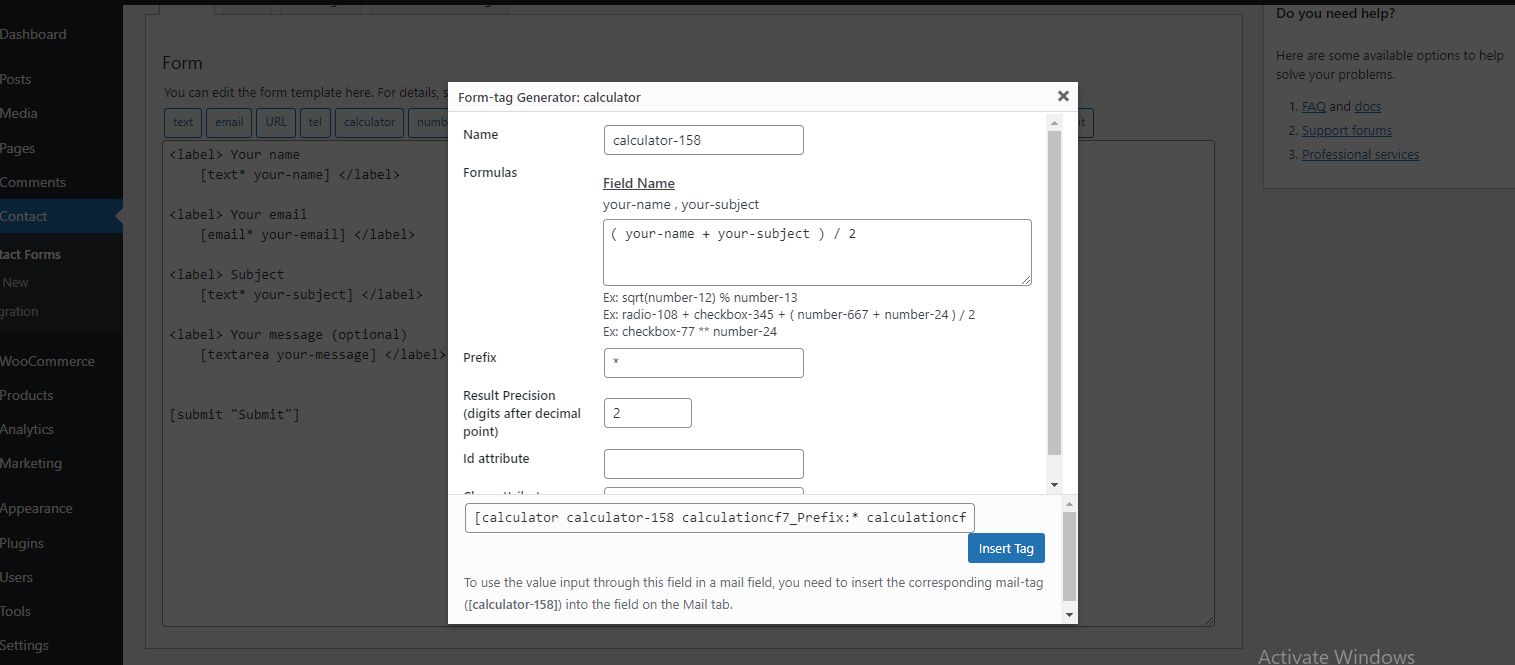
Adding formulas, prefix, and precision options

Calculated field values displayed live in Contact Form 7