

Caddy – WooCommerce Side Cart & Free Shipping Bar
Hospedagem WordPress com plugin Caddy – Smart Side Cart for WooCommerce
Onde posso hospedar o plugin Caddy – Smart Side Cart for WooCommerce?
Este plugin pode ser hospedado em qualquer servidor que possua WordPress configurado. Recomendamos fortemente optar por uma hospedagem confiável, com servidores especializados para WordPress, como o serviço de hospedagem WordPress da MCO2.
Hospedando o plugin Caddy – Smart Side Cart for WooCommerce em uma empresa de hospedagem seguro
A MCO2, além de instalar o WordPress na versão mais atual para seus clientes, disponibiliza o plugin WP SafePress, um mecanismo exclusivo que protege e melhora seu site simultaneamente.
Por que a Hospedagem WordPress funciona melhor na MCO2?
A Hospedagem WordPress funciona melhor pois a MCO2 possui servidores otimizados para WordPress. A instalação de WordPress é diferente de uma instalação trivial, pois habilita imediatamente recursos como otimização automática de imagens e fotos, proteção da página de login, bloqueio de atividades maliciosas diretamente no firewall, cache avançado e HTTPS ativado por padrão. São plugins que potencializam seu WordPress para a máxima segurança e o máximo desempenho.
Caddy is a high performance WooCommerce side cart plugin (also known as a floating cart, sliding cart, cart drawer, or mini cart) that improves your store’s shopping experience and helps grow your sales. It replaces the default WooCommerce cart page with a sticky AJAX side cart that slides in from the edge of the screen, letting customers manage their cart without leaving the page.
Built on Modern WordPress APIs
Caddy v3 is built from the ground up on the WordPress Interactivity API and the WooCommerce Store API – the same modern foundations that power WooCommerce’s own cart and checkout blocks. This means:
- Instant AJAX cart updates – no full-page reloads. Cart changes are reactive and immediate, making it the fastest WooCommerce AJAX side cart available.
- Server-synced state – every cart operation goes through the official WooCommerce Store API, ensuring accurate prices, tax calculations, and stock validation.
- Lightweight floating cart – no jQuery dependency. Caddy uses native ES modules loaded as WordPress script modules for the smallest possible footprint.
- Future-proof – built on the same APIs WordPress and WooCommerce are investing in long-term.
Increase average order value with Caddy’s built-in in-cart upsells and cross-sell product recommendations, reduce cart abandonment with a free shipping bar, and encourage repeat shoppers with a save for later wishlist.
🛒 Side cart, mini cart & floating cart drawer in one
🚚 Free shipping bar to lift average order value
⚡️ Built on WordPress Interactivity API & WooCommerce Store API
📱 Mobile friendly responsive design
🔄 Real-time reactive cart updates
🌏 Translated into 6 languages
⚔️ Cross-browser and cross-OS battle tested
🔒 Secure and reliable
💡 Lightweight – no jQuery dependency
💰 Boosts sales and average order value
🔄 Works with most themes and plugins
🎁 Apply cart discounts and promo codes
Try the Demo | Cart Optimization Playbooks | Visit usecaddy.com
Caddy Lite features:
- Sticky floating side cart / mini cart powered by the WordPress Interactivity API – available across your whole site
- Slide-in cart drawer that opens like an add-to-cart popup – no page reloads
- Real-time AJAX cart operations via the WooCommerce Store API – no page reloads
- Free shipping bar (progress meter) that shows customers how close they are to free shipping
- In-cart upsell and cross-sell product recommendations when customers add to cart
- Save products for later / wishlist (logged-in users)
- Quick AJAX add to cart from shop and archive pages – no page reload
- Cart and saved list links for your navigation menu (shortcodes + widgets)
- Elementor widgets: drag a “Caddy Cart” or “Caddy Saved Items” element into any Elementor header or layout, with full icon, label, and count-badge styling; clicking opens the side cart and the count stays live
- Add products & manage cart items without reloading the page
- Manage cart quantities directly in the side cart
- Sticky add-to-cart bubble (floating cart icon) with a live quantity indicator
- Apply coupon codes in the side cart
- Custom CSS to match your brand
- WooCommerce HPOS support
- No jQuery dependency – pure ES modules
Supported Languages
Caddy is translated into the following languages:
- English (default)
- German (Deutsch)
- French (Français)
- Italian (Italiano)
- Brazilian Portuguese (Português do Brasil)
- Spanish (Español)
Compatibility
Caddy is compatible with most themes and plugins. The following themes and plugins have been tested and confirmed working:
- Plugins: WooCommerce Subscriptions, WooCommerce Product Bundles, All Products For WooCommerce Subscriptions, Elementor, Divi
- Themes: GeneratePress, Flatsome, Astra, Hello Elementor, Kadence, OceanWP, Storefront
Upgrade to Pro
Upgrade to Pro and unlock powerful customization features, analytics, recommendations, and more.
Caddy Pro features:
- 7 different cart icon styles & 30+ custom color options
- Cart tracking & analytics dashboard
- Multi-tier reward levels with free shipping, free gifts, and discounts
- Workflow automation engine – trigger targeted product recommendations, popup notifications, and auto-apply coupons based on cart contents, cart total, product categories, page, and customer role
- In-cart announcement bar
- In-cart product subscription upsells using with the All Products for WooCommerce Subscriptions extension
- Change the cart bubble position on the screen
- Display notices when adding to cart or adding/removing saved products
- Promote custom coupon offers in the cart
- Set free shipping meter exclusions
- Set product recommendation exclusions
- Set product recommendation fall-back rules
- Show save for later buttons on product pages and shop archives
- Manage placement of save for later buttons on shop archives
- Customize a welcome message to new users
- Hide Caddy on specific pages
- Hide out of stock products from product recommendations
- Get priority email support
- Get early access to new features
Upgrade to Pro Now: https://www.usecaddy.com/
Capturas de tela

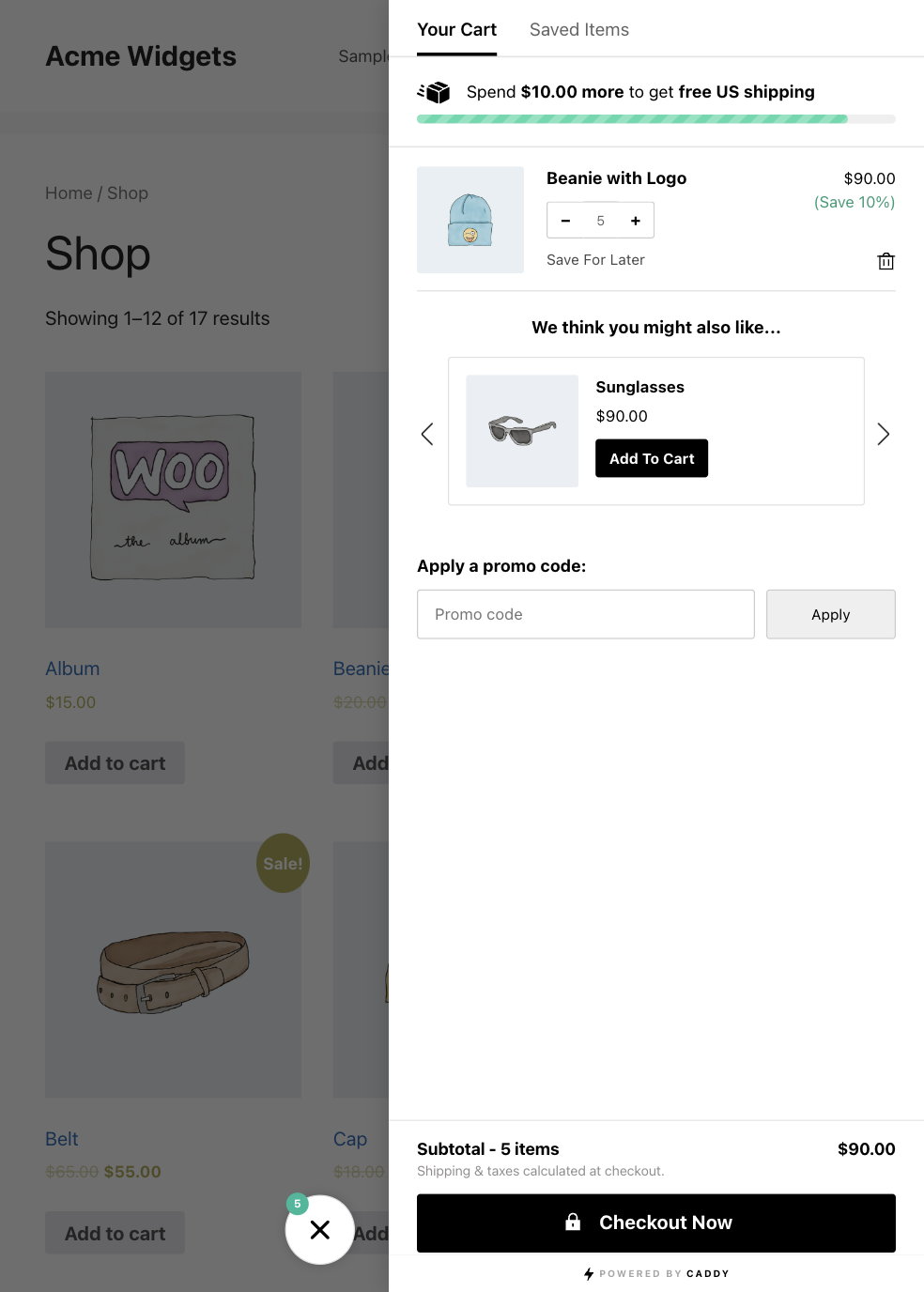
The Caddy WooCommerce side cart drawer open, with the free shipping bar and live cart subtotal.

In-cart upsell and cross-sell product recommendations shown after a product is added to the side cart.
The Caddy settings screen for the side cart, free shipping bar, and recommendations.

The custom CSS styling screen for matching the cart drawer to your brand.