Ativar o editor "clássico" anterior e o estilo antigo da tela Editar Post com TinyMCE, Meta Boxes, etc. Suporta todos os plugins que estendem esta tela.

Breadcrumb Block
Hospedagem WordPress com plugin Breadcrumb Block
Onde hospedar o plugin Breadcrumb Block?
Este plugin pode ser hospedado em qualquer hospedagem que possua WordPress instalado. Recomendamos fortemente utilizar uma empresa de hospedagem seguro, com servidores adaptados para WordPress, como o serviço de hospedagem de sites da MCO2.
Hospedando o plugin Breadcrumb Block em um provedor confiável
A MCO2, além de instalar o WordPress na versão mais nova para seus clientes, disponibiliza o WP SafePress, um mecanismo singular que assegura e aumenta a performance do seu site simultaneamente.
Por que a Hospedagem WordPress funciona melhor na MCO2?
A Hospedagem WordPress funciona melhor pois a MCO2 possui servidores otimizados para WordPress. A instalação de WordPress é diferente de uma instalação trivial, pois habilita imediatamente recursos como otimização de imagens e fotos, proteção da página de login, bloqueio de atividades maliciosas diretamente no firewall, cache avançado e HTTPS ativado por padrão. São plugins que potencializam seu WordPress para a máxima segurança e o máximo desempenho.
This is a single-block plugin for the breadcrumb trail. It’s simple, lightweight, SEO-friendly, and WooCommerce compatibility. It also includes some simple separator icons. It works everywhere: Page Editor, Site Editor, and template files.
How to customize the breadcrumb
-
How to change/remove an item?
add_filter( 'breadcrumb_block_get_item', function ( $item_args, $context, $breadcrumbs_instance ) {
  // Ignore items without context.
  if ( ! $context || ! ( $context['object'] ?? false ) ) {
    return $item_args;
  }

  // Eg: remove a term.
  if ( 'term' === ( $context['type'] ?? '' ) && 'term-slug' === $context['object']->slug ) {
    return false;
  }

  // Eg: Change the title of a page.
  if ( 'page' === ( $context['type'] ?? '' ) && page_id_to_change === $context['object']->ID ) {
    $item_args[0] = 'Make it shorter';
  }

  return $item_args;
}, 10, 3 );
$item_args is a 3-item array:
[$item_label, $item_link, $item_attrs]
$context is an associative array:['type' => 'item type', 'object' => 'item object'].typecan be one of the following values:front_page,home,shop,page,post,single,term,taxonomy,post_type_archive,search,404,paged,author,date_year,date_month,date_day,attachment. -
How to change the markup of the block?
add_filter( 'breadcrumb_block_get_breadcrumb_trail', function ( $markup, $args, $breadcrumbs_instance ) { return $markup; }, 10, 3 ); -
How to add or remove the items from the breadcrumb trail?
add_filter( 'breadcrumb_block_get_items', function ( $items, $breadcrumbs_instance ) { return $items; }, 10, 2 ); -
How to use a custom separator for the breadcrumb trail?
add_filter( 'breadcrumb_block_get_args', function ( $args ) {
  // For example, change separator.
  $args['separator'] = '<svg xmlns="http://www.w3.org/2000/svg" fill="currentColor" width="1em" height="1em" viewBox="0 0 16 16"><path fill-rule="evenodd" d="M3.646 1.646a.5.5 0 0 1 .708 0l6 6a.5.5 0 0 1 0 .708l-6 6a.5.5 0 0 1-.708-.708L9.293 8 3.646 2.354a.5.5 0 0 1 0-.708z"/><path fill-rule="evenodd" d="M7.646 1.646a.5.5 0 0 1 .708 0l6 6a.5.5 0 0 1 0 .708l-6 6a.5.5 0 0 1-.708-.708L13.293 8 7.646 2.354a.5.5 0 0 1 0-.708z"/></svg>';
  return $args;
} );
The custom separator should be an inline SVG. To make sure it displays properly, it should have three attributes: width, height, and fill. The values of these attributes should be as follows:
fill="currentColor" width="1em" height="1em".
Using this hook, you can customize other attributes such as container, before, after, list_tag, item_tag, item_before, item_after, separator. -
How to prepend the blog page to all single posts?
add_action( 'breadcrumb_block_single_prepend', function ( $post, $breadcrumbs_instance ) {
  if ( 'post' === $post->post_type ) {
    $blog_id = get_option( 'page_for_posts');
    if ( $blog_id ) {
      $breadcrumbs_instance->add_item( get_the_title( $blog_id ), get_permalink( $blog_id ) );
    }
  }
}, 10, 2 );
If this plugin is useful for you, please do a quick review and rate it on WordPress.org to help us spread the word. I would very much appreciate it.
Please check out my other plugins if you’re interested:
- Content Blocks Builder – Build custom layouts and blocks visually in the Block Editor without needing a code editor, using only core blocks and native Gutenberg features.
- Meta Field Block – A single block to display custom fields in the Block Editor without coding. It supports ACF, MetaBox, WooCommerce, meta, rest field, shortcode and more. Works everywhere: in the Site Editor (FSE), the Block Editor, inside Query Loop, WooCommerce Product Collection, Term Query blocks, and even in template files.
- SVG Block – A block to display SVG images as blocks. Useful for images, icons, dividers, and buttons. It allows you to upload SVG images and load them into the icon library.
- Icon separator – A tiny block just like the core/separator block but with the ability to add an icon.
- Block Enhancements – Adds practical features to blocks like icons, box shadows, transforms, etc.
- Counting Number Block – A block to display numbers with a counting effect
- Better YouTube Embed Block – A block to solve the performance issue with embedded YouTube videos. It can also embed multiple videos and playlists.
The plugin is developed using @wordpress/create-block.
Capturas de tela
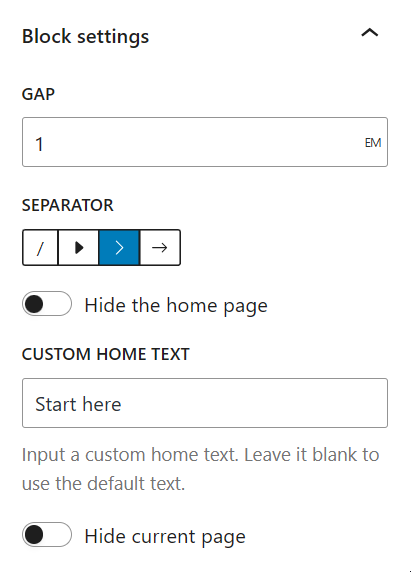
Block settings
Plugins semelhantes


Ativa a tela clássica de configuração de widgets em Aparência > Widgets e em Personalizar. Desativa o editor de blocos ao gerenciar widgets.

Amplia e aprimora o editor de blocos (Gutenberg) e o editor clássico (TinyMCE).

The growing library of 300+ ready-to-use templates that work with all WordPress themes including Astra, Hello, OceanWP, GeneratePress and more

Gutenberg blocks for existing Spectra websites. Maintained, stable, and fully supported — no action needed on your part.

Adds breadcrumb navigation showing the visitor's path to their current location.
Do mesmo author (Phi Phan)

Embed YouTube videos without slowing down your site. Easily embed one or multiple videos, shorts, and playlists.

Display an SVG image as a block, which can be used for displaying images, icons, dividers, buttons