
Share buttons for WordPress including the AddToAny button, Facebook, Bluesky, Mastodon, WhatsApp, Pinterest, Reddit, many more, and follow icons too.

Wbcom Designs – BuddyPress Activity Social Share
Hospedagem WordPress com plugin Wbcom Designs – BuddyPress Activity Social Share
Onde posso hospedar o plugin Wbcom Designs – BuddyPress Activity Social Share?
Este plugin pode ser hospedado em qualquer servidor que possua WordPress instalado. Recomendamos optar por uma hospedagem confiável, com servidores adaptados para WordPress, como o serviço de hospedagem de sites da MCO2.
Hospedando o plugin Wbcom Designs – BuddyPress Activity Social Share em uma empresa de hospedagem de confiança
A MCO2, além de configurar e instalar o WordPress na versão mais atualizada para seus clientes, disponibiliza o WP SafePress, um sistema singular que assegura e otimiza seu site conjuntamente.
Por que a Hospedagem WordPress funciona melhor na MCO2?
A Hospedagem WordPress funciona melhor pois a MCO2 possui servidores otimizados para WordPress. A instalação de WordPress é diferente de uma instalação trivial, pois habilita imediatamente recursos como otimização de imagens, proteção da página de login, bloqueio de atividades suspeitas diretamente no firewall, cache avançado e HTTPS ativado por padrão. São recursos que potencializam seu WordPress para a máxima segurança e o máximo desempenho.
BuddyPress activity updates are where your community talks, but they stay inside your site. This plugin adds a Share button next to Comment and Favorite on each activity item. One click opens a row of network icons, and the update goes out with its link back to your site.
What it does
- Adds a Share button to activity items in the activity stream, on member profiles and in groups. Logged-in members see the button; visitors do not.
- Supports Facebook, X (Twitter), LinkedIn, Pinterest, WhatsApp, email, Reddit, WordPress and Pocket.
- Choose which networks appear: drag them between the Enable and Disable lists in the settings.
- Set the icon color for each network.
- Opens each network in a popup window, or in a new tab if you turn the popup off. WhatsApp and email always use their own app.
- Adds Open Graph tags to single activity pages, so shared links show a title, description and image.
- Works with BuddyPress and the BuddyBoss Platform.
Getting started
- Install and activate BuddyPress, then this plugin.
- Go to WB Plugins > BuddyPress Share > General Settings.
- Drag the networks you want into the Enable list, and the ones you do not want into the Disable list.
- Optional: set icon colors under Icon Color Settings.
Need help? Read the documentation or contact Wbcom Designs support.
More from Wbcom Designs
- BuddyX – free community theme for BuddyPress and BuddyBoss sites.
- BuddyNext – a complete community platform for WordPress.
- Jetonomy – modern discussion forums for WordPress.
- WB Gamification – points, badges and leaderboards for your members.
Capturas de tela

The Share button on an activity update, with the network icons open.
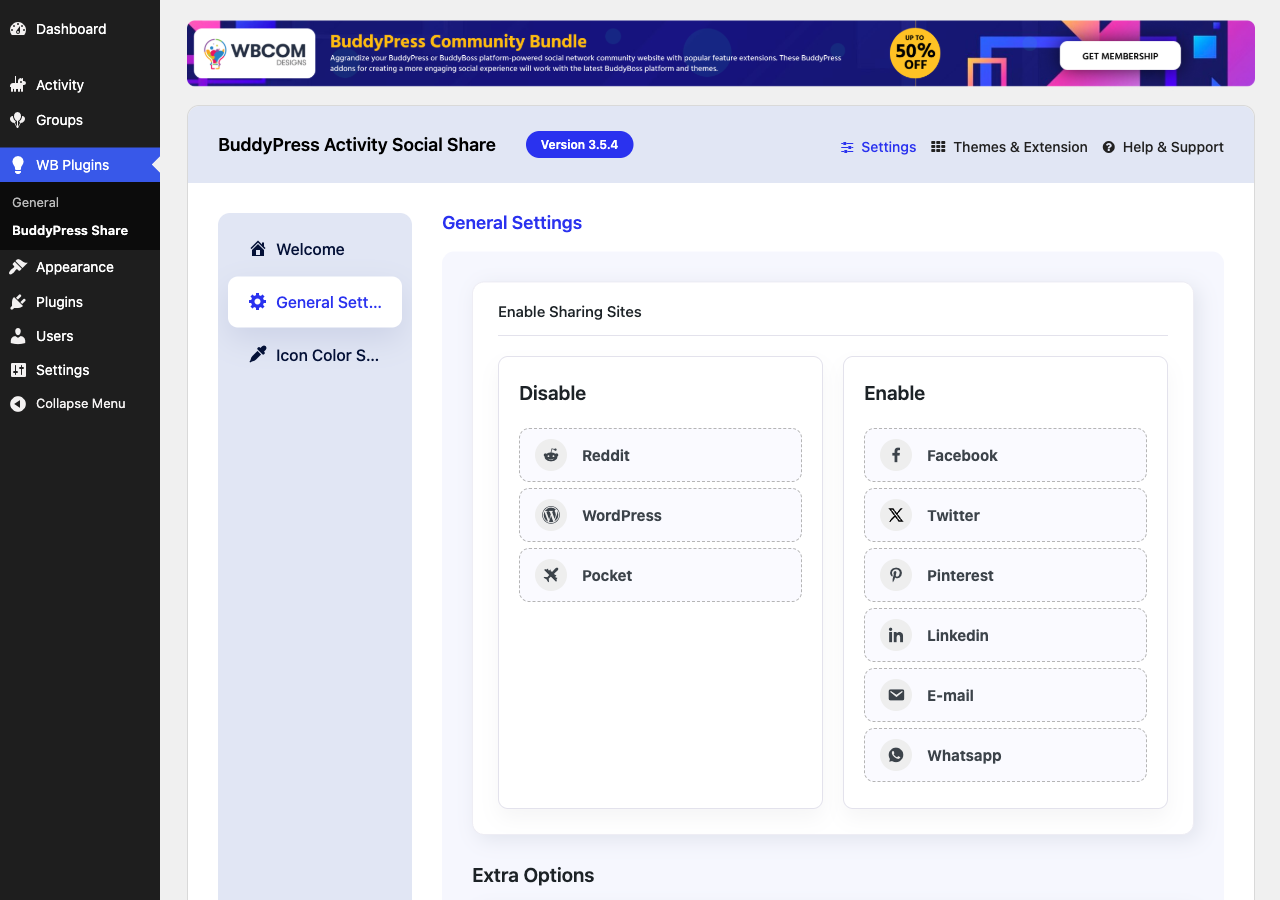
General Settings: drag networks between the Enable and Disable lists.

Icon Color Settings: pick a color for each network icon.
Plugins semelhantes


Botões e ícones pop-up de compartilhamento em redes sociais

Get together safely, in your own way, in WordPress.

Real-time activity log and audit log for WordPress. Track every user action — logins, edits, plugin & settings changes — and get alerts.

Events calendar and booking system: bookings, reservations, appointments, scheduling, event registration, tickets and recurring events.

Site: https://oceanwp.org/ Suporte: https://oceanwp.org/support/ Documentação: https://docs.oceanwp.org/ Extensões: https://oceanwp.
Do mesmo author (wbcomdesigns)

Upload your own font files and use them anywhere on your site, or add Google Fonts with a free Google API key.

Hide activity types from your BuddyPress activity streams and choose the default filter members see.

Let members review and rate each other on their profiles. Build trust with star ratings, custom criteria, moderation, and directory ratings.

Let BuddyPress and BuddyBoss members add a place to activity posts, keep a map of where they have been, and set a profile location.