The best AI Chatbot for WordPress. Like having ChatGPT trained on your content — turn your site into a 24/7 sales & support machine.
BotWriter – AI Content Generator
Hospedagem WordPress com plugin BotWriter – AI Content Generator
Onde hospedar o plugin BotWriter – AI Content Generator?
Este plugin pode ser hospedado em qualquer hospedagem que tenha WordPress configurado. Recomendamos fortemente optar por uma hospedagem de confiança, com servidores otimizados para WordPress, como o serviço de hospedagem WordPress da MCO2.
Hospedando o plugin BotWriter – AI Content Generator em uma empresa de hospedagem confiável
A MCO2, além de configurar e instalar o WordPress na versão mais nova para seus clientes, oferece o plugin WP SafePress, um sistema exclusivo que assegura e melhora seu site conjuntamente.
Por que a Hospedagem WordPress funciona melhor na MCO2?
A Hospedagem WordPress funciona melhor pois a MCO2 possui servidores otimizados para WordPress. A instalação de WordPress é diferente de uma instalação trivial, pois habilita imediatamente recursos como otimização de imagens, proteção da página de login, bloqueio de atividades suspeitas diretamente no firewall, cache avançado e HTTPS ativado por padrão. São plugins que potencializam seu WordPress para a máxima segurança e o máximo desempenho.
BotWriter is the most complete AI content plugin for WordPress. It works as an AI auto blogging tool that automatically generates and publishes SEO-optimized articles, and as a WooCommerce AI content optimizer that bulk-improves your entire product catalog.
Whether you need an AI writing plugin to keep your blog updated on autopilot, or an AI-powered SEO content creator for your online store, BotWriter handles it all with support for 7+ AI text providers and 8 image generators.
🔹 Automatically publish content every day / every week
🔹 Generate 100% original articles with AI images
🔹 NEW: Choose from 7+ AI text providers (OpenAI, Claude, Gemini, Mistral, Groq…)
🔹 NEW: 8 image providers including Flux 2, Nano Banana Pro, Gemini & DALL-E 3
🔹 NEW: Article templates for consistent, professional content
🔹 NEW: Image style presets (realistic, cartoon, anime, 3D, watercolor…)
🔹 NEW: Smart image optimization for Google Discover (WebP, resize, compress)
🔹 NEW: WooCommerce AI Content Optimizer — bulk-optimize product titles, descriptions, tags, SEO & more
🔹 NEW: AI Review Generator for WooCommerce products
🔹 Optimize your blog to rank higher on Google
🔹 Set it up in minutes and let AI do the rest
In this video, we’ll show you how to set up BotWriter in just a few steps so your blog stays active effortlessly. Take advantage of AI-powered automation and streamline your content strategy! 🚀
BotWriter has been designed to simplify content creation for blogs, websites, and online stores. As a WordPress AI plugin with multi-provider architecture, you can choose the best AI for each job. Use GPT-5 for creative writing, Claude for technical content, or Gemini for multilingual articles. Pair them with cutting-edge image models like Flux 2 Pro, Google’s Nano Banana, or Stable Diffusion.
For WooCommerce store owners, BotWriter includes a dedicated AI Content Optimizer that bulk-optimizes product titles, descriptions, tags, image ALT text, SEO metadata and more—all from a single dashboard. It also generates AI-powered product reviews and SEO-optimized category descriptions to help your store rank higher.
BotWriter is also an AI blogging plugin that can automatically generate and publish blog posts based on keywords, RSS feeds, or news sources—making it the ideal tool for AI-powered SEO content creation.
BotWriter is capable of creating entire blog content in minutes! Check out the example:
How to Auto-Generate Articles from an RSS Feed | BotWriter + NASA RSS
Key Features
🆕 Multi-Provider AI Text Generation
Choose from 7 different AI providers for text generation:
* OpenAI: GPT-5, GPT-4.1, GPT-4o series
* Anthropic: Claude Sonnet 4.5, Claude Haiku
* Google: Gemini 2.5 Pro, Gemini 2.5 Flash
* Mistral: Mistral Large, Mistral Small
* Groq: Llama 3.3 70B (ultra-fast inference)
* OpenRouter: Access to 200+ models through one API
* DeepSeek: Cost-effective alternatives
⛽ Multi-Provider AI Image Generation
6 image providers with 50+ models:
* OpenAI DALL-E: GPT-Image-1, DALL-E 3
* Google Gemini: gemini-2.5-flash-image, gemini-3-pro-image-preview
* Fal.ai: Flux 2 Pro/Dev, Nano Banana Pro (Google Gemini), Seedream 4.5
* Replicate: Flux 1.1 Pro, Ideogram V3, Imagen 4
* Stability AI: Stable Diffusion 3.5, SDXL
* Cloudflare Workers AI: Flux Schnell (fast & affordable)
🎨 Image Style Presets (NEW in 2.0.7)
Choose from 12 artistic styles for your AI images:
* Realistic / Photographic, Digital Art, Illustration
* Cartoon, Comic Book, Anime / Manga
* 3D Render, Watercolor, Oil Painting
* Minimalist, Vintage / Retro, Cinematic
* Or define your own custom style!
⚡ Smart Image Optimization (NEW in 2.0.7)
Automatic post-processing for web-ready images:
* Convert to WebP format (up to 95% smaller files)
* Resize to optimal dimensions (configurable max width)
* Compress to target file size (default: 120KB for Google Discover)
* Works with any image provider
🛒 WooCommerce AI Content Optimizer (NEW in 3.0)
Bulk-optimize your entire product catalog with AI:
* 9 content fields: titles, descriptions, short descriptions, tags, image ALT text, review summaries, SEO meta descriptions, SEO titles and category descriptions
* Bulk Optimizer: select products, choose fields and AI provider, preview all changes before applying
* Category Optimizer: generate SEO-friendly category descriptions using product data as context
* AI Review Generator: create realistic product reviews with configurable ratings, length, tone, reviewer names and date spread
* Full Backup & Revert: automatic backup before every change, per-field or full revert, visual before/after diff
* Optimization History: browse all past optimizations with filters, search and pagination
* Advanced product filters: filter by status, category, stock, type, word count, price, tag count, review count and more
* SEO plugin integration: auto-writes to Yoast SEO, Rank Math, SEOPress, All in One SEO and The SEO Framework
* Customizable prompt templates with {{placeholder}} variables for full control over AI output
* Works with all supported AI text providers
⛽ Article Templates
Create professional, consistent content with reusable templates:
* Pre-configured prompts for different content types
* SEO-optimized structures
* Custom style guidelines
* One-click template application to any task
Scheduled Content Automation
BotWriter automates your content creation workflow. Schedule tasks to publish AI-generated articles on specific days and times—daily, weekly, or custom schedules. Perfect for maintaining a consistent publishing calendar without manual intervention.
Multiple Content Sources
* AI-Generated Content: Create 100% original articles from scratch using custom prompts and AI keywords
* RSS Feed Integration: Transform RSS feeds into unique, rewritten articles automatically
* News Aggregation: Pull trending news stories and rewrite them for your niche
* Super Tasks: Generate entire content series—create multiple related articles in bulk with a single configuration
Smart Content Generation
Each scheduled task runs automatically via WordPress cron, generating:
* SEO-optimized titles and content
* Relevant tags and categories
* AI-generated featured images (configurable per task)
* Custom post lengths (from short to comprehensive articles)
Instant Publishing with “Write Now”
Need content immediately? The “Write Now” feature creates and publishes a single post instantly with real-time progress tracking—no waiting for scheduled cron jobs.
Full Customization
* Choose from multiple AI text and image models per task
* Configure image size and quality
* Customize writing style, tone, and narrative voice
* Set post status (publish, draft, pending, private)
* Control publishing frequency and timing
Your API Keys, Your Control
BotWriter lets you bring your own API keys and pay the AI providers directly.
All AI requests are routed through the BotWriter cloud service at api.wpbotwriter.com, which handles request queuing, long-running AI sessions, error recovery, retries, and delivery coordination. This architecture ensures reliable content generation even on shared hosting environments with strict timeout limits.
Why BotWriter?
Unlike other AI WordPress plugins, BotWriter supports multiple AI providers instead of locking you into a single API. You can choose between GPT, Claude, Gemini, Mistral, Groq and more—depending on cost, speed, or quality.
Looking for the best AI WordPress plugin? Here’s what sets BotWriter apart:
- Multi-provider freedom: switch between 7+ AI text providers and 8 image generators—no vendor lock-in
- WooCommerce native: the only AI writer for WordPress with a dedicated WooCommerce product optimizer, review generator, and category description tool
- True automation: schedule posts daily or weekly, generate bulk content series, or publish instantly with Write Now
- Full SEO stack: AI-generated meta descriptions, SEO titles, slug translation, image optimization for Core Web Vitals
- Your keys, your cost: BotWriter doesn’t mark up API costs—you pay providers directly at their published rates
Who Is BotWriter For?
BotWriter is the ideal AI content plugin for WordPress for:
- Bloggers who want to publish consistently without writing every post by hand
- SEO agencies that need to produce high-volume, optimized content for client sites
- Affiliate marketers building niche sites with AI-generated review articles and comparisons
- Niche site builders creating topical authority with bulk content series
- WooCommerce store owners looking to optimize product descriptions, tags, SEO metadata, and generate reviews
- Content marketers scaling their output across multiple blogs and languages
- News aggregation sites that rewrite trending stories automatically
Use Cases
BotWriter can be used for:
- AI auto blogging — Automatically publish fresh articles on a schedule you define
- AI-powered SEO content creation — Generate keyword-rich, well-structured articles optimized for search engines
- WooCommerce content automation — Bulk-optimize product titles, descriptions, tags, SEO metadata, and generate AI reviews
- News aggregation blogs — Pull and rewrite trending news stories for your niche
- Affiliate niche websites — Create product reviews, comparisons, and buying guides at scale
- RSS feed rewriting — Transform any RSS feed into unique, original blog posts
- Multilingual content — Generate articles in any language using Gemini, GPT, or Claude
- Bulk content libraries — Build entire topic clusters with Super Tasks (5, 10, 20+ articles at once)
- WooCommerce SEO — Generate SEO meta descriptions, SEO titles, and category descriptions for your store
External Services
This plugin relies on third-party external services to generate text and images automatically, as well as to retrieve related content for your blog.
Service's Terms
 https://wpbotwriter.com/service-terms.html

Privacy Policy
https://wpbotwriter.com/privacy-policy.html
Below is a summary of the external services used and the data they handle:
1. BotWriter Cloud Service — Managed AI Processing Hub (api.wpbotwriter.com)
BotWriter routes all content generation requests through the BotWriter cloud service at api.wpbotwriter.com, which acts as a centralized processing hub between your site and the AI providers. The plugin may also contact provider endpoints directly for optional settings actions such as API key verification and model connectivity tests initiated by the site administrator.
Why is this cloud service necessary?
AI content generation is fundamentally different from typical WordPress operations. A single article generation request involves multiple sequential steps — building a structured prompt, calling the AI text provider, parsing and validating the response, extracting image prompts, calling a separate AI image provider, downloading and processing the generated image, and assembling the final result. This entire pipeline can take anywhere from 30 seconds to several minutes depending on the providers and content length.
Most WordPress hosting environments (shared hosting, managed WordPress hosts) impose strict execution time limits (typically 30–60 seconds) and restrict long-running background processes. Making these calls directly from WordPress would result in frequent timeouts, lost content, and failed tasks — especially when generating multiple articles in sequence or processing bulk WooCommerce optimizations.
The BotWriter cloud service solves these problems by offloading the heavy lifting to a dedicated infrastructure designed for long-running AI workloads:
- Long-running session management: AI provider API calls can take 30–120+ seconds per request. The cloud service maintains persistent HTTPS connections to AI providers for as long as needed, without being constrained by your web server’s timeout limits. Your WordPress site only needs short polling requests (a few seconds each) to check for completed results.
- Asynchronous job queue: Tasks are placed in a processing queue and executed independently. Your WordPress cron submits a task and moves on immediately — the cloud service handles the actual generation in the background. This means your site’s performance is never affected by AI processing.
- Multi-provider orchestration: BotWriter supports 7+ text providers and 6+ image providers, each with different API formats, authentication methods, rate limits, and error behaviors. The cloud service normalizes all of this into a single consistent interface, so the plugin doesn’t need to bundle and maintain separate API client libraries for every provider.
- Intelligent error recovery and retries: AI providers frequently return transient errors — rate limits (HTTP 429), server overload (HTTP 503), temporary outages, and malformed responses. The cloud service implements provider-specific retry strategies with exponential backoff, automatically re-submitting failed requests without any intervention from your WordPress site.
- Provider-specific fallback logic: If a provider consistently fails (e.g., an API outage), the cloud service can detect patterns and surface clear error messages, preventing your WordPress cron from burning cycles on doomed requests.
- Result caching and delivery guarantee: Completed results are stored in the cloud and delivered to your site on the next cron poll. Even if your WordPress server is briefly unavailable (maintenance, reboot, host downtime), no generated content is ever lost.
- Structured response parsing: AI models don’t always return perfectly formatted output. The cloud service parses, validates, and structures the AI response (title, content, tags, image prompt) before delivering it, handling edge cases like malformed JSON, markdown fences in code blocks, and truncated responses.
- Image generation pipeline: After text generation completes, the cloud service automatically extracts the AI-generated image prompt, calls the configured image provider, waits for the image to be rendered, and makes it available for download — all in a single seamless pipeline that would be nearly impossible to run reliably within WordPress’s execution constraints.
- Request lifecycle tracking: The cloud service monitors the processing pipeline end-to-end — from queue entry through provider call to result delivery — ensuring every request completes or surfaces a clear diagnostic message.
This architecture means that even sites on basic shared hosting can reliably generate AI content with any provider — something that would be technically impossible if the plugin attempted to make these long-running API calls directly.
Endpoints used:
– Queue Request: https://api.wpbotwriter.com/redis_api_cola.php — Submits content generation requests to the processing queue
– Retrieve Results: https://api.wpbotwriter.com/redis_api_finish.php — Retrieves completed content from the queue
Data transmitted to api.wpbotwriter.com: site URL, site_token (a unique UUID auto-provisioned on first contact, used to identify the site — see FAQ), plugin version, task configuration (prompts, language, length, provider preferences), and the AI provider API keys you configure. API keys are encrypted in your WordPress database (AES-256 using your site’s AUTH_KEY) and transmitted securely over HTTPS to the cloud service, which uses them only for the duration of the request and does not store them permanently.
2. Text Generation Providers (called by the cloud service on your behalf)
When configured, the cloud service connects to these AI providers for text generation using your API keys:
– OpenAI API – Terms | Privacy
– Anthropic API (Claude) – Terms | Privacy
– Google AI (Gemini) – Terms | Privacy
– Mistral AI – Terms | Privacy
– Groq – Terms | Privacy
– OpenRouter – Terms | Privacy
3. Image Generation Providers (called by the cloud service on your behalf)
When configured, the cloud service connects to these AI providers for image generation using your API keys:
– OpenAI DALL-E – Terms | Privacy
– Fal.ai – Terms | Privacy
– Replicate – Terms | Privacy
– Stability AI – Terms | Privacy
– Cloudflare Workers AI – Terms | Privacy
By using this plugin, you acknowledge that it communicates with these third-party and external services, and that data is transmitted as described above. Please review the respective Terms of Service and Privacy Policies for each service.
Capturas de tela
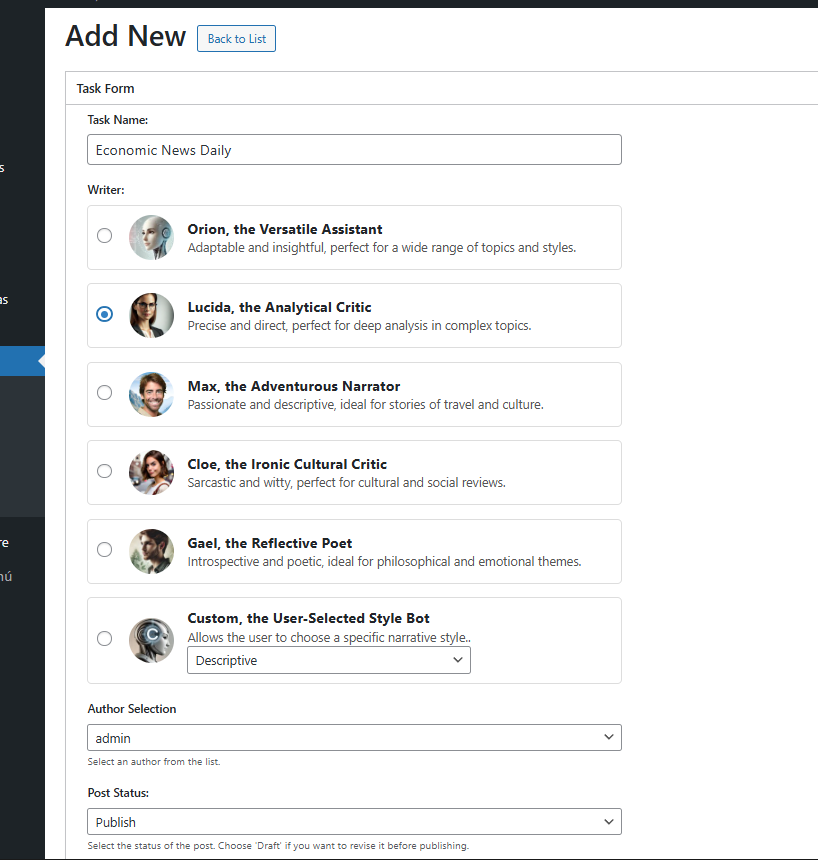
Add New AI Task 1/3.
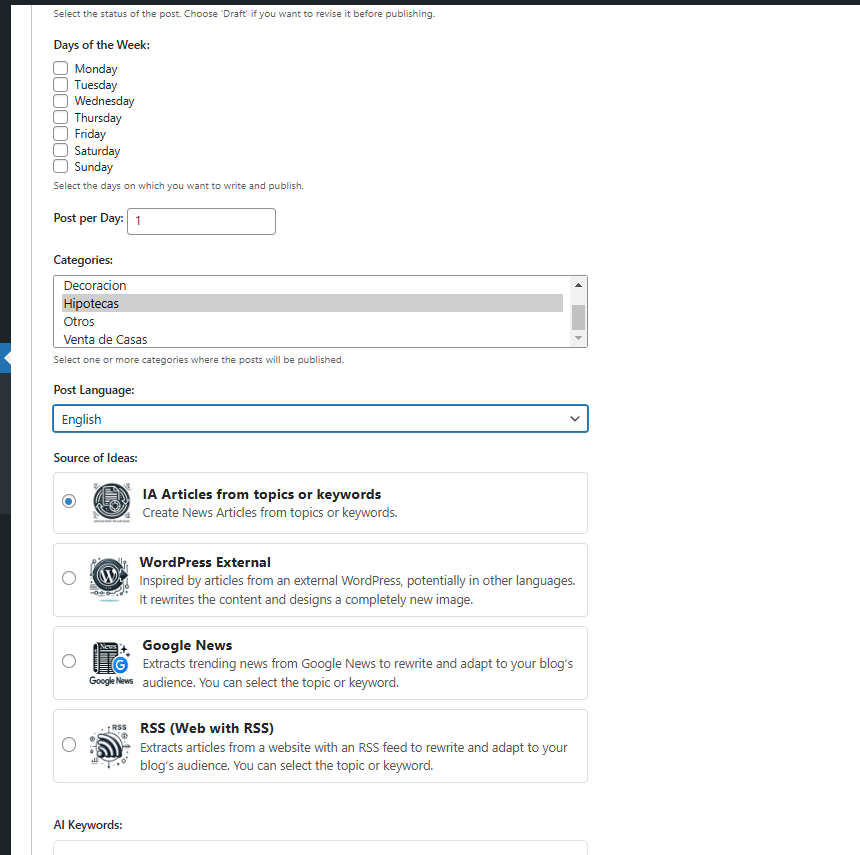
Add New AI Task 2/3.
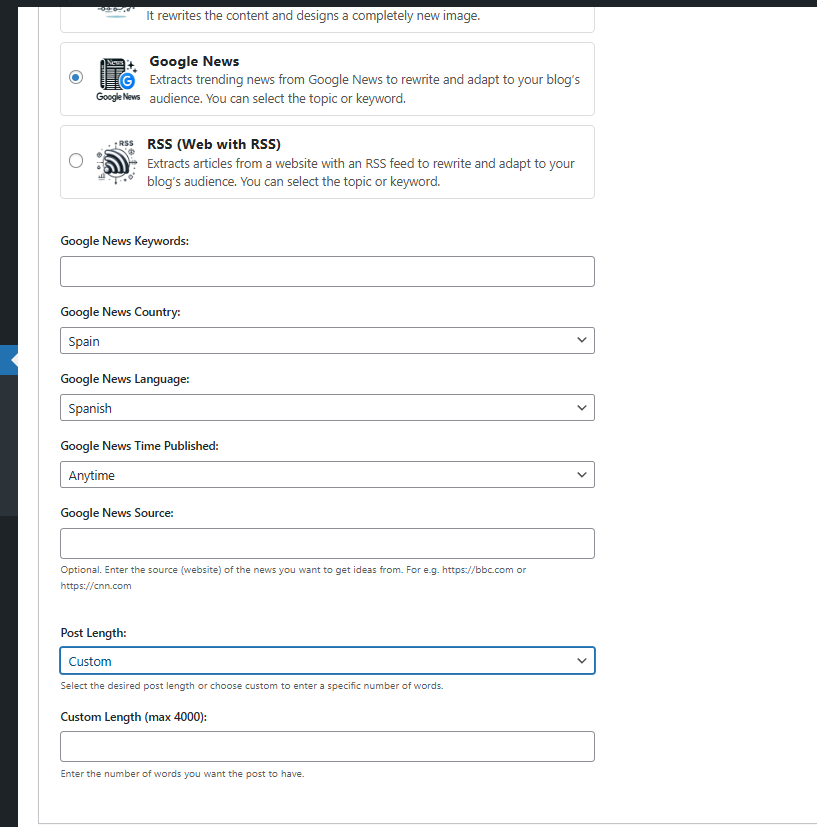
Add New AI Task 3/3.

Add Tasks
Do mesmo author (Esteban)
