Uma pequena coleção de blocos leves do WordPress que podem realizar quase qualquer coisa.
Authors List
Hospedagem WordPress com plugin Authors List
Onde hospedar o plugin Authors List?
Este plugin pode ser hospedado em qualquer servidor que tenha WordPress instalado. Recomendamos optar por uma empresa de hospedagem de confiança, com servidores adaptados para WordPress, como o serviço de hospedagem de sites da MCO2.
Hospedando o plugin Authors List em uma empresa de hospedagem confiável
A MCO2, além de configurar e instalar o WordPress na versão mais atual para seus clientes, fornece o WP SafePress, um sistema singular que assegura e aumenta a performance do seu site conjuntamente.
Por que a Hospedagem WordPress funciona melhor na MCO2?
A Hospedagem WordPress funciona melhor pois a MCO2 possui servidores otimizados para WordPress. A instalação de WordPress é diferente de uma instalação trivial, pois habilita imediatamente recursos como otimização de imagens, proteção da página de login, bloqueio de atividades suspeitas diretamente no firewall, cache avançado e HTTPS ativado por padrão. São plugins que potencializam seu WordPress para a máxima segurança e o máximo desempenho.
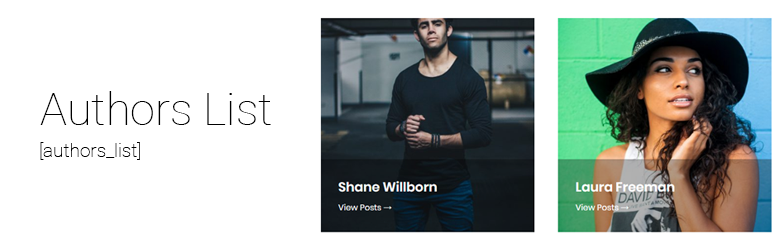
Easily display a list or grid of post authors (or any other user role) and links to their post archives page using a shortcode.
Backend UI can be used to change all the options.
Introducing New Authors List Pro
The free version offers a large amount of features for free, and the PRO version comes with even more amazing features for your authors list.
Some of those features are Styler, Search and Filters.
Styler allows easy change of color/typography/spacing on any of the elements in the authors list.
Filters allow you to create a better organization of the authors list.
Search allows your visitors to search for specific users.
Click here to get the PRO version!
Shortcode
All the options are available in the WP admin but you can also use a plain shortcode (as it was in version 1 of the plugin). The shortcode is [authors_list] and accepts the following attributes.
- style (1,2,3)
- columns (2,3,4)
- columns_direction ( horizontal, vertical )
- avatar_size (any number, example 500)
- amount (any number, no limit by default)
- show_title (yes,no)
- show_count (yes,no)
- show_bio (yes,no)
- show_link (yes,no)
- orderby ( post_count, post_date, ID, login, nicename, email, url, registered, display_name, first_name, last_name )
- order ( ASC, DESC )
- skip_empty ( yes, no )
- minimum_posts_count ( any number )
- bio_word_trim ( any number, leave empty for no trim )
- only_authors ( yes, no )
- exclude ( user IDs separated by comma, example 1,3,4 )
- include ( user IDs separated by comma, example 1,3,4 )
- roles ( roles separated by comma, example administrator,editor )
- latest_post_after ( for example if set to 7 it will only show authors that have posts published in the past 7 days )
- name_starts_with ( limit to authors whose display name starts with specific characters )
- first_name_starts_with ( limit to authors whose first name starts with specific characters )
- last_name_starts_with ( limit to authors whose last name starts with specific characters )
- categories ( category IDs separated by comma, example 1,3,4 )
- terms ( term IDs separate by comma, example 1,3,4 )
- taxonomy ( name of a taxonomy, for example post_tag )
- title_element (the element that wraps the name of the user/author, defaults to div, can be any element, for example h2)
- link_count (yes, no)
Example usage with attributes:
[authors_list style="2" columns="2" amount="4" show_count="no"]
There are additional attributes for custom content before and after each element:
- before_avatar
- before_title
- before_count
- before_bio
- before_link
- after_avatar
- after_title
- after_count
- after_bio
- after_link
Example usage with attributes:
[authors_list before_title="My custom content"]
These before/after attributes also support dynamic user/author meta fields using
{al:INSERT_FIELD_NAME}
Example usage:
[authors_list before_title="My first name is {al:first_name}"]
They also support some dynamic output functionality. Currently supports displaying posts links and social links (Yoast SEO needed):
Example usage for posts links:
[authors_list after_title="{alf:posts}"]
[authors_list after_title="{alf:posts type=plain amount=5}"]
Example usage for social links:
[authors_list after_title="{alf:social}"]
Example usage for roles:
[authors_list after_title="{alf:role}"]
Example usage for link (the “to” parameter accepts foollowing values: archive bbpress_profile buddypress_profile):
[authors_list after_title="{alf:link to=bbpress_profile}"]
Social Icons SVGs by FontAwesome are licensed under CC BY 4.0
What’s Next
If you like this plugin, then please consider leaving us a rating / review. This plugin is maintained by WPKube, a WordPress resource site, where you can learn from our in-depth guides such as
What is WordPress, How to choose a WordPress hosting, & more!
Our Other Projects
- Optin Forms: Simple and easy to use plugin for creating optin forms, works with most well known autoresponder services.
- Simple Basic Contact Form: Light-weight contact form plugin
- Subscribe to Comments Reloaded: Email Notification plugin for Comments
- Advanced Excerpts: This plugin adds several improvements to WordPress’ default way of creating excerpts.
Plugins semelhantes


Easy to show posts, pages, custom posts in customizable grid, list, slider, accordion... Available as Widgets (for Elementor), Shortcode, and Blocks.

Allows an admin (or capable user) to edit the author slug of a user, and change the author base.

Remove meta author and date information from posts and pages. Hide from Humans and Search engines.SEO friendly and most advance plugin.
A Gutenberg container block to let you align items consistently across a global grid.

Very customizable plugin to list posts by category (or tag, author and more) in a post, page or widget. Uses the [catlist] shortcode to select posts.
Do mesmo author (WPKube)

Control the appearance of WordPress post excerpts