
The best anti-spam protection to block spam comments and spam in a contact form. The most trusted antispam solution for WordPress and WooCommerce.

Anti-spam Reloaded
Hospedagem WordPress com plugin Anti-spam Reloaded
Onde hospedar o plugin Anti-spam Reloaded?
Este plugin pode ser hospedado em qualquer hospedagem que possua WordPress configurado. Recomendamos fortemente utilizar um provedor de hospedagem seguro, com servidores especializados para WordPress, como o serviço de hospedagem WordPress da MCO2.
Hospedando o plugin Anti-spam Reloaded em um provedor de confiança
A MCO2, além de instalar o WordPress na versão mais nova para seus clientes, oferece o plugin WP SafePress, um mecanismo exclusivo que salvaguarda e aumenta a performance do seu site simultaneamente.
Por que a Hospedagem WordPress funciona melhor na MCO2?
A Hospedagem WordPress funciona melhor pois a MCO2 possui servidores otimizados para WordPress. A instalação de WordPress é diferente de uma instalação trivial, pois habilita imediatamente recursos como otimização automática de imagens, proteção da página de login, bloqueio de atividades maliciosas diretamente no firewall, cache avançado e HTTPS ativado por padrão. São plugins que potencializam seu WordPress para a máxima segurança e o máximo desempenho.
This is fork of successful Anti-spam plugin v5.5 written by webvitalii, for more info visit GitHub Fork.
From version 5.6 maintained by kudlav.
Anti-spam Reloaded plugin blocks 100% of automatic spam messages in comments section and also blocks all trackbacks.No captcha required.
Plugin is simple and easy to use: just install it and it just works.
Blocked comments can be stored in the Spam area and converted to regular comments if needed.
Anti-spam Reloaded plugin is GDPR compliant and does not store any other user data except of the behaviour mentioned above.
Plugin blocks spam only in comments section..
Plugin does not block manual spam (submitted by spammers manually via browser).
Compatibility
All modern browsers and IE11+ are supported.
Anti-spam Reloaded plugin works with disabled JavaScript. Users with disabled JavaScript should manually fill current year before submitting the comment.
Server compatibility:
- WordPress 3.3 – 7.0
- PHP 5.6 – 8.4
- Doesn’t use jQuery
Plugin is incompatible with:
- Disqus
- Jetpack Comments
- AJAX Comment Form
- bbPress
If site has caching plugin enabled and cache is not cleared or if theme does not use ‘comment_form’ action
and there is no plugin inputs in comments form – plugin tries to add hidden fields automatically using JavaScript.
How does it work?
The blocking algorithm is based on 2 methods: ‘invisible js-captcha’ and ‘invisible input trap’ (aka honeypot technique).
‘invisible js-captcha’
The ‘invisible js-captcha’ method is based on fact that bots does not have JavaScript on their user-agents.
Extra hidden field is added to comments form.
It is the question about the current year.
If the user visits site, than this field is answered automatically with JavaScript, is hidden by JavaScript and CSS and invisible for the user.
If the spammer will fill year-field incorrectly – the comment will be blocked because it is spam.
‘invisible input trap’
The ‘invisible input trap’ method is based on fact that almost all the bots will fill inputs with name ‘email’ or ‘url’.
Extra hidden field is added to comments form.
This field is hidden for the user and user will not fill it.
But this field is visible for the spammer.
If the spammer will fill this trap-field with anything – the comment will be blocked because it is spam.
Capturas de tela
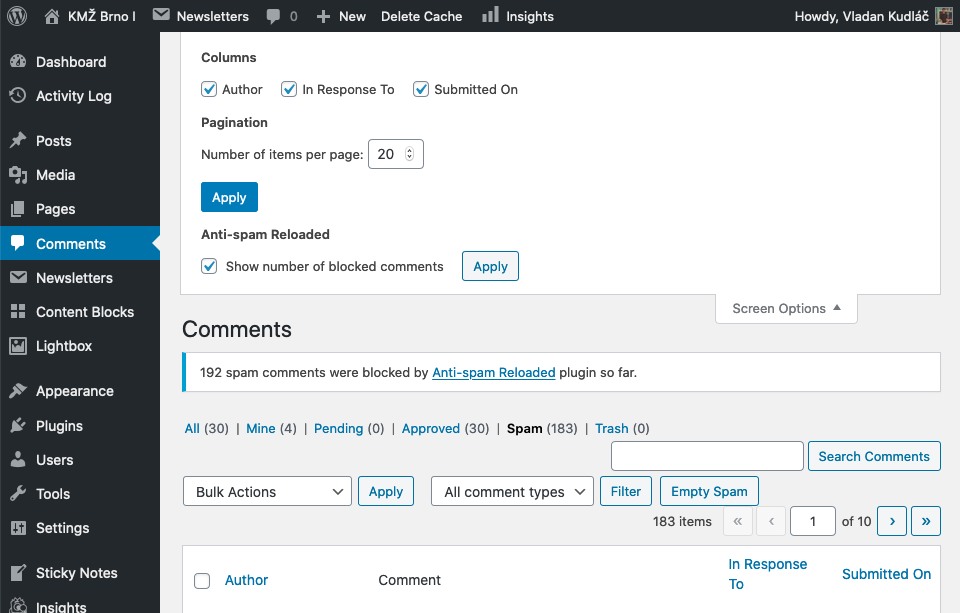
Plugin will count number of blocked comments, blocked comments can be saved.

Plugin settings page

Spam comments will not be proceeded.
Plugins semelhantes

![Disable Comments – Remoção de comentários e interrupção de spam [compatível com multisite]](https://ps.w.org/disable-comments/assets/icon-128x128.png?rev=2509854)
Permite que os administradores desativem globalmente os comentários em seu site. Os comentários podem ser desativados de acordo com o tipo de post. Compatível com multisite.

Sophisticated antispam plugin for effective daily comment and trackback spam-fighting. Built with data protection and privacy in mind.

The Sucuri WordPress Security plugin is a security toolset for security integrity monitoring, malware detection and security hardening.

Add hCaptcha, Honeypot, and Redirection to Contact Form 7 with CF7 Apps, and generate forms effortlessly with AI. Improve form security, keep it light …

Top-rated antispam for contact forms, comments, WooCommerce, eCommerce, and login. No CAPTCHAs, no friction, just background anti spam protection.