
Adds breadcrumb navigation showing the visitor's path to their current location.

Fullscreen Menu
Hospedagem WordPress com plugin Fullscreen Menu
Onde posso hospedar o plugin Fullscreen Menu?
Este plugin pode ser hospedado em qualquer provedor que possua WordPress instalado. Recomendamos fortemente optar por um provedor de hospedagem confiável, com servidores adaptados para WordPress, como o serviço de hospedagem da MCO2.
Hospedando o plugin Fullscreen Menu em uma empresa de hospedagem de confiança
A MCO2, além de configurar e instalar o WordPress na versão mais atual para seus clientes, fornece o WP SafePress, um mecanismo singular que salvaguarda e melhora seu site conjuntamente.
Por que a Hospedagem WordPress funciona melhor na MCO2?
A Hospedagem WordPress funciona melhor pois a MCO2 possui servidores otimizados para WordPress. A instalação de WordPress é diferente de uma instalação trivial, pois habilita imediatamente recursos como otimização de imagens, proteção da página de login, bloqueio de atividades suspeitas diretamente no firewall, cache avançado e HTTPS ativado por padrão. São plugins que potencializam seu WordPress para a máxima segurança e o máximo desempenho.
Add a Full Screen Menu to your WordPress website with this plugin – it features a fully customizable experience, allowing you to build the menu using all the available settings that best suit your site. This plugin is also compatible with WooCommerce and Polylang, so you can easily display WooCommerce elements like the user’s cart and default menus. Upgrade your website’s navigation with this intuitive and visually appealing plugin.
The Menu button can be added as a Block – compatible with Block Themes.
Demos
Design/Appearance Features
This plugin offers a range of features to enhance your website’s menu:
- Hover animation effects for a dynamic and engaging user experience
- Full responsiveness for seamless viewing on all devices
- The option to use either a full screen or lateral menu layout
- The ability to set a background image for added visual appeal
- A clean and modern design that will complement any website
- Preview fullscreen menu before launching in the wp-admin
Integration/Menu Settings
- WooCommerce Buttons Menu (My Account, Cart, Checkout);
- Animated Search Bar included;
- Social Media Icons;
- Google Fonts Integration;
- GDPR options (Privacy Policy Page).
- Hide Menu on Specific Pages
- Schema.org (SiteNavigationElement) Structure (SEO)
PRO Features
Upgrade to the PRO version of this plugin to unlock even more features for your website’s menu:
- Submenus that open automatically for streamlined navigation
- The ability to create multi-level menus
- The option to set a background image or video for added visual interest
- The ability to select the font size and add text shadow for a custom look
- The option to adjust the position of the menu button
- The ability to align the menu text to the left, right, or center
- The ability to disable the menu button
- The ability to use a custom image for the menu hamburger button
- Integration with WooCommerce to display the cart in the menu.
Icons by Font-Awesome.
Capturas de tela

Custom Background (integration with WooCommerce and Polylang)
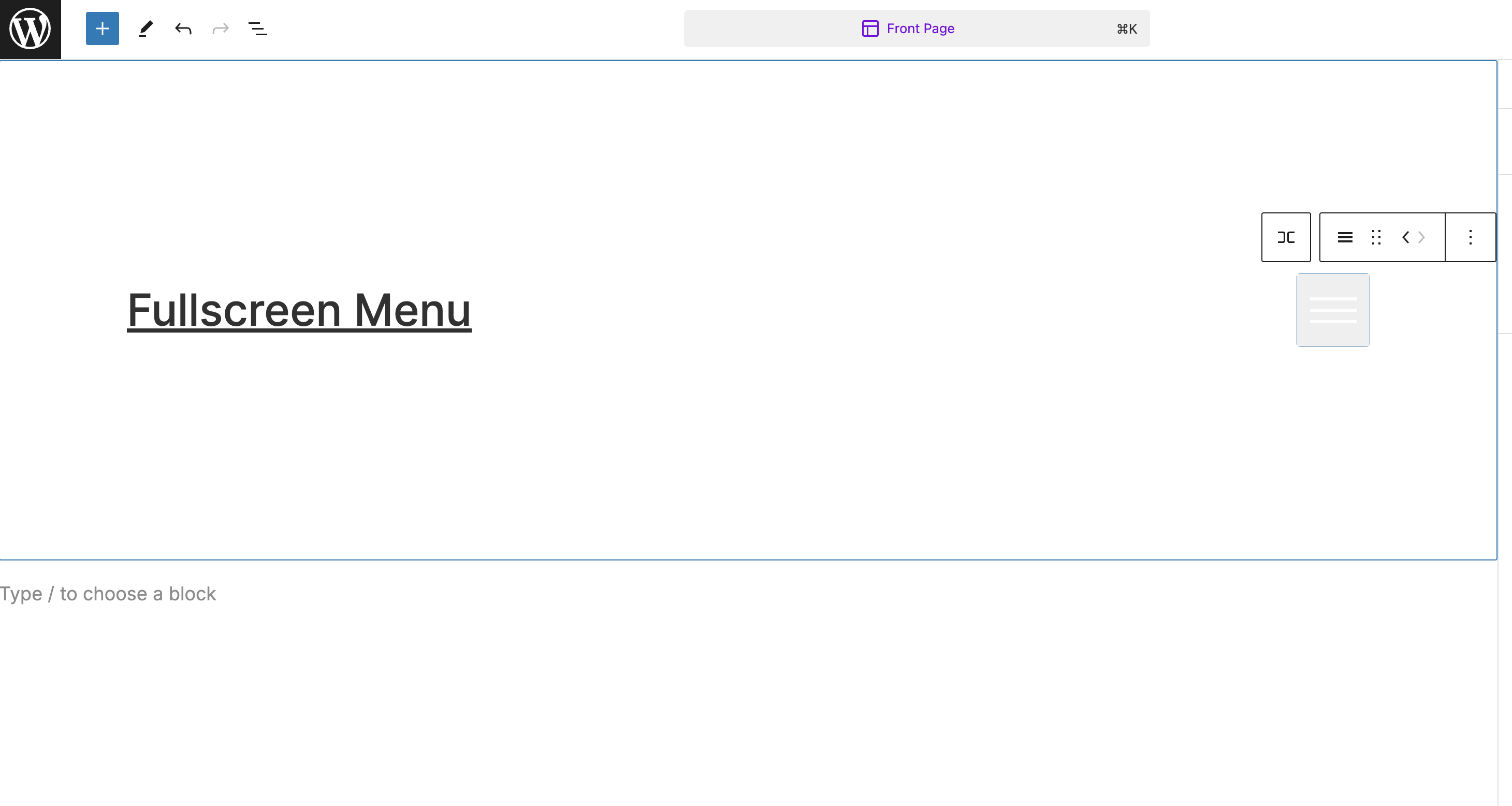
Render Menu button as a Block

Demo Animation

Demo Hover Animation

Dropdown functionality

Menu Settings - General
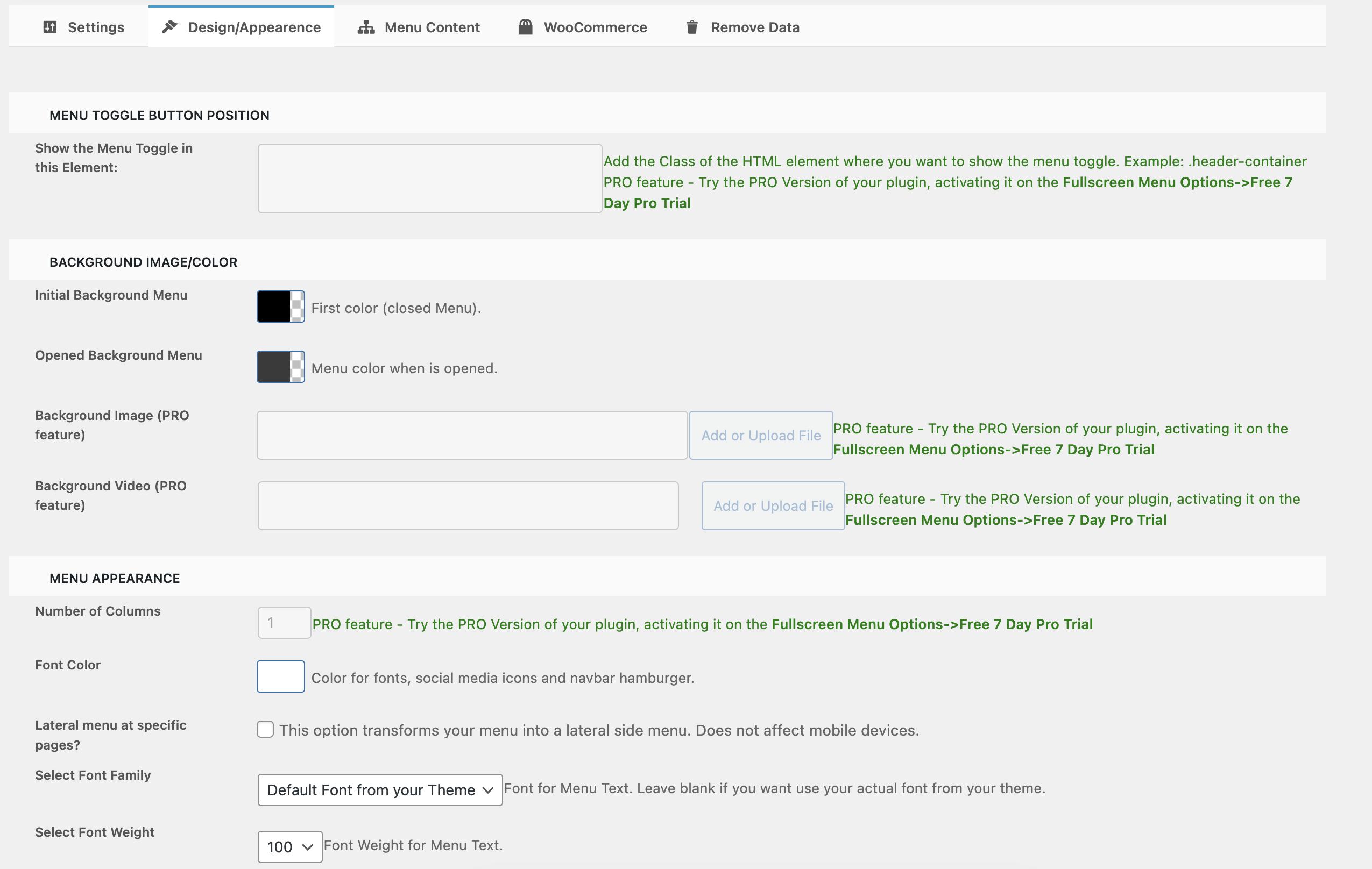
Menu Settings - Design/Appearance

Menu Settings - Menu Content
Plugins semelhantes


An easy to use mega menu plugin. Written the WordPress way.

Lets you edit the WordPress admin menu. You can re-order, hide or rename menus, add custom menus and more.

Create a welcome notification bar for your website. Also, My Sticky Bar plugin can make your menu or header sticky to the top when scrolled 📌

Adicione um tempero a mais nos seus menus com belos ícones, facilmente.

Adds an image or icon in the menu items. You can choose the position of the image (after, before, above, below) or even hide the menu item title.