
Checkout Field Editor for WooCommerce – The best WooCommerce checkout manager plugin to manage checkout fields in both Classic & Block Checkout.

Custom WooCommerce Checkout Fields Editor
Hospedagem WordPress com plugin Custom WooCommerce Checkout Fields Editor
Onde posso hospedar o plugin Custom WooCommerce Checkout Fields Editor?
Este plugin pode ser hospedado em qualquer provedor que possua WordPress configurado. Recomendamos fortemente utilizar uma hospedagem de confiança, com servidores especializados para WordPress, como o serviço de hospedagem de sites da MCO2.
Hospedando o plugin Custom WooCommerce Checkout Fields Editor em uma empresa de hospedagem seguro
A MCO2, além de instalar o WordPress na versão mais nova para seus clientes, disponibiliza o plugin WP SafePress, um mecanismo singular que salvaguarda e aumenta a performance do seu site conjuntamente.
Por que a Hospedagem WordPress funciona melhor na MCO2?
A Hospedagem WordPress funciona melhor pois a MCO2 possui servidores otimizados para WordPress. A instalação de WordPress é diferente de uma instalação trivial, pois habilita imediatamente recursos como otimização de imagens, proteção da página de login, bloqueio de atividades maliciosas diretamente no firewall, cache avançado e HTTPS ativado por padrão. São plugins que potencializam seu WordPress para a máxima segurança e o máximo desempenho.
Custom WooCommerce Checkout Fields Editor helps you customize the WooCommerce checkout experience without code. Manage billing, shipping, and additional checkout fields from a simple admin interface.
The plugin supports Classic checkout and WooCommerce Block checkout (WooCommerce 8.8+), with drag-and-drop ordering, field validation, backup/import, and locale override settings.
Free features
- Add, edit, remove, enable, disable, duplicate, and reorder checkout fields
- Classic checkout sections: Billing, Shipping, Additional
- Block checkout sections: Contact, Address, Additional Information
- 17 field types on classic and block checkout
- Field label, placeholder, required, validation, and width controls
- Custom CSS classes per field
- Display fields in order emails and order detail pages
- Locale override settings for address fields
- Backup and import for classic, block, and settings data
- HPOS and cart/checkout blocks compatibility
- Multilingual ready: WPML, Polylang, and Loco Translate support
Field types (free)
- Text
- Number
- Hidden
- Password
- Phone
- Textarea
- Select
- Multi Select
- Checkbox
- Checkbox Group
- Radio
- Heading
- Paragraph
- Date
- Time Picker
- URL
Multilingual compatibility
Checkout field labels, placeholders, and option text can be translated with:
- WPML — field strings are registered automatically (String Translation) when fields are saved or on page load
- Polylang — field strings are registered with Polylang String Translations
- Loco Translate / Gettext — translate static plugin UI strings from the
wcfetext domain (/languages)
Dynamic field text entered in the admin is translated via WPML or Polylang after you translate the registered strings. Classic and Block checkout, order details, and order emails use the translated labels.
Block checkout
Block checkout editing requires WooCommerce 8.8 or later and a store checkout page that uses the Checkout block.
Supported block sections:
- Contact Information
- Address
- Additional Information
Order notes remain managed by the native WooCommerce checkout block.
Premium features
- My Account field editor
- Conditional field display
- Conditional custom checkout sections
- Price fields and checkout fees
- File upload fields
- Advanced address display formatting
Notes
- Classic checkout uses the WooCommerce checkout shortcode.
- Only use one checkout field editor plugin at a time to avoid conflicts.
- Need help? Contact ThemeLocation
Capturas de tela

Checkout field editor with Classic and Block checkout tabs
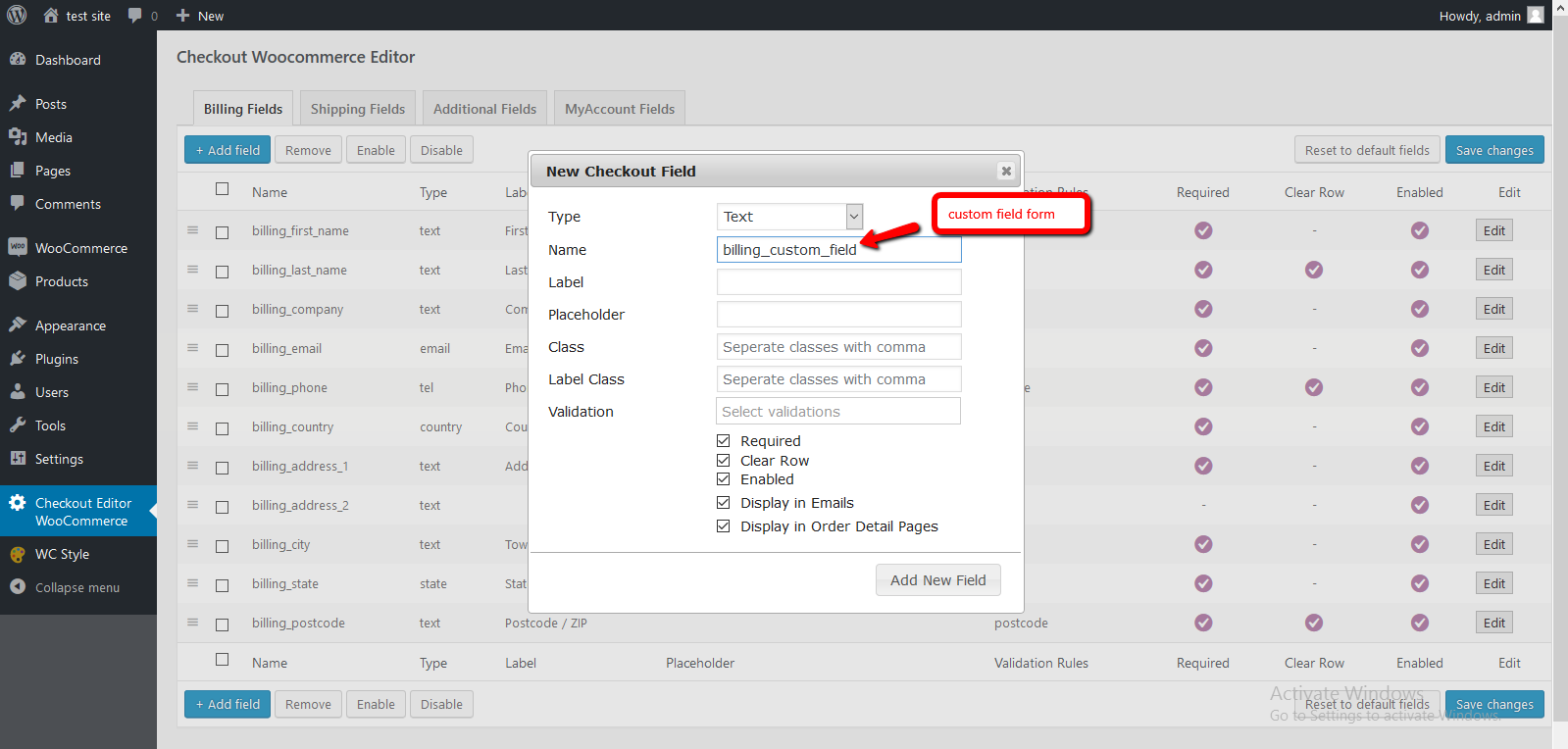
Add or edit field popup with label, placeholder, validation, width, and custom CSS classes

Block checkout Contact, Address, and Additional Information sections
Plugins semelhantes


Checkout Field Manager (Checkout Manager) for WooCommerce is the most advanced plugin to customize checkout fields on your WooCommerce checkout page.

The best WooCommerce checkout manager. Edit, remove or add checkout fields. Customize WooCommerce checkout with this checkout field customizer.

Modern Cart gives your store a side cart and free shipping bar so shoppers stay on the page, spend more to unlock rewards, and check out in seconds.

Adicione opções (complementos) aos seus produtos WooCommerce para que seus clientes possam personalizar seus produtos. Formulários de produtos para todos!

Create high-converting WooCommerce checkout pages, thank you pages & sales funnels with the highest-rated WordPress funnel builder.